Wood Product Photography: Show the Grain, Identify the Piece
A practical approach to photographing wooden bowls and small wooden objects: choose informative views, separate reflection checks from angle changes, and keep each export tied to the correct item's original photographs.
·
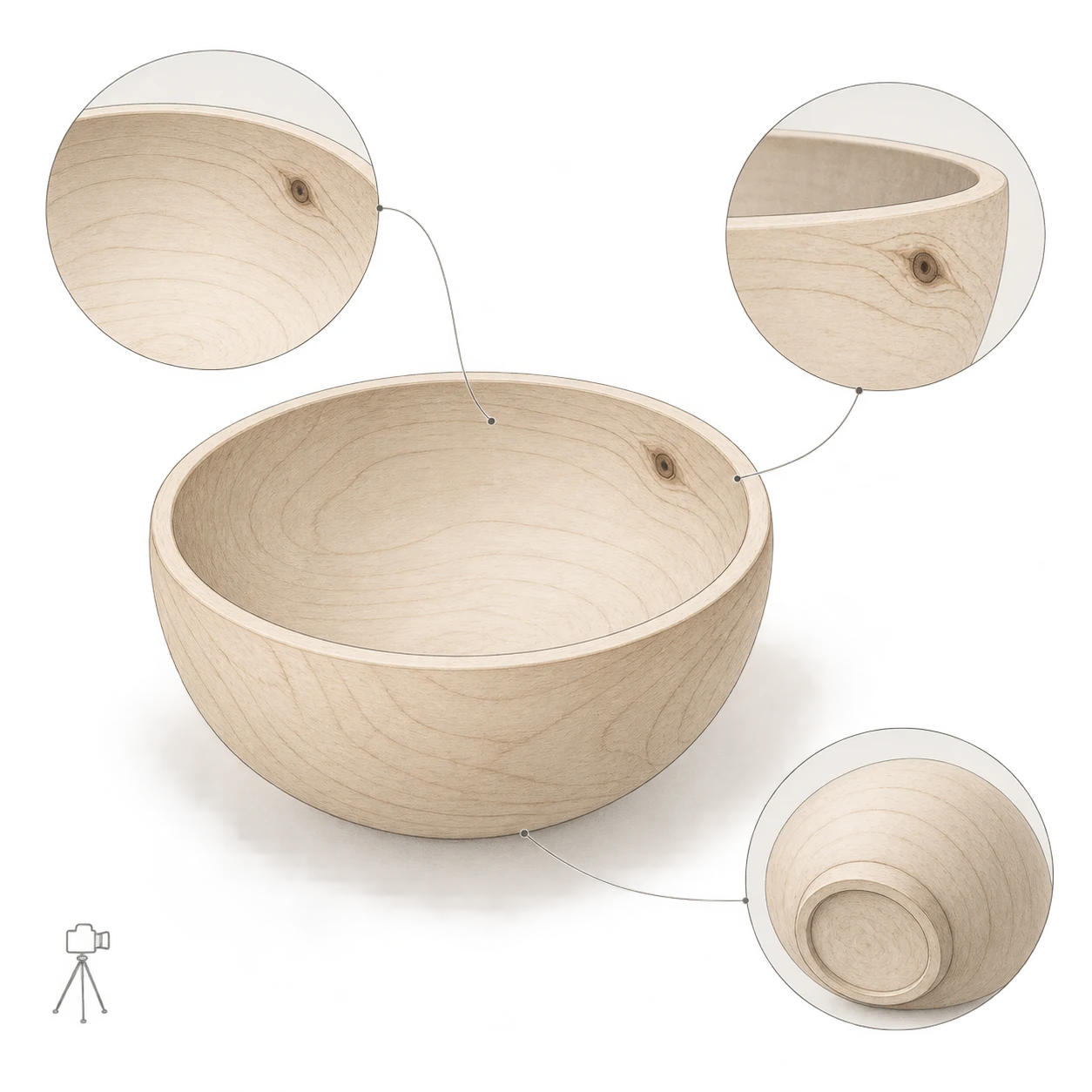
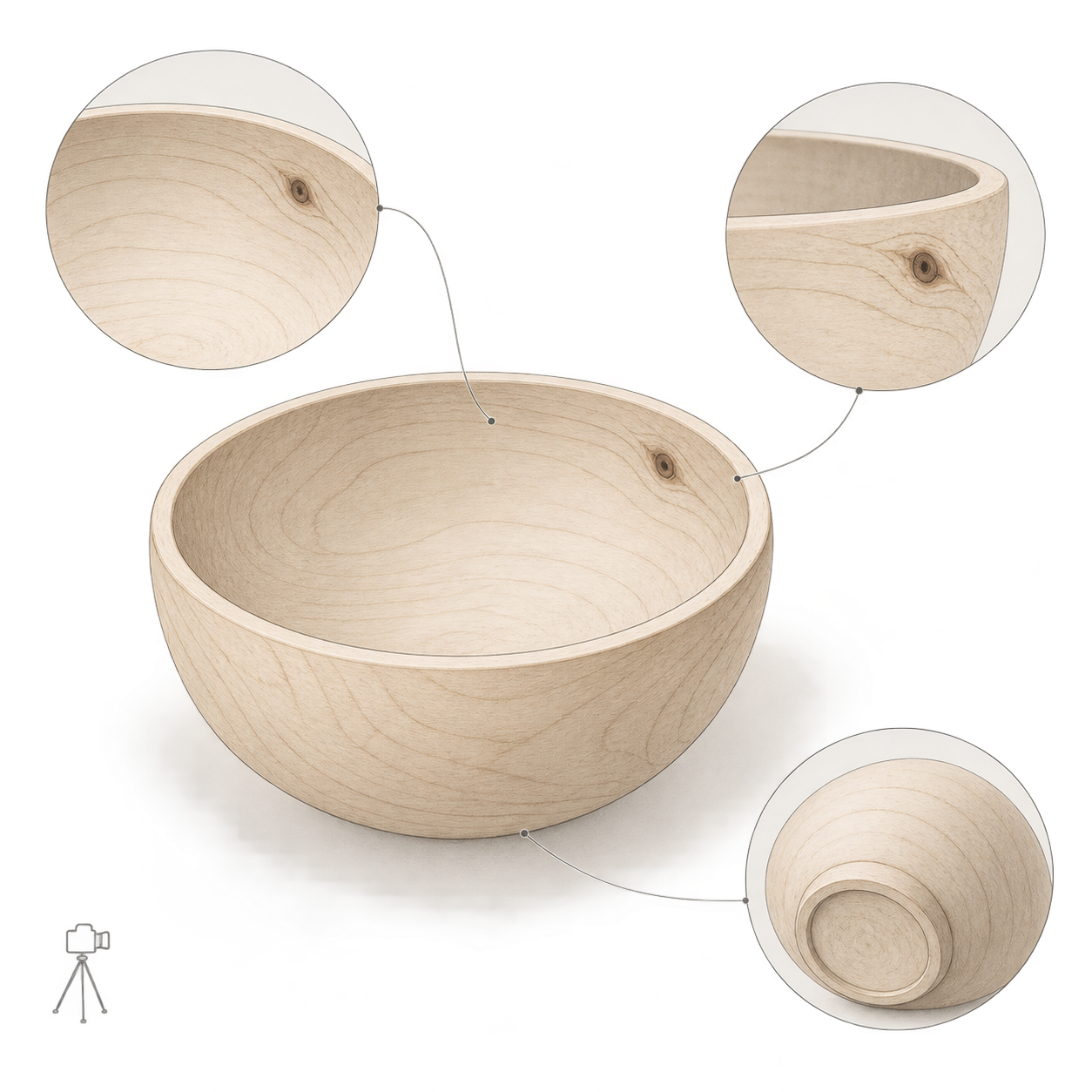
Two wooden bowls with similar outlines should not automatically share a set of product photographs. If a buyer is purchasing a particular piece, the knots, grain turns, and base details in the listing should belong to that piece.
For individually sold objects, wood product photography has a recording job as well as a presentation job. The aim is to show the form while making the actual item recognizable. The approach below is a suggested working method for wooden bowls and small wooden objects, not a report of equipment testing.
Start with a recognizable reference view
Before arranging the lighting, assign each item an identifier, such as WB-001. Keep it in the file records; it does not need to appear permanently in the product image. Fix the camera position and background, then make a reference photograph showing the opening, side, and some of the interior.
Choose a feature you can find again: a knot near the rim or a distinct turn in the grain. Note where it appears in the reference view. When you rotate the bowl later, this gives you a way to identify orientation without relying on memory.
One reference photograph will not show everything. Add views according to the information they contribute, rather than working toward an arbitrary image count.
- An overall oblique view establishes the relationship between the rim and body. Avoid framing so closely that the opening dominates and the body becomes hard to judge.
- An interior view records how the grain continues through the inside and bottom. A bright patch covering the center is not a substitute for that information.
- A base view records the foot, any maker's mark, and the visible condition underneath. Keep supports clear of important details and avoid unstable positioning.
- A feature detail shows a knot, grain pattern, or known flaw that is unclear in the overall view. Make its location identifiable from another photograph; an isolated patch of wood is difficult to place.
Separate reflection checks from changes of view
Reflections are a real concern for bowl makers: the readable comment on this Turn A Wood Bowl page asks for help with glare. The available text does not provide a solution, so the suggestions here should not be attributed to that article.
For a controlled comparison, first leave the camera, bowl, and background in place and change only the light's position or direction. With window light, try changing the shooting table's orientation relative to the window. Change one condition at a time and check whether the bright area still covers the grain you need to show. Once you have a usable arrangement, rotate the item to record additional views.
The goal need not be a surface with no highlights. Ask whether the highlight hides an identifying feature or makes the rim difficult to distinguish from the background. An attractive angle that conceals a knot can remain a presentation image, provided another photograph clearly records that knot. Do not reconstruct the missing grain in editing.
Be equally cautious about increasing local contrast to make the grain more dramatic. If processing introduces dark boundaries absent from the original, or makes the grain look incised, back off and compare with both the object and its original photograph. There is no single setting recommended here for every wood, finish, and lighting arrangement.
Give every export a traceable original
Keep a separate folder for each item and retain a shared identifier in original and export filenames—for example, WB-001_base_original and WB-001_base_export. Do not mix in another bowl from the same design, and do not apply one standardized grain pattern across different pieces.
Use a short record alongside the files. Its purpose is to tell the photographer or listing editor what to check, not to produce a numerical score.
| Record | What to enter | Reason to return the image for correction |
|---|---|---|
| Item and view | Item ID, reference orientation, overall/interior/base/detail | Mixed IDs or a view that cannot be matched to the actual item |
| Grain and knots | Original filename and feature location | Invented or repeated grain; a moved or missing knot |
| Outline and base | Corresponding rim, foot, and maker's-mark photographs | Changed outline or removed base details |
| Export and listing | Export filename, crop purpose, reviewer | A crop or listing preview conceals information that needs to be shown |
Review the actual files rather than thumbnails alone. Check the outline first, enlarge the grain and base details, and then inspect the intended listing crop. Judge color against the physical item and shooting conditions as well; a screen image is not a guarantee of exact color.
Treat background editing as optional
After saving the item's separate originals, creators who actually need background changes or layout adaptation can use the InkRoom image editor. It accepts an existing image and an editing description; available models and parameters depend on the current interface configuration. This does not guarantee subject fidelity or accurate text.
You can ask for changes to the background and surrounding space only, but that instruction does not ensure the wood remains unchanged. Compare the export with its original for grain direction, knots, outline, and base details. If those features change, reject the result as a photograph of that item and return to the original or reshoot. When no background work is needed, a checked camera photograph is enough.
Related articles and cases
- Product Photography Color Accuracy: Gray Cards, White Balance, and Delivery Review
Not every product color error is a white balance problem. Build references for each color variant, check mixed lighting and exposure first, and review background edits separately from the product’s own color.
- Leather Product Photography: Grain, Stitching, and Honest Wear
Photograph wallets, belts, and other small leather goods with lighting that reveals material without exaggerating wear. Plan connected detail views and check edits against the original photographs.
- Electronics Product Photography: Screens, Ports, and Product Accuracy
Plan screen-on and screen-off records, readable port details, and consistent variant photos. Diagnose screen artifacts without relying on universal settings, and keep background editing separate from product verification.
- Product Photography Lighting Setup: Compare Window Light, One Light and Two
Build a repeatable lighting setup by comparing the same product under window light, one light and two lights. Includes a setup log, material-specific troubleshooting and export checks—without a universal settings recipe.