Product Photography Color Accuracy: Gray Cards, White Balance, and Delivery Review
Not every product color error is a white balance problem. Build references for each color variant, check mixed lighting and exposure first, and review background edits separately from the product’s own color.
·
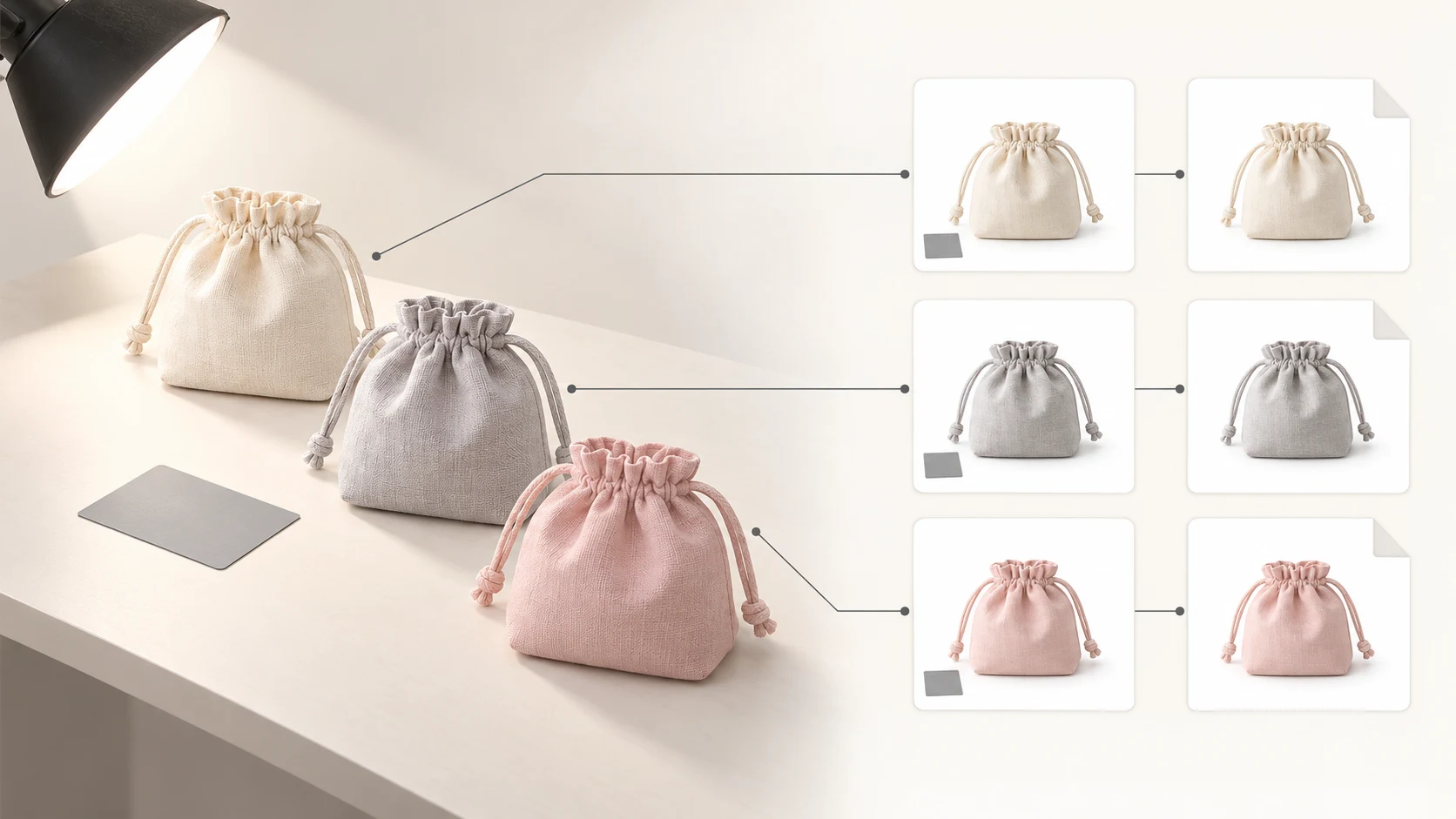
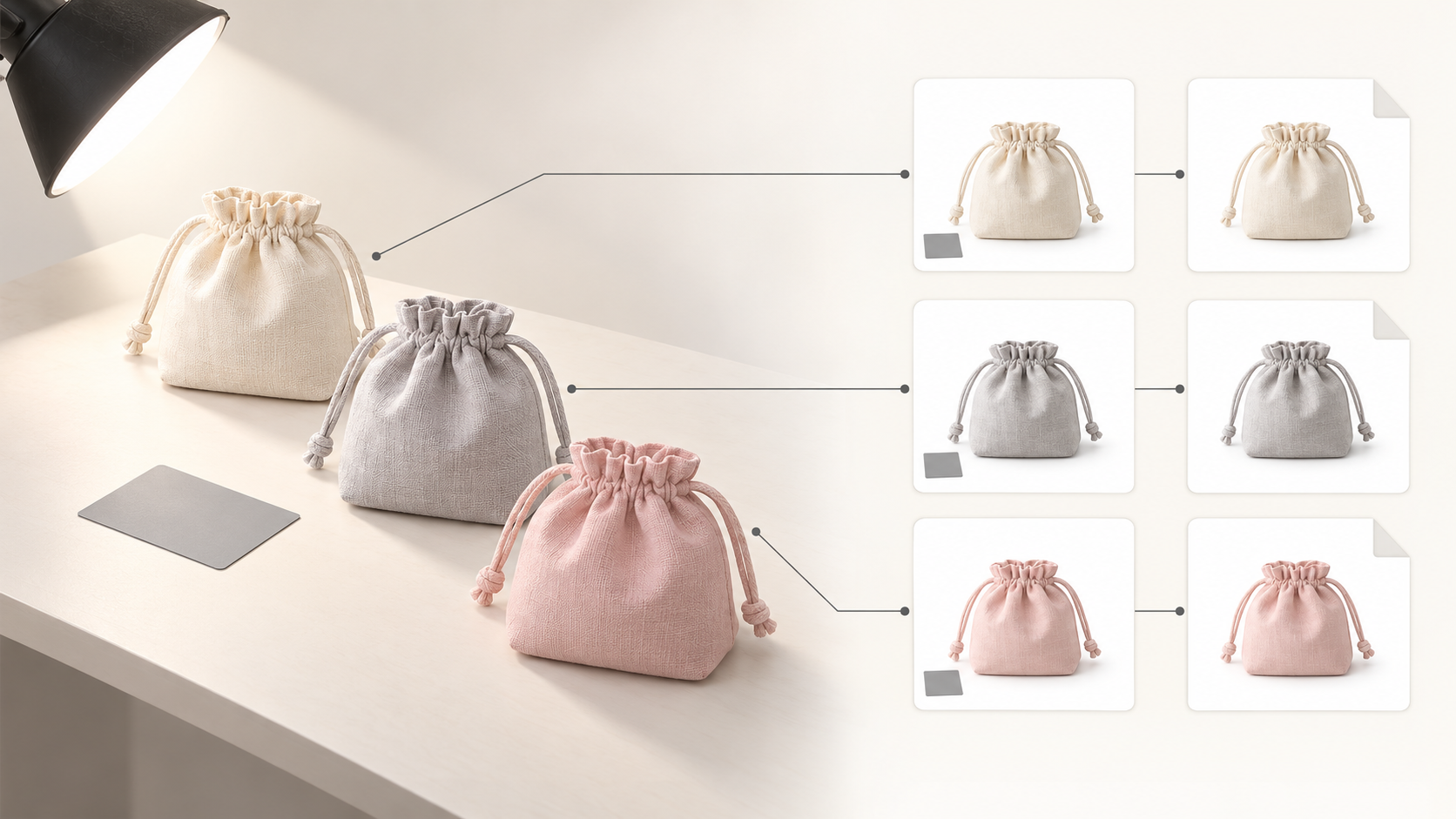
Cream, light gray, and pale pink versions of the same product can each look plausible on their own—and become difficult to distinguish on a product page. Product photography color accuracy is about more than an attractive image. Buyers need to tell the available colors apart.
A gray card provides a starting point for white balance, not a guarantee that a photograph and the physical item will match under every viewing condition. A more useful approach is to establish references, then work out where a mismatch entered the process.
Give every color variant its own reference
As a working method, keep a reference photograph for each colorway of the same product. Do not photograph one color and treat it as the visual target for all the others. Use the product identifier plus the color name as a review key. If each variant has its own SKU, retain the link between that SKU and the shared product family.
Keep lighting, camera position, and viewing angle as consistent as practical, and associate these photographs with a gray-card reference frame. Confirm the color names against the physical items during the shoot and retain versions without creative color grading. These are review references, not inherently accurate color measurements.
Preserve real material differences, too. Matte and glossy finishes, textured fabric and smooth surfaces should not all be flattened into the same appearance. With materials such as velvet, check orientation during comparison so that a change in direction is not mistaken for a different product color.
Check lighting, then exposure, then white balance
ISA AYDIN’s article on color matching explains that mixed lighting can produce different color casts on different sides of a product. It also recommends checking exposure with a histogram. Building on those points, use the following diagnostic order rather than reaching immediately for the temperature slider.
| What you see | Check first | Suggested next action |
|---|---|---|
| One side looks yellow and the other blue | Whether window light, room lights, and photographic lights are contributing together | Reduce mixed lighting and make a new reference frame; one global white balance adjustment may not resolve both sides |
| Pale areas turn white and lose texture or color separation | Exposure and possible clipping in those areas | Inspect the histogram and clipping warnings; reduce exposure and reshoot if needed rather than treating a white balance change as recovered detail |
| The frame has a broadly uniform warm, cool, or green cast | White balance in the reference frame, after checking lighting and exposure | Take a gray-card reading as a starting point, then compare the product with its reference |
A histogram shows brightness or channel distribution; it does not certify accurate product color. A white-looking background likewise does not prove that a pale product retains its detail. The purpose of this exposure check is to preserve information needed for color review, not to turn the shoot into a white-background exercise.
Photograph the gray card with the lighting, not as an afterthought
The reference article recommends photographing a gray card after setting up the lights, then sampling it with a white balance tool in post-production. In practice, place the card where the product receives light, without shading it with your hand, camera, or another object. Do not substitute packaging paper simply because it looks gray.
Keep a frame with the card, then photograph the product without it. Use the reference frame’s white balance as a common starting point for images made under the same lighting. Recheck that reference when lights move, contributing daylight changes, or the product moves into different illumination.
A gray card helps assess a neutral reference; it does not establish that every product color is correct. The source also discusses color charts and profiles. That is not a basis for promising perfect white balance or inventing a color-difference acceptance threshold without measurement conditions.
Review the color range—and the limits of each edit
For delivery review, place the reference photographs and final exports for the color variants side by side in the same viewing environment. Check identity first, then relationships: has cream become white, has pale pink drifted toward beige, or has a glossy highlight been mistaken for the product’s base color?
If all variants share a similar cast, revisit common settings first. If one variant differs unexpectedly, inspect its individual edits. This is a suggested way to narrow an investigation, not an automatic diagnosis. When uncertain, return to the physical item and shooting conditions rather than approving a set simply because it looks consistent.
Changing the background is a separate task. Review edges, translucent areas, and reflective surfaces after that change, but do not assume a warmer background requires warming the product itself. State which areas may change and which product colors should be preserved, then inspect the output manually.
If you genuinely need to modify an existing photograph or work on its background, the InkRoom image editor accepts an existing image and an editing description. Check the currently available models and parameters before proceeding. It is not a gray-card calibration or automatic white balance tool, and it does not guarantee subject fidelity, text accuracy, or unchanged colors. Compare the edited result with the references.
A useful delivery note can be brief: identify the SKU or color name, the reference used, any color or background edits, and unresolved differences. If review was limited to on-screen references rather than the physical item, record that limitation. “Checked against the reference photograph” is not the same claim as “an exact match to the product.”
Related articles and cases
- Wood Product Photography: Show the Grain, Identify the Piece
A practical approach to photographing wooden bowls and small wooden objects: choose informative views, separate reflection checks from angle changes, and keep each export tied to the correct item's original photographs.
- Leather Product Photography: Grain, Stitching, and Honest Wear
Photograph wallets, belts, and other small leather goods with lighting that reveals material without exaggerating wear. Plan connected detail views and check edits against the original photographs.
- Electronics Product Photography: Screens, Ports, and Product Accuracy
Plan screen-on and screen-off records, readable port details, and consistent variant photos. Diagnose screen artifacts without relying on universal settings, and keep background editing separate from product verification.
- Product Photography Lighting Setup: Compare Window Light, One Light and Two
Build a repeatable lighting setup by comparing the same product under window light, one light and two lights. Includes a setup log, material-specific troubleshooting and export checks—without a universal settings recipe.