White on White Product Photography: Keep Edges and Texture Visible
A brighter background should not erase a white product. Use a subject-only reference frame and a separate background-light comparison to find spill, protect texture, and inspect the exported image.
·
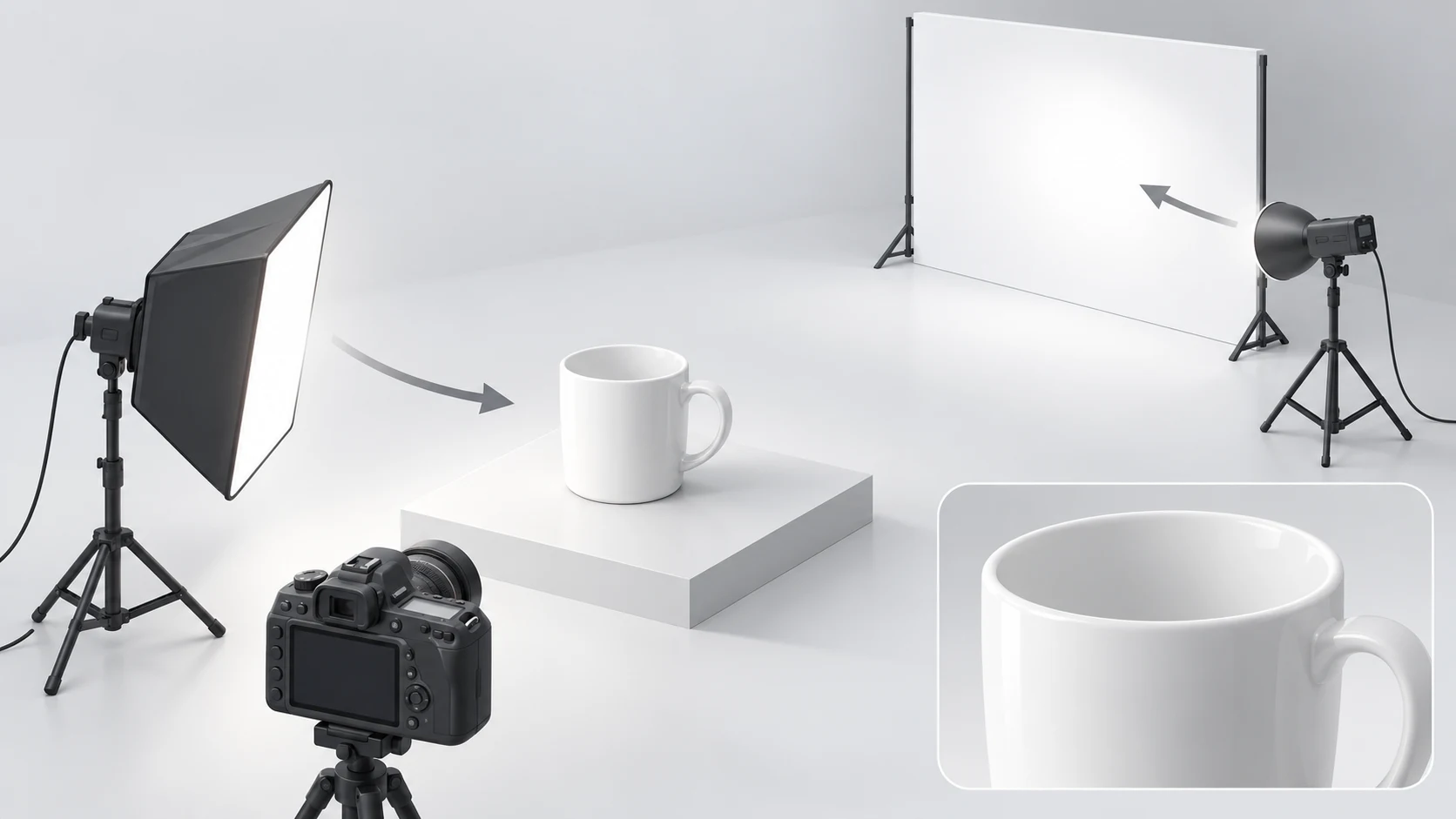
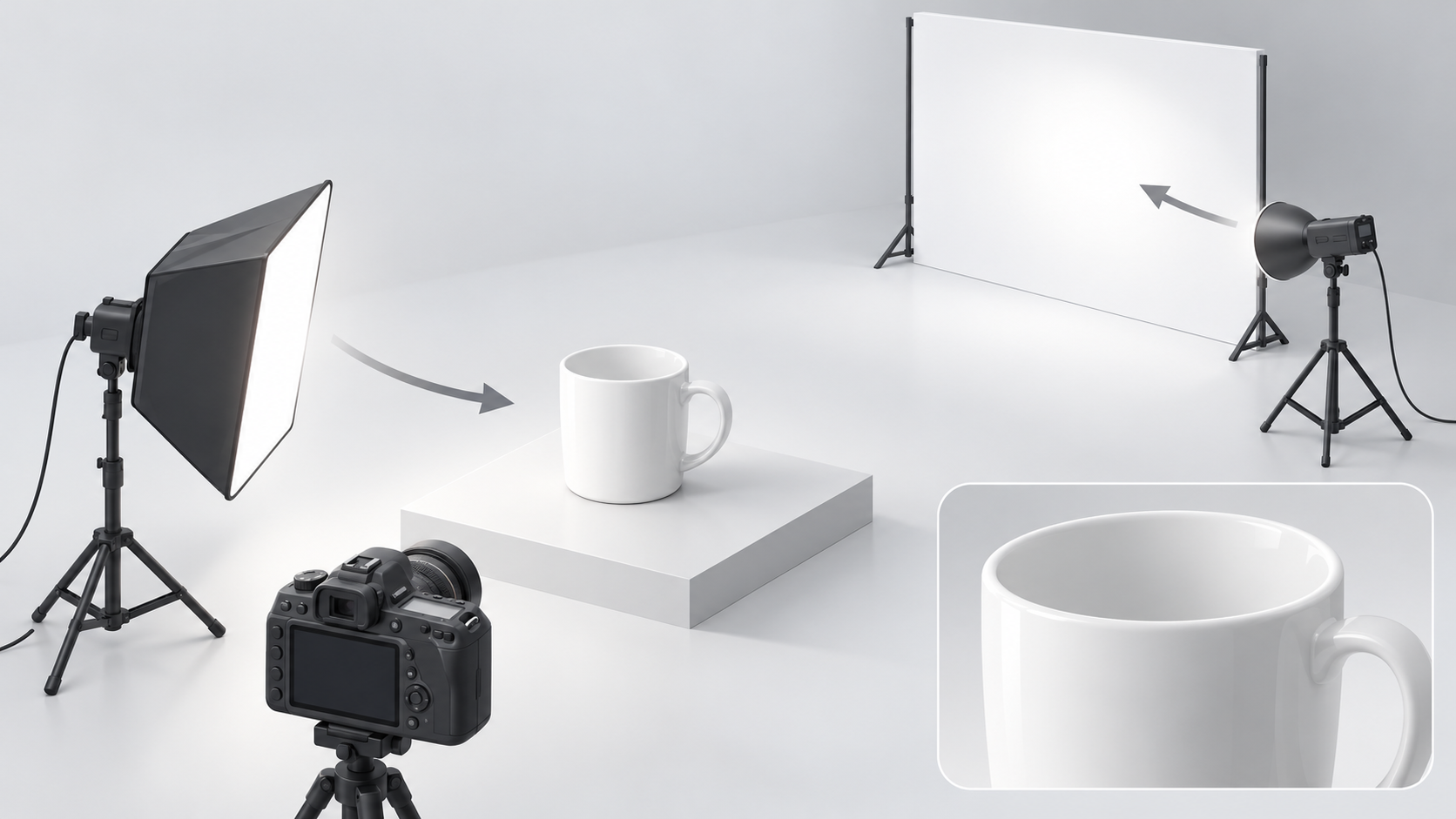
Put a white cup against a white backdrop, add more light, and the rim may become harder—not easier—to see. The problem is often not a lack of brightness. It is that the background light is also changing the product.
White on white product photography has two different jobs: make the background clean, and keep the product readable. A white background can be even; a white product still needs tonal variation. Those small changes in tone describe a curved cup, embossed paper, or the weave of fabric.
Make a reference frame for the product first
Try starting with the background lights off and lighting only the product. This is a diagnostic approach, not the only valid shooting order: establish what the product should look like before checking what the background light changes.
Fix the camera position and choose an aperture that covers the detail you need in focus. Keep camera exposure and white balance unchanged throughout the comparison. Move the subject light until you can see useful transitions across the white surface, rather than judging only the overall brightness. Save this frame so you can compare texture directly instead of relying on memory.
For paper or fabric, try light coming across the surface from the side, then refine the angle. With glossy ceramics, also watch the shape of the reflection. If a broad bright patch hides the cup's curve, change the light position or angle before increasing exposure. Erica + Jon's lighting tutorial supports independent control of product lighting and recommends side lighting to reveal texture in white products.
Add background light and watch what changes
Keep the camera and subject light settings fixed. Bring in the background light at a low output and increase it gradually. Aim for even coverage across the background that will remain in the photograph—not maximum light output.
Compare frames with the background lights off and on. If the rim becomes thinner only when those lights are on, or a pale halo appears around the product, investigate light wrapping around from the background. Lowering global exposure is not the first fix: it also darkens the subject lighting you already established.
Try one change at a time:
- Move the product farther from the backdrop, refocus, and make another comparison frame.
- Redirect the background lights so they illuminate the backdrop rather than the rear of the product.
- Add a flag outside the frame, where it can limit stray light without blocking the subject light.
There is no universal working distance. Judge the separation by whether important edges and textures remain close to the subject-only reference when the background light changes. The source tutorial also warns against background light wrapping around product edges; its distance guidance should not be treated as a specification for every studio.
Keep material detail separate from background whiteness
A light-gray transition on a white product may be doing useful work: describing its shape. A contact shadow can show where the product rests on a surface. Neither should be removed simply because it is not pure white.
A gray background and a flat-looking product require different adjustments. If the subject detail looks right but the background away from the product is uneven, adjust background coverage first. If the background is already bright but embossing has vanished, return to the subject light and highlights rather than adding more background light.
Highlight warnings help locate possible clipping, but they are not a complete quality test. Inspect the details the photograph needs to communicate: the thickness of a paper edge, the direction of fabric fibers, or the change in curvature across a ceramic highlight. If important product detail is clipped, do not assume that darkening the file later will recover it.
Inspect the export, not just the editing preview
Review the actual delivery file at its intended viewing size, then zoom in for local checks.
| Area | What to inspect | First response if it fails |
|---|---|---|
| Edges | Continuous rims and outer contours; no bright halo or missing sections | Compare with the subject-only frame and investigate background spill; reshoot lost detail |
| Texture and highlights | Visible embossing, fibers, and curved-surface transitions | Adjust the subject light angle or output instead of raising global exposure |
| Shadows | Natural surface contact; no broken transitions or floating appearance from editing | Compare the shadow connection with the original; re-edit or reshoot if needed |
| Background and final dimensions | Even background, correct delivery pixel dimensions, and no resizing halos | Check background samples and file dimensions in the exported file, not only the editor preview |
If exposure and product detail are sound but the existing photograph still needs background changes, you can submit the original image and an editing description through the InkRoom image editor. Available models and parameters depend on the current interface configuration. Editing does not guarantee that the subject, material detail, or text will remain unchanged; compare the result with the original using the checks above. It is not a guaranteed repair for overexposure.
This guide addresses lighting and edge separation, not marketplace dimensions or composition rules. Check delivery requirements separately, without sacrificing the product detail that makes the photograph useful.
Related articles and cases
- Metal Product Photography: Show Polish, Brushing, and Real Wear
Shape reflections with diffusion, white cards, and black cards, then check that lighting and editing have not hidden the product’s actual surface condition.
- Glass Product Photography: Clear Edges, Honest Transparency
Make clear cups and bowls readable with bright-field and dark-field lighting. Learn what to check in the rim, walls and reflections—and what not to invent during editing.
- Sunglasses Product Photography: Lens Gradients, Temples, and Symmetry
Plan complementary views, separate lens gradients from lighting reflections, and review background edits without losing the product’s geometry, markings, or actual wear.
- Ceramic Product Photography: Glaze, Rims, Feet, and One-of-a-Kind Records
Plan photographs around what a buyer needs to see: the form, interior, handle joins, and foot. Use soft light to describe the surface, measure dimensions separately, and keep each unique piece linked to its original photographs.