Metal Product Photography: Show Polish, Brushing, and Real Wear
Shape reflections with diffusion, white cards, and black cards, then check that lighting and editing have not hidden the product’s actual surface condition.
·
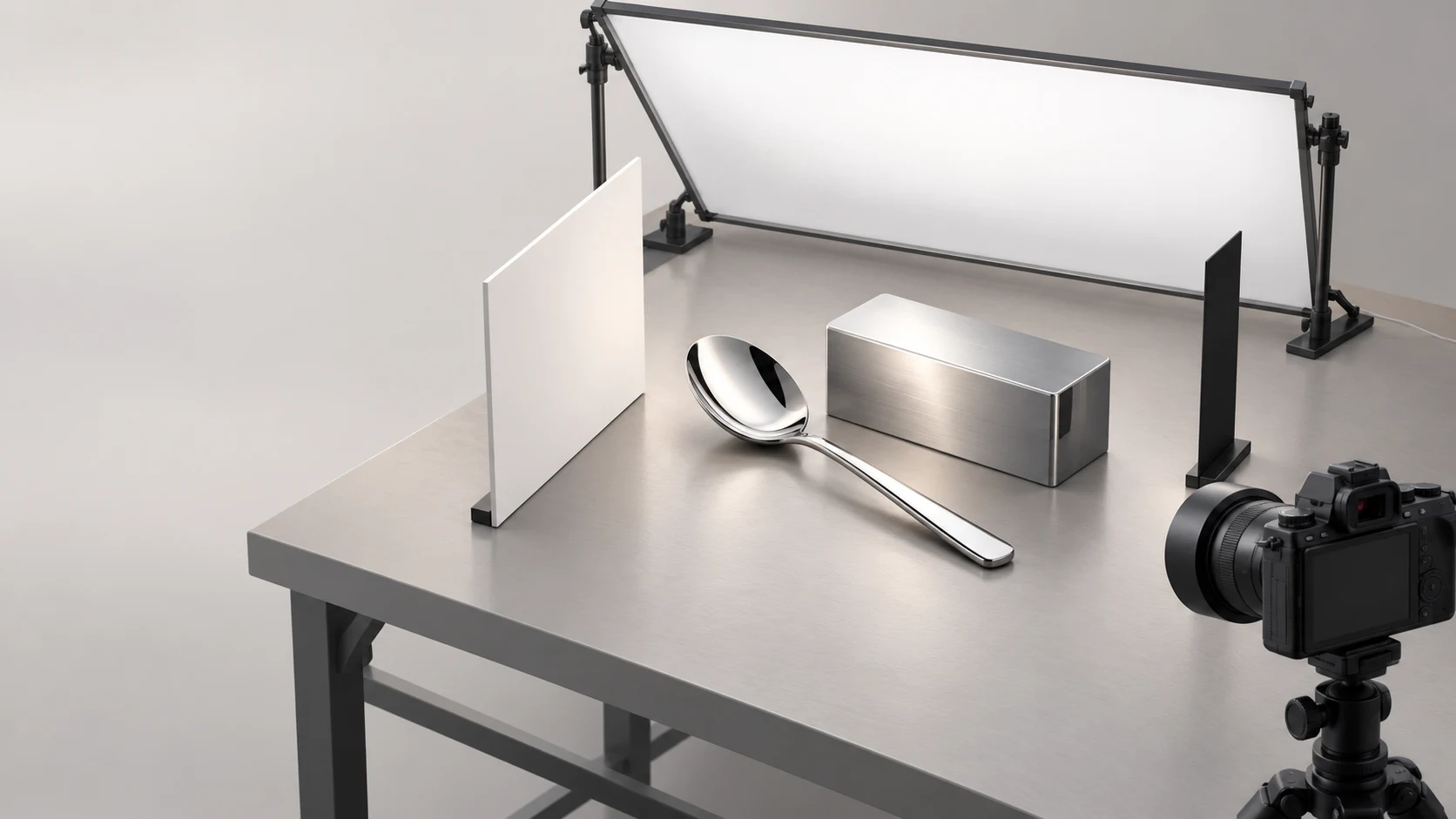
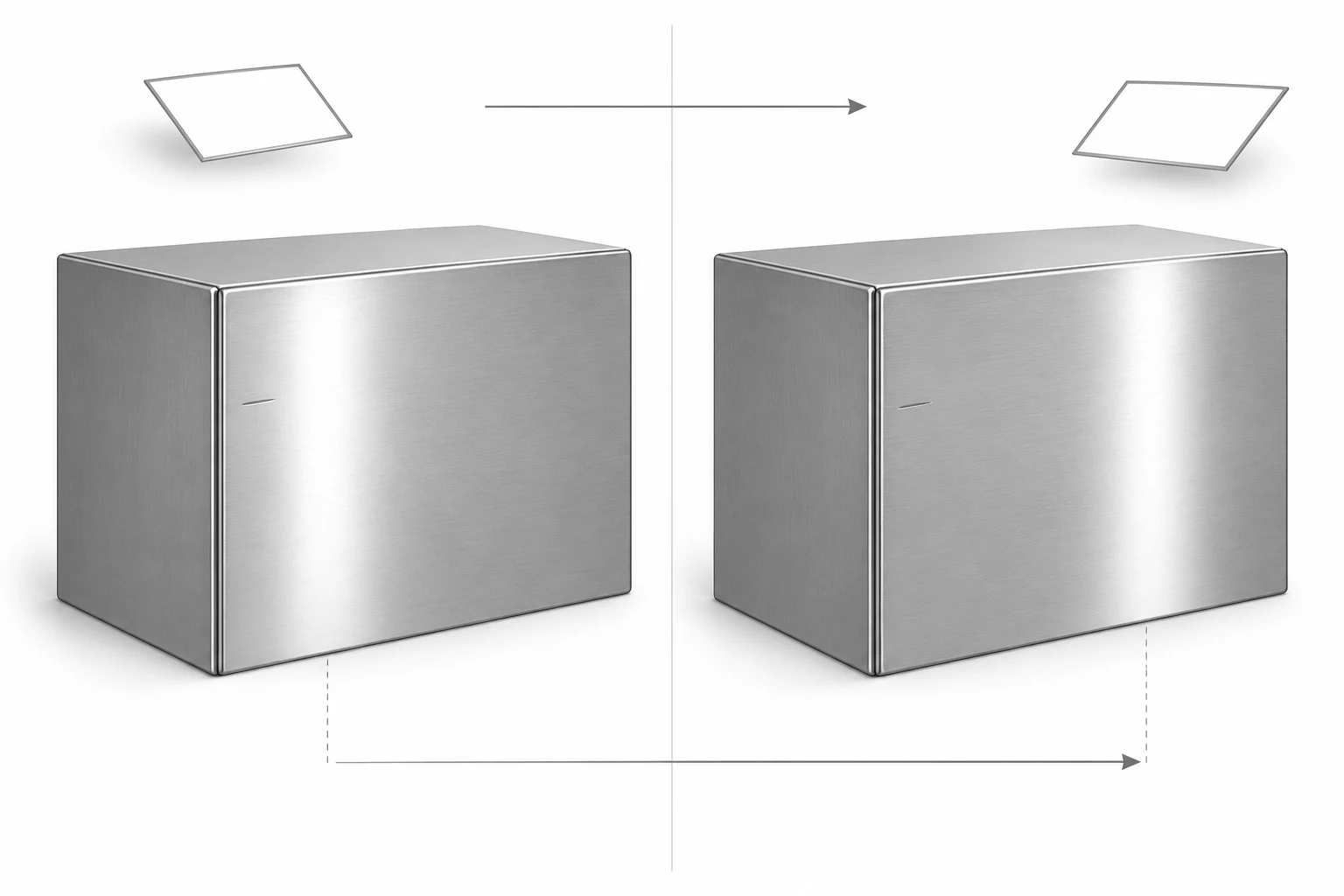
A metal spoon that photographs as a flat white shape does not necessarily need a better light. A brushed metal box that looks like smooth plastic may not need more sharpening. First, look at what the surface is reflecting. In metal product photography, arranging the reflected environment is often more useful than adding brightness.
This guide concerns small metal household objects, not jewelry fit or watch dials. A polished spoon and a brushed metal box serve as suggested practice subjects below; they are not examples from a completed test.
Is that a scratch, or a reflection?
Before styling the shot, inspect the object under light that makes its condition easy to see. Note existing scratches, dents, worn edges, and the general direction of any brushed finish. Keep an overall reference photograph and close-ups of existing damage. These are condition records, not necessarily attractive listing images.
Then leave the camera and object fixed and move one white card. Watch whether a bright band changes position or width. This helps identify tonal features created by the surroundings.
Do not treat disappearance as proof that a line is not a scratch. A real scratch can become invisible at a particular angle, too. Use a seam or corner as a location reference, change the lighting direction, and compare with the physical object. One photograph is rarely enough to classify every fine line as a reflection, brushing, or damage.
On the polished spoon, look for light and dark areas that describe the curve. On the brushed box, also check that the existing fine grain remains readable. Making both objects uniformly bright can erase the distinction you need to show.
Give the surface something useful to reflect
The Slanted Lens tutorial on lighting shiny metal explains the importance of reflected surroundings and demonstrates using black cards to create tonal gradation. The transferable idea is control over the reflected area—not a universal lighting angle copied from its example.
Start with a diffusion surface large enough to cover the reflection you want. Light photographic diffusion material, then locate its reflection through the camera. Adjust its position, orientation, and distance until the bright area helps describe the object’s curve or plane. Keep diffusion materials safely away from hot light sources.
Next, move a white card to introduce a lighter reflection into a side that is difficult to read. More white is not automatically better: if the whole surface approaches the same tone, its shape can become less distinct.
Bring a black card gradually into the edge of the reflected area. Watch where the dark band appears. The aim is not to turn the metal black, but to place a readable transition beside the bright area. If the band swallows an edge, move the card away, change its angle, or try a narrower card.
Change one variable at a time. Move a card before changing the camera position or tilting the product. Otherwise, an improvement tells you little about which adjustment helped. After moving the object, check again that a strong reflection has not concealed known scratches.
Brushing needs direction; wear needs a record
For the brushed box, keep the composition and try moving the diffusion surface from different directions. Compare how clearly the existing grain appears. The purpose is neither to make the product look as worn as possible nor to make it look new. Look for light that describes both its form and its actual condition.
If one angle cannot show the silhouette and a worn area clearly, make a separate condition detail. A hero image does not have to carry every piece of information. For used goods in particular, a scratch that is subtle in the main photograph should not disappear from the product record.
Use the following comparison while shooting and when checking the same areas after editing.
| What you see | What to check first | Adjustment and boundary |
|---|---|---|
| A featureless white highlight | Highlight warnings and whether the original file retains detail | Adjust exposure or the reflected area; do not rely on editing to recover detail that was not recorded |
| A black side merging into the background | Whether it reflects a black card or dark surroundings | Move the black card or introduce a white card while retaining useful shape-defining darkness |
| Brushing becomes invisible | The actual grain direction against the current lighting | Compare another diffusion position before trying aggressive sharpening |
| A scratch appears and disappears | Its location relative to a seam and the condition close-up | Provide a readable detail; invisibility at one angle is not evidence of an undamaged surface |
| An edge looks thinner or dented | Whether its reflection blends into the background | Adjust cards and background separation first; after editing, check for a real shape change |
There is no single exposure combination for every metal finish. Judge highlights, shadows, and required depth of field in the current composition rather than borrowing settings from another product.
Edit the picture, not the condition
Before editing, specify whether the intended change concerns the background, composition, or local brightness. Identify real scratches, wear, and contours as features to retain. Afterwards, compare the original and edited files at the same magnification, checking both the overall reflection gradient and corresponding areas of grain, lettering, and edges.
If you need to modify an existing photograph, the InkRoom image editor accepts an image and an editing description. Available models and parameters depend on the current interface configuration. The entry point does not guarantee subject, text, structure, or material fidelity, and it is not a substitute for controlling reflections on set.
If an edit removes scratches, redirects the grain, or reshapes an edge, revert that change or narrow its scope. A cleaner-looking photograph is not necessarily a more accurate description of the product.
Related articles and cases
- Glass Product Photography: Clear Edges, Honest Transparency
Make clear cups and bowls readable with bright-field and dark-field lighting. Learn what to check in the rim, walls and reflections—and what not to invent during editing.
- Sunglasses Product Photography: Lens Gradients, Temples, and Symmetry
Plan complementary views, separate lens gradients from lighting reflections, and review background edits without losing the product’s geometry, markings, or actual wear.
- Ceramic Product Photography: Glaze, Rims, Feet, and One-of-a-Kind Records
Plan photographs around what a buyer needs to see: the form, interior, handle joins, and foot. Use soft light to describe the surface, measure dimensions separately, and keep each unique piece linked to its original photographs.
- Product Photography Shot List: Track SKUs, Image Uses, and Reshoots
Build a copyable shot list around buyer questions and specific deliverables. A hypothetical example shows how to track real variants, views, included items, files, ownership, approval, and gaps without confusing reshoots with edits.