Ceramic Product Photography: Glaze, Rims, Feet, and One-of-a-Kind Records
Plan photographs around what a buyer needs to see: the form, interior, handle joins, and foot. Use soft light to describe the surface, measure dimensions separately, and keep each unique piece linked to its original photographs.
·
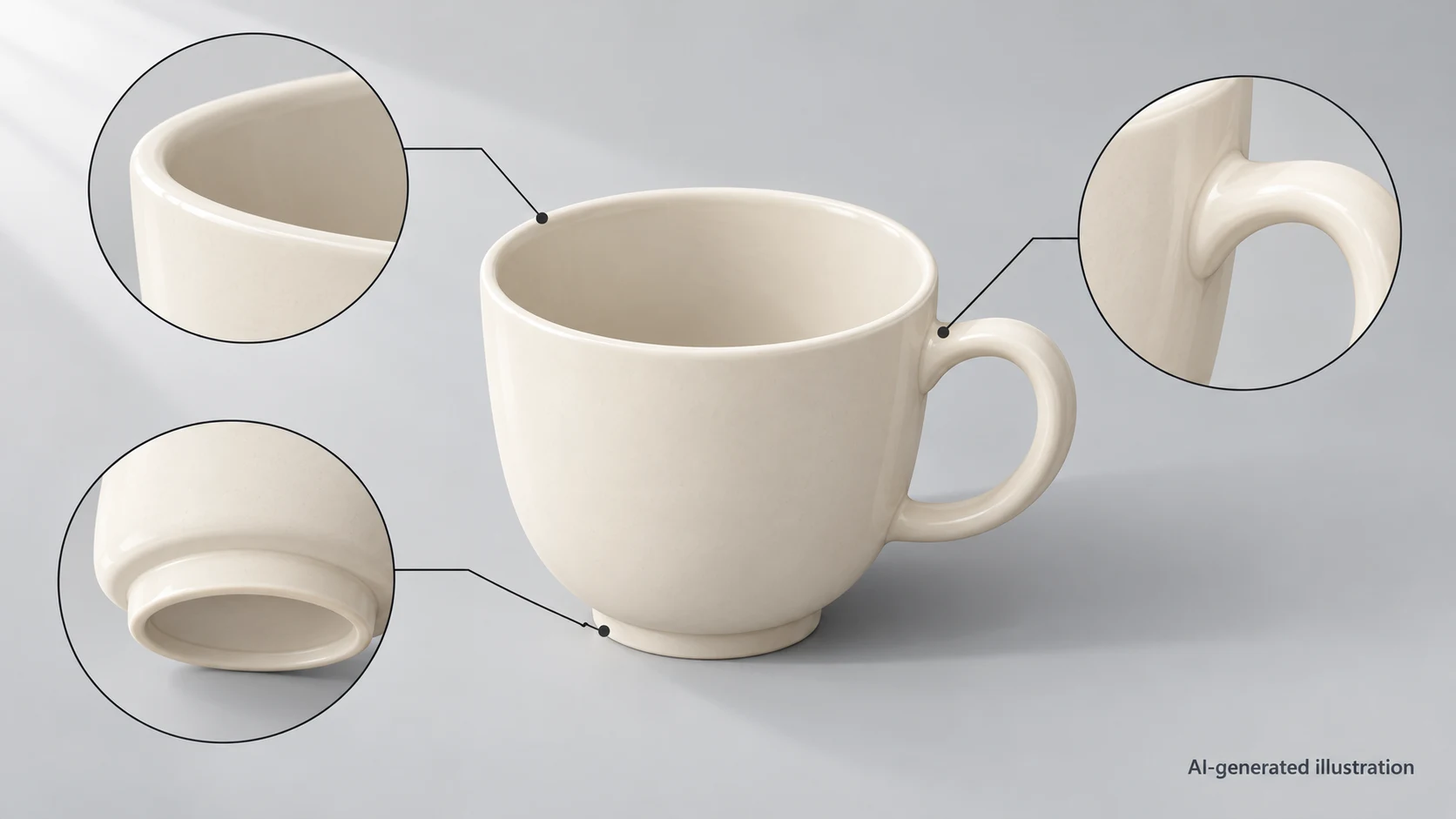
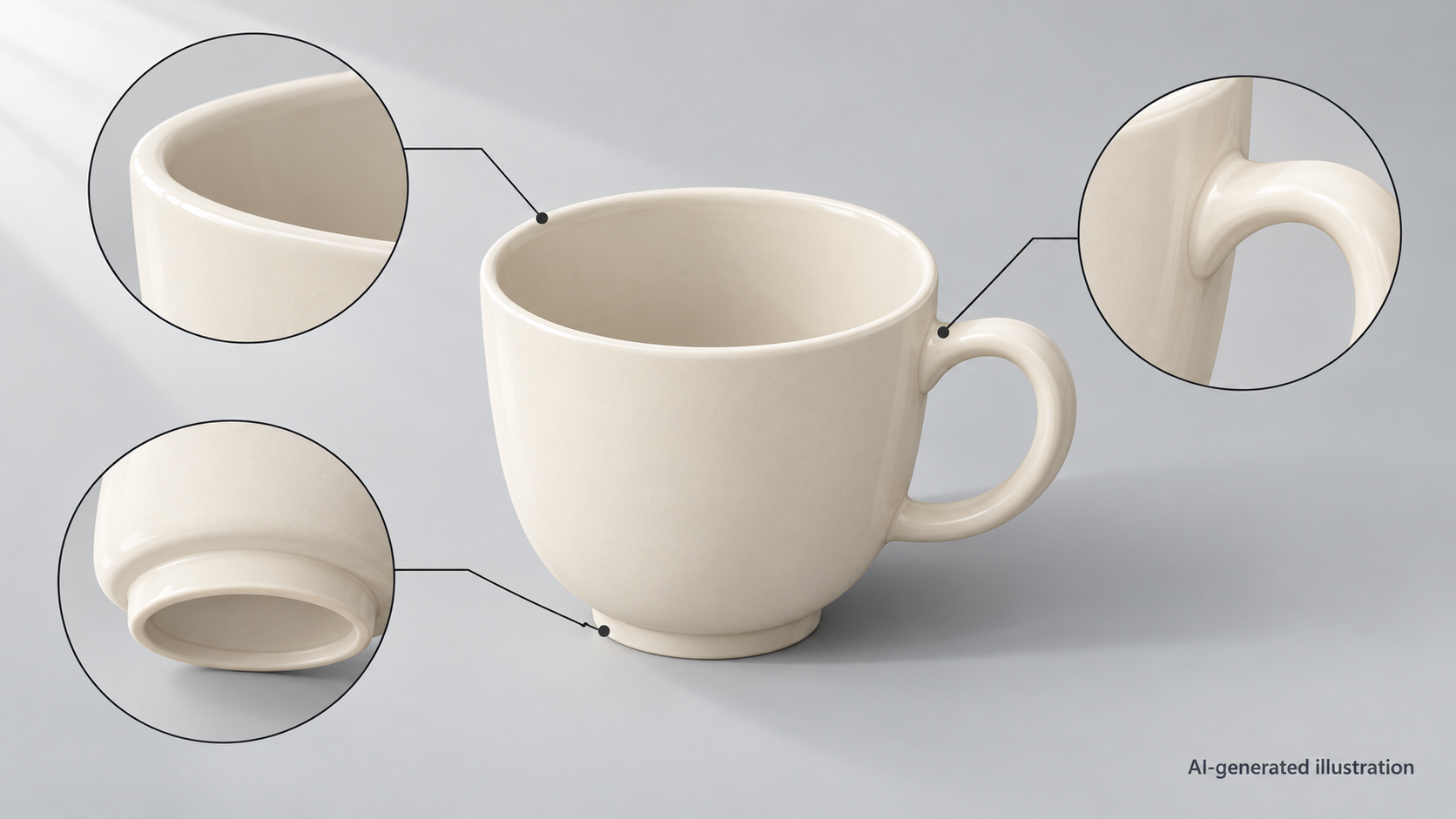
A beautiful front view of a mug can still leave important questions unanswered. Is the rim even? How does the handle meet the body? What does the interior glaze look like? Is there a mark or wear on the foot? Ceramic product photography needs to show more than an attractive silhouette.
You do not have to remove every reflection. A more useful goal is to keep highlights from hiding important information, give less visible parts their own photographs, and connect those images to the actual piece for sale. The approach below is a suggested working method, not a report of equipment testing.
Give each photograph a job
Start with the actual item you intend to sell. Inspect its dry surface and distinguish removable dust from features of the ceramic itself. If you cannot identify a mark confidently, leave it intact rather than cleaning or editing it away for appearance’s sake.
Choose views to fill information gaps, not to meet a fixed image count.
| What the buyer needs to see | Suggested view | What to watch for |
|---|---|---|
| Overall shape and glaze distribution | Front, with a side or back view where needed | Keep reflections off important decoration; a photograph alone does not establish dimensions |
| Rim and interior | A raised viewpoint into the vessel, plus a rim detail if needed | Show the rim thickness, interior finish, and visible marks clearly |
| Handle or other joins | An angled close-up showing the attachment | A handle silhouette is not a record of its joins |
| Foot, maker’s mark, and unglazed areas | A bottom view with the piece safely supported | Photograph this item’s actual base, not another example of the same design |
| Crazing, pinholes, or other visible features | A locating view and a close-up where necessary | Make the detail traceable to the whole piece; do not diagnose its cause or safety from an image alone |
A glossy mug with a handle needs a view of the joins. A shallow plate does not. If a one-off piece has different glaze runs on the back, that back deserves its own photograph rather than being represented by the front.
Let the light describe the surface
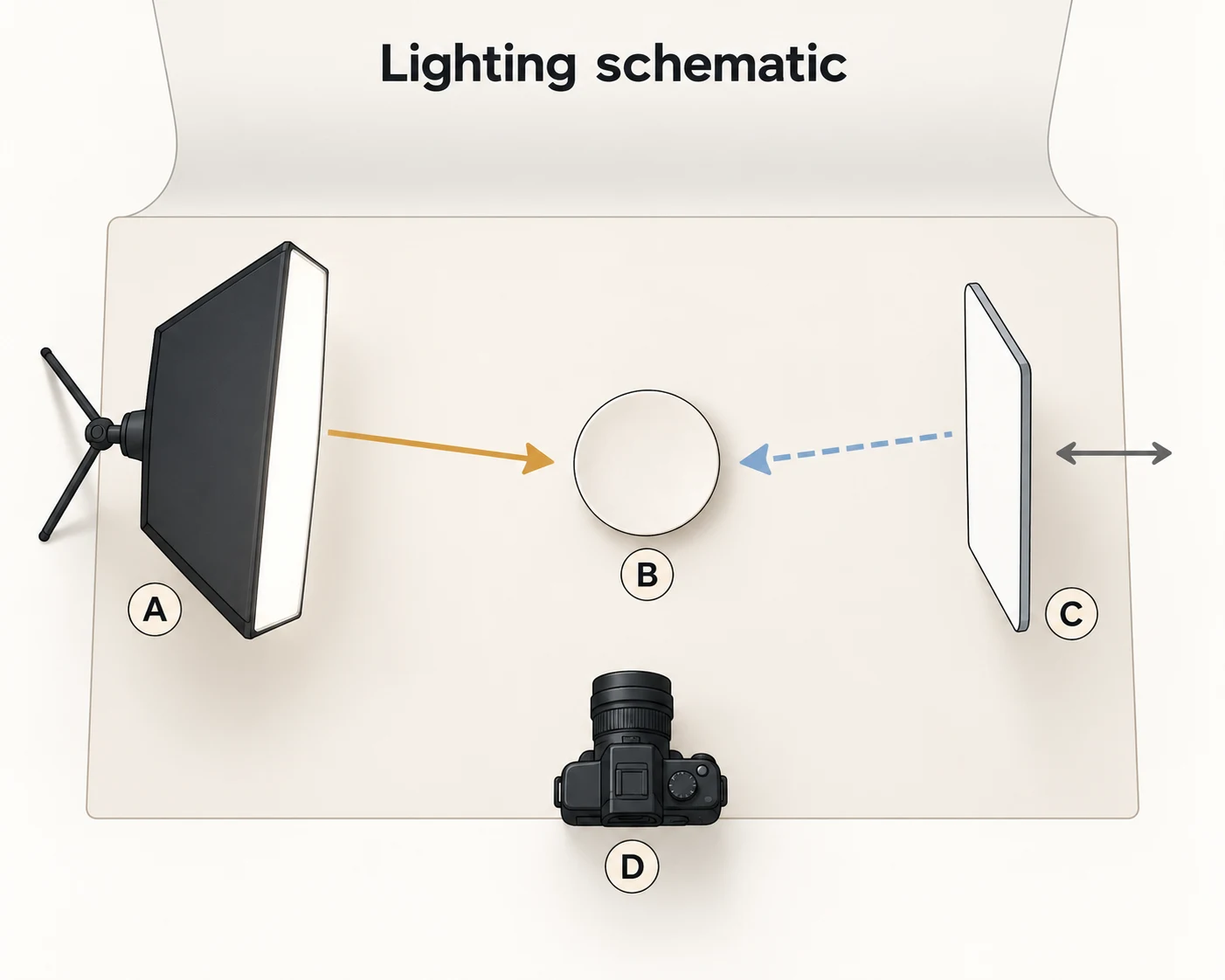
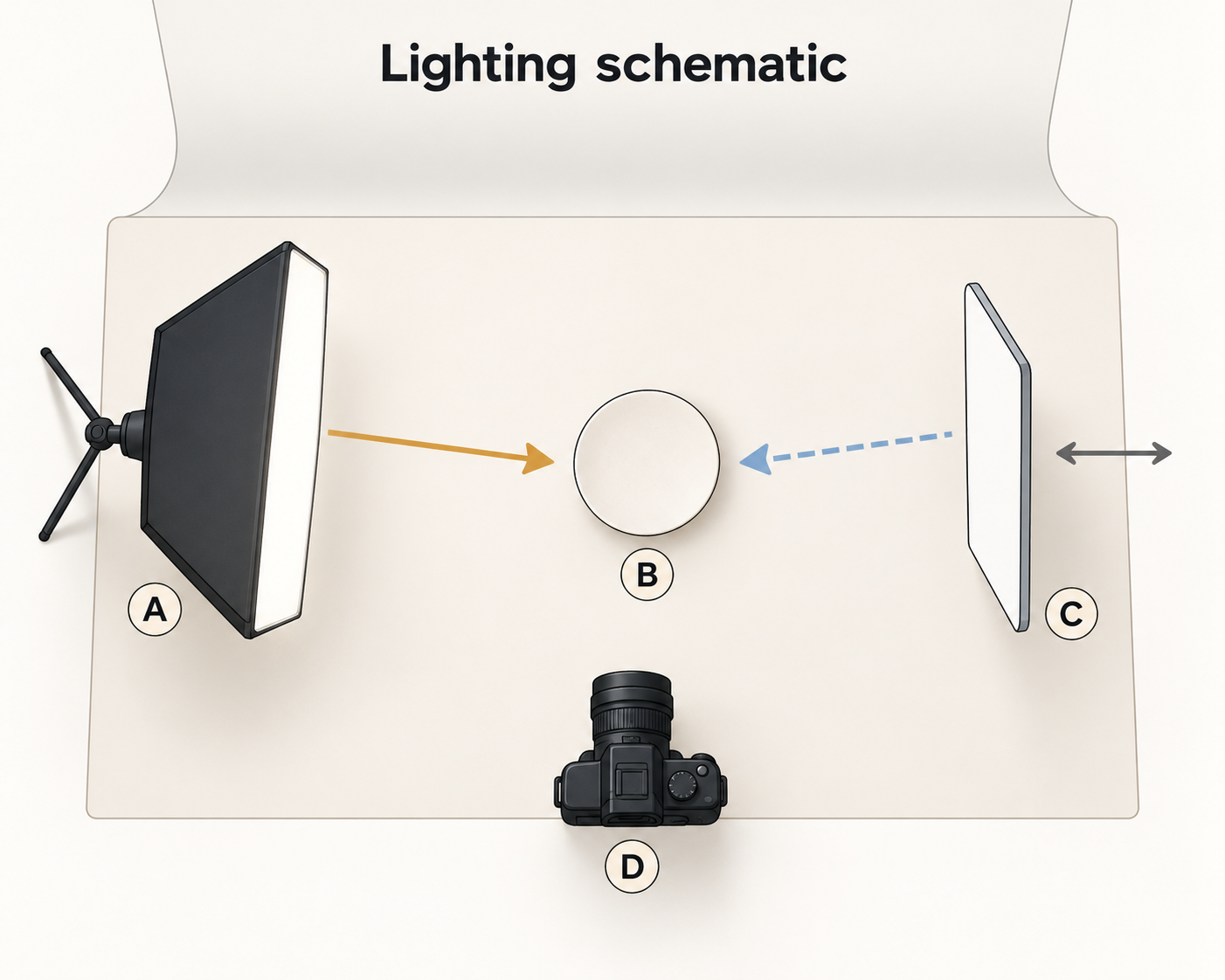
The Ceramic Arts Queensland photography guide recommends diffuse, indirect light for both natural and artificial lighting, and warns against mixing light sources with different color temperatures. A practical starting point is soft window light or a diffused lamp from one side, with a white reflector on the other to lift shadows. Fixing the camera in position makes lighting changes easier to compare.
Take an observation frame, then adjust for the surface in front of you:
- Glossy glaze: notice what the highlight hides. Move the light, vessel, or camera slightly and watch whether the reflection moves away from the rim, decoration, or join. If one angle cannot show everything, keep the overall view and add a detail. Do not reconstruct texture hidden by glare in editing.
- Matte or textured surfaces: preserve useful shading. Side lighting can reveal relief. Too much reflected fill can make that relief harder to read; move the reflector farther away in stages and compare the result with the object, rather than aiming for no shadows at all.
- White ceramics: separate the edge from the background. A background is not usefully white if the rim and outline disappear into it. Consider recording the form against pale gray first. If you need a white-background version, treat that as a separate edit and inspect the edges afterward.
These are adjustment directions, not a universal exposure recipe. Shape, glaze, and room conditions vary. A screen is not a substitute for checking the physical object, either: more appealing saturation is not necessarily more accurate color.
Change the light to investigate, not to diagnose
A bright patch may be a reflection, and it may also obscure a real surface feature. Keep the framing fixed, change the light direction, and inspect the object itself. A moving reflection helps explain the obstruction; it does not prove that the surface beneath it is free of pinholes, cracks, or other features.
Treat crazing, pinholes, and wear on the item differently from a stain on the backdrop. Background dirt can be removed within a defined editing area. Features on the object should remain visible and be described in terms of what you have actually observed. Questions about cracks, safe use, or food-contact suitability cannot be settled by a photograph alone.
Measure dimensions; record capacity separately
Use photographs to show form and physical measurements to supply dimensions. Record height, opening diameter or maximum width, and where you measured. For a handled piece, distinguish body width from overall width including the handle. A ruler in the frame can help, but tilt and perspective make it a poor replacement for a separate measurement record.
Do not infer capacity from a perspective photograph. If capacity matters, measure with a graduated vessel only when the ceramic is suitable for holding water and its condition permits it. State whether the figure refers to near-brim capacity or a defined working fill level; record both separately if useful. Do not test an unsuitable or questionable piece merely to fill a listing field, or borrow a measurement from another item of the same design.
Store the measurement conditions with the photographs. “Looks similar” and “measured the same” are different claims.
Keep the unique piece attached to its images
Assign a unique SKU or inventory number before shooting. One useful internal record is a photograph of the piece beside its identifier card, followed by clean product views without the card. The identifier does not need to appear in the public images.
A filename pattern such as SKU_view_version can help: CUP-A017_foot_original, for example. This is a filing suggestion, not a platform requirement. Keep originals, publication copies, and measurement notes together, with a clear record of which images belong to which item. The next piece needs its own base and detail photographs even if its shape is similar.
Save crops, color adjustments, and background edits as separate versions rather than overwriting the originals. That leaves something to consult if a mark might have come from editing, although the record itself is not authentication.
Edit the setting, not the product information
Define the permitted editing area first. Removing a stain on background paper is different from smoothing away a glaze pinhole. Where the boundary cannot be separated reliably, leave it alone or reshoot.
If an existing photograph needs background work, InkRoom’s image editor accepts an image and an editing description. Describe the limited change you want, and check the models and parameters currently available in the interface. A restricted description does not guarantee that only the background will change, or that the subject, structure, or text will remain unchanged.
Compare the result with the original for the same SKU. Look closely at glaze highlights and texture, the rim, handle joins, foot marks, outline, and proportions. Reject an output that invents, removes, or changes product details. If an important feature was never photographed, photograph it rather than generating it. For a white-background export, also check pixel dimensions and edge quality; a white background is not proof that the product detail is acceptable.
The reference guide calls for accurate proportion, color, and texture without excessive digital alteration. For one-of-a-kind ceramics, that principle has a practical consequence: the piece that reaches the buyer should be the piece your photographs and records describe, not simply another attractive example of the design.
Related articles and cases
- Sunglasses Product Photography: Lens Gradients, Temples, and Symmetry
Plan complementary views, separate lens gradients from lighting reflections, and review background edits without losing the product’s geometry, markings, or actual wear.
- Product Photography Shot List: Track SKUs, Image Uses, and Reshoots
Build a copyable shot list around buyer questions and specific deliverables. A hypothetical example shows how to track real variants, views, included items, files, ownership, approval, and gaps without confusing reshoots with edits.
- Watch Photography: Clear Dials, Honest Condition
Plan complementary watch photos, separate reflection problems from focus problems, and edit backgrounds without misrepresenting the watch.
- Product Photography Focus Stacking: When to Reshoot Instead of Using AI Sharpening
Capture overlapping focus coverage, align and blend real photographs, and use the source frames to decide whether a soft detail needs a mask adjustment or a reshoot.