Sunglasses Product Photography: Lens Gradients, Temples, and Symmetry
Plan complementary views, separate lens gradients from lighting reflections, and review background edits without losing the product’s geometry, markings, or actual wear.
·
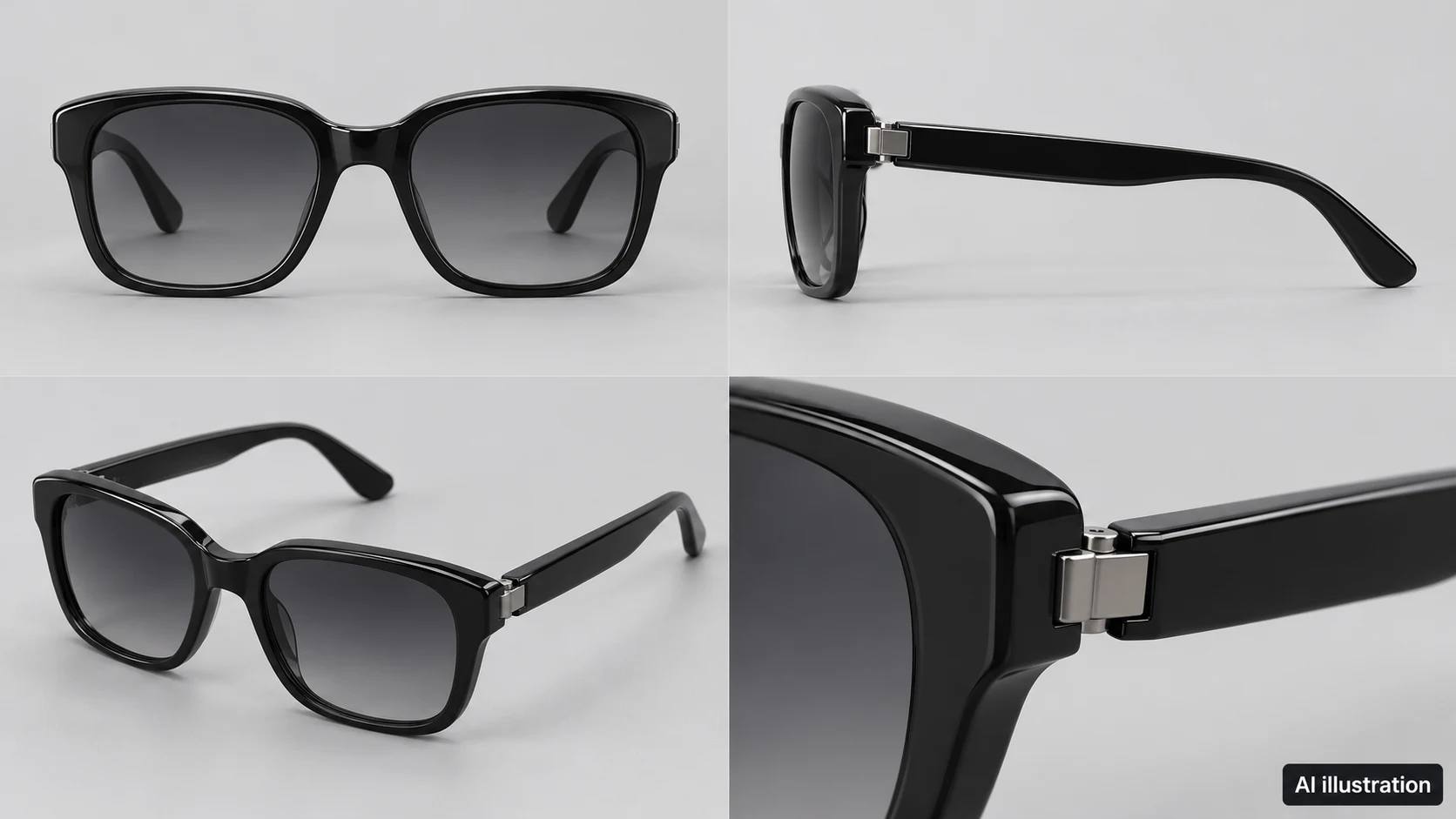
In sunglasses product photography, a bright image is not necessarily an informative one. A reflection can hide the lens gradient, while a convincing front view can leave the temples and hinges unexplained. Aim for a set of photographs that describes the product together, rather than making one hero image do every job.
The following is a suggested shooting method, not a report of a tested setup. Visual Education’s public class description lists glossy surfaces, gradient lighting, and post-production among its topics. It does not provide the full paid lesson, and this guide does not claim to reproduce its lighting arrangement or camera settings.
Give each view a specific job
Remove loose dust and fingerprints before shooting, while retaining actual scratches, chipped finishes, and other wear. This matters particularly for used products: cleaning an item is not permission to retouch away its condition.
Take an identification photograph first, then plan complementary views. The table below assigns jobs to views; it is not a mandatory image count.
| View | What it should explain | What to check during capture |
|---|---|---|
| Front | Frame outline, lens shape, left–right relationship | Whether the bridge faces the camera squarely and positioning makes one side look larger |
| Side | Temple thickness, curvature, and side logo | Whether the front frame obscures the temple or a highlight hides the logo |
| Angled view with temples open | How the temples connect to the front and sit in space | Whether both temples are distinguishable without arranging them into a misleading configuration |
| Hinge and wear close-up | Connection details, visible scratches, and chipped finish | Whether focus and reflections allow the relevant details to be seen |
If the front appears uneven, realign the bridge, camera, and support before deciding that the product itself is asymmetric. Do not mirror one side onto the other: positioning errors call for another capture, while genuine differences should remain visible. Photographs from different angles are not precise dimensional measurements either.
Separate the lens gradient from the lighting gradient
A lens’s color transition and the tonal transition reflected from a diffusion surface can overlap in a photograph. One image alone does not establish that every visible gradient belongs to the lens.
Try a one-variable-at-a-time comparison. Keep the sunglasses, camera, exposure, and white balance fixed while changing only the light position, and record the change. Return to the starting arrangement, then change only the diffusion surface’s position or angle. This makes it easier to identify which adjustment moved a bright band, hid a logo, or darkened one lens.
If a bright band moves with the light or diffusion surface, it is at least lighting-dependent; do not present it as evidence of an intrinsic lens gradient. Choose the final image with the physical product available for comparison, rather than simply selecting the most dramatic transition.
Glossy frames also need reflections that communicate their finish. The goal is not to eliminate every reflection, but to keep highlights from obscuring contours, logos, and connections. If an adjustment makes glossy plastic look matte, revise the light or diffusion surface instead of treating that loss of material information as a cleaner result.
Keep the camera stable and inspect the front, temples, and hinges at a useful magnification. No single aperture works for every distance and view. If important structures cannot all be rendered clearly, add a detail photograph rather than using sharpening to imply detail that was not captured.
Edit the background, not the product’s identity
Save the unedited originals and define the intended change, such as removing background clutter or an unwanted support. Lenses need particular care: the old background visible through a lens, an environmental reflection on it, and its actual color are not interchangeable things to erase.
For an existing photograph that needs further work, the InkRoom image editor accepts an image and editing instructions. Available models and parameters depend on the current interface. You can request changes only outside the product and ask that the frame, temples, and logo not be reshaped, but those instructions do not guarantee preservation. Generated hinge details, lettering, or wear that the original never recorded are not evidence about the physical item.
Compare the edit and original side by side at sufficient magnification:
- Outline and structure: Check frame thickness, bridge shape, temple count, and connection points. Look for genuine left–right differences that have been incorrectly made identical.
- Lenses and finish: Check for flattened gradients, implausible transparent areas, or a glossy finish made to look matte.
- Logo and condition: Look for altered lettering and scratches or chips that have disappeared.
- Delivery edges: Inspect gaps between temples, thin edges, and shadows for halos, leftover background, or missing sections. Confirm pixel dimensions, crop, and aspect ratio against the actual delivery requirements.
If the product itself has changed, return to the original for local correction or reshoot. A prettier overall image is not a sufficient reason to approve it. Photographs can show visible appearance; they cannot, by themselves, establish UV protection, polarization performance, or authenticity. Those claims require appropriate product documentation or independent verification.
Related articles and cases
- Ceramic Product Photography: Glaze, Rims, Feet, and One-of-a-Kind Records
Plan photographs around what a buyer needs to see: the form, interior, handle joins, and foot. Use soft light to describe the surface, measure dimensions separately, and keep each unique piece linked to its original photographs.
- Product Photography Shot List: Track SKUs, Image Uses, and Reshoots
Build a copyable shot list around buyer questions and specific deliverables. A hypothetical example shows how to track real variants, views, included items, files, ownership, approval, and gaps without confusing reshoots with edits.
- Watch Photography: Clear Dials, Honest Condition
Plan complementary watch photos, separate reflection problems from focus problems, and edit backgrounds without misrepresenting the watch.
- Product Photography Focus Stacking: When to Reshoot Instead of Using AI Sharpening
Capture overlapping focus coverage, align and blend real photographs, and use the source frames to decide whether a soft detail needs a mask adjustment or a reshoot.