Glass Product Photography: Clear Edges, Honest Transparency
Make clear cups and bowls readable with bright-field and dark-field lighting. Learn what to check in the rim, walls and reflections—and what not to invent during editing.
·
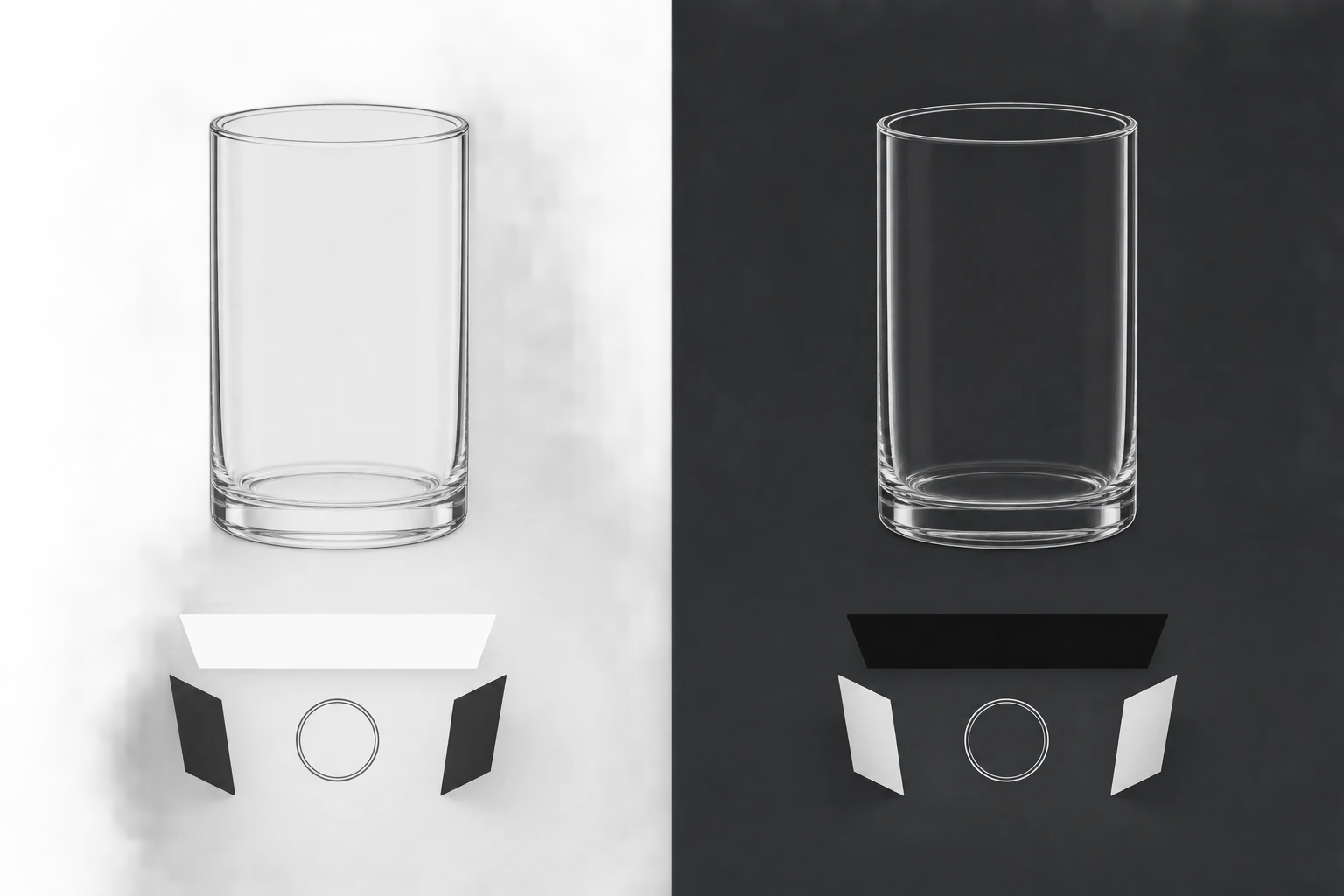
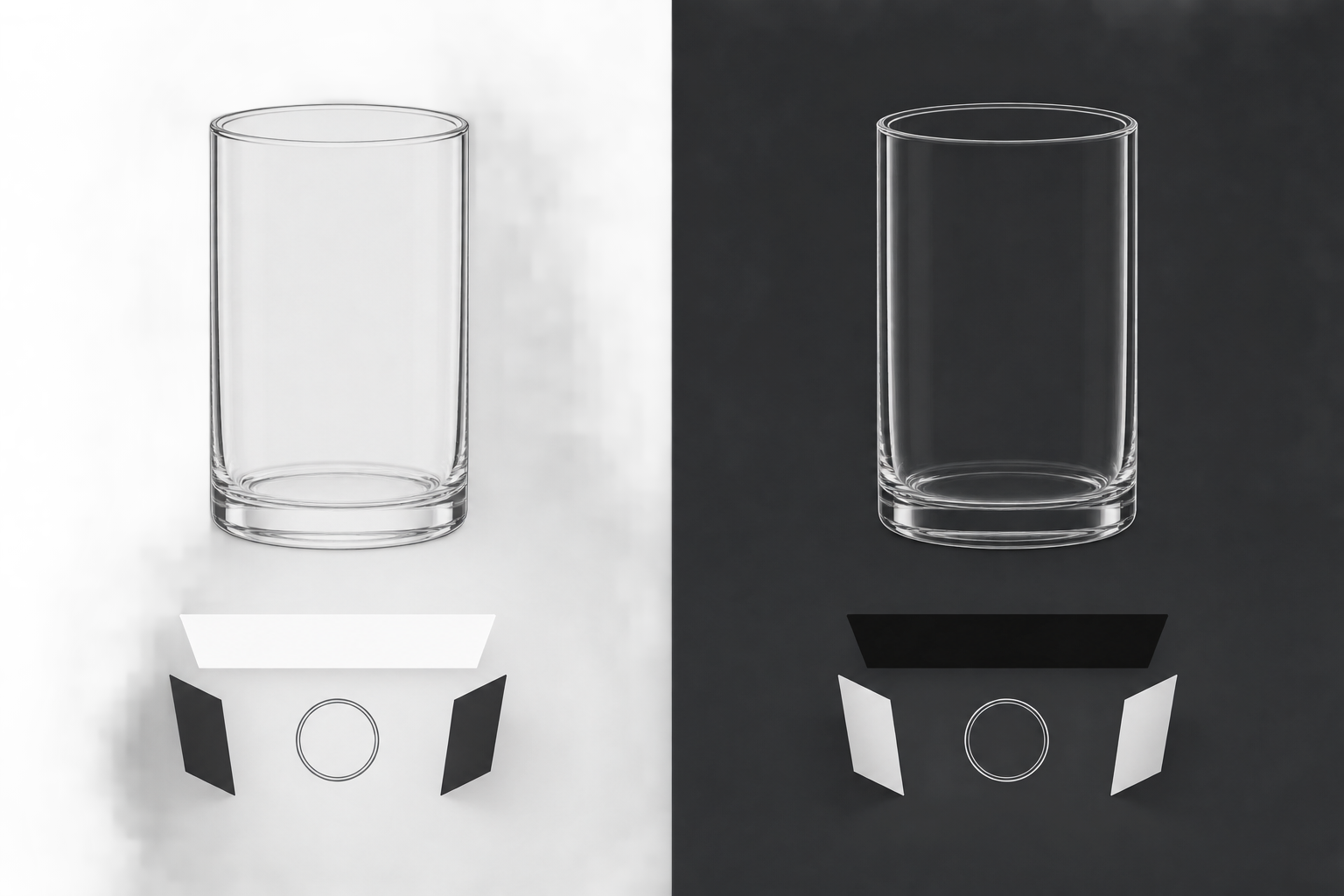
A clear cup can disappear against white. Put it against black and the outline may return, while the body seems almost empty. Good glass product photography is not simply a matter of adding light. It makes the shape readable without changing how the actual object transmits light.
This guide focuses on clear, unlabelled cups and bowls. Look at the object first, then decide where a dark edge or a bright edge will help. Making glass more visible should not mean turning a transparent cup milky white.
Start with the object, not an ideal of perfect glass
Clean the glassware, then examine it in neutral surroundings from the front and slightly above. Is the rim thin or substantial? Does the base have visible thickness? Is there a faint tint along the bowl’s edge? Note these features so that you have something specific to check during editing.
Remove dust and fingerprints before shooting where possible. Internal bubbles, engraving, seams and genuine colour are different: do not automatically treat them as blemishes. If a mark is uncertain, inspect the object, rotate it or take a detail photograph. A single image may not tell you whether a bright line is a scratch, refraction or a reflection of the room.
Transparency is not an absence of information. The glass changes the appearance of the background seen through it, and a thicker base may create more complex light and dark areas. Preserve those differences rather than wiping the centre into a uniform white patch.
Choose the background for the information you need
Digital Photo Mentor’s glassware tutorial concentrates on dark-field photography: a bright rim separates clear or dark glass from a black background. It does not provide a full bright-field method. The comparison below is a suggested working approach for this task, not a claim that these setups have been tested here.
| What the image needs to show | Setup to try | What to watch |
|---|---|---|
| An outline on a light product page | An evenly lit diffusion surface behind the glass, with black cards outside the frame at the sides | Whether dark edges describe the walls without losing the rim |
| Curves against a dark background | A black background with lit white cards or diffusion surfaces toward the sides | Whether bright edges remain readable without distracting hotspots |
| The thickness of the rim or base | Adjust camera height within the chosen setup; add a detail view if needed | Whether inner and outer edges overlap or hide important structure |
For bright-field lighting, begin with an even, bright background. Move black cards outside the frame to introduce dark edge definition. Closer is not automatically better: a broad dark band can obscure the transparency you are trying to show. Watch the camera view as you move each card.
For dark-field lighting, let the edges see controlled bright surfaces while keeping unwanted direct light out of the shot. White cards reflecting light from the sides are one starting point. Adjust their angles individually. Aim for a readable contour, not a thick white outline around the entire object.
These backgrounds need not compete for a single winner. If one main image cannot explain both the silhouette and a thick base, add a detail photograph instead of drawing missing structure in post-production.
Change one thing to find the source of a reflection
Fix the camera and glassware in position, then inspect the rim, both walls and the base. Use stable support. If the exposure is slow, a timer or remote release can reduce movement caused by pressing the shutter. Choose aperture for the areas that need to be sharp; a setting from another photographer’s setup is not a universal answer. Match white balance to your actual light rather than copying the tutorial’s tungsten-light setting.
Move just one black or white card and take another frame. Which line changed? Is the wall easier to read? Moving the light, camera and subject together makes it difficult to identify what helped.
If a window frame, camera or person appears in the glass, try shielding that part of the surroundings or making a small camera-position adjustment. Watch the object’s shape as well: a new viewpoint changes the rim’s ellipse and how much of the inner wall is visible. With a bowl, a low viewpoint may hide the interior base altogether.
For a line that might be a bubble or seam, take another angle and check the physical object. Both genuine structure and reflections can change appearance with viewpoint; “it moved, so it must be a reflection” is not a reliable test on its own.
Review the photographs enlarged on a computer. The linked tutorial specifically recommends this because a small camera screen can conceal problems. The question is not whether every reflection has vanished, but whether a reflection hides something the buyer needs to see.
Keep a comparison through capture, editing and export
- At capture: Keep an original showing the overall shape, plus any necessary rim or base details. Record the chosen camera and card positions for reshoots. Missing visual evidence should not become an editing guess.
- During editing: Retain the untouched original. Limit changes to confirmed dust, background distractions or other identified local issues. If you use the InkRoom image editor, you can upload an existing photograph and describe the edit; available models and parameters depend on the current interface configuration. Specifying a limited edit does not guarantee subject or material fidelity. Compare the result with the original for wall shape, rim, base, transparency, bubbles, engraving, seams and tint. AI-invented glass walls are not evidence of the real product.
- At export: Inspect enlarged edges for seams, halos and repeated details, then check at the intended display size to see whether the rim and walls remain legible. If transparent areas contain patches or textures from the old background, return to the edit or reshoot rather than blurring over the problem.
When a structure is unclear, another viewpoint or a small card adjustment is often the more useful next step. For a product photograph, an honest, slightly uneven edge is more valuable than a polished wall the object never had.
Related articles and cases
- Packaging Photography: Show the Structure, Printing, and Actual Contents
Choose useful views for cartons, pouches, and labels, handle foil and window reflections, and check finished images against the physical package and shipping contents.
- How to Photograph Black Products on a Black Background
Separate a black product from a black backdrop without turning it gray. Control edge light, shadow texture, and reflected highlights as distinct parts of the photograph.
- White on White Product Photography: Keep Edges and Texture Visible
A brighter background should not erase a white product. Use a subject-only reference frame and a separate background-light comparison to find spill, protect texture, and inspect the exported image.
- Metal Product Photography: Show Polish, Brushing, and Real Wear
Shape reflections with diffusion, white cards, and black cards, then check that lighting and editing have not hidden the product’s actual surface condition.