How to Photograph Black Products on a Black Background
Separate a black product from a black backdrop without turning it gray. Control edge light, shadow texture, and reflected highlights as distinct parts of the photograph.
·
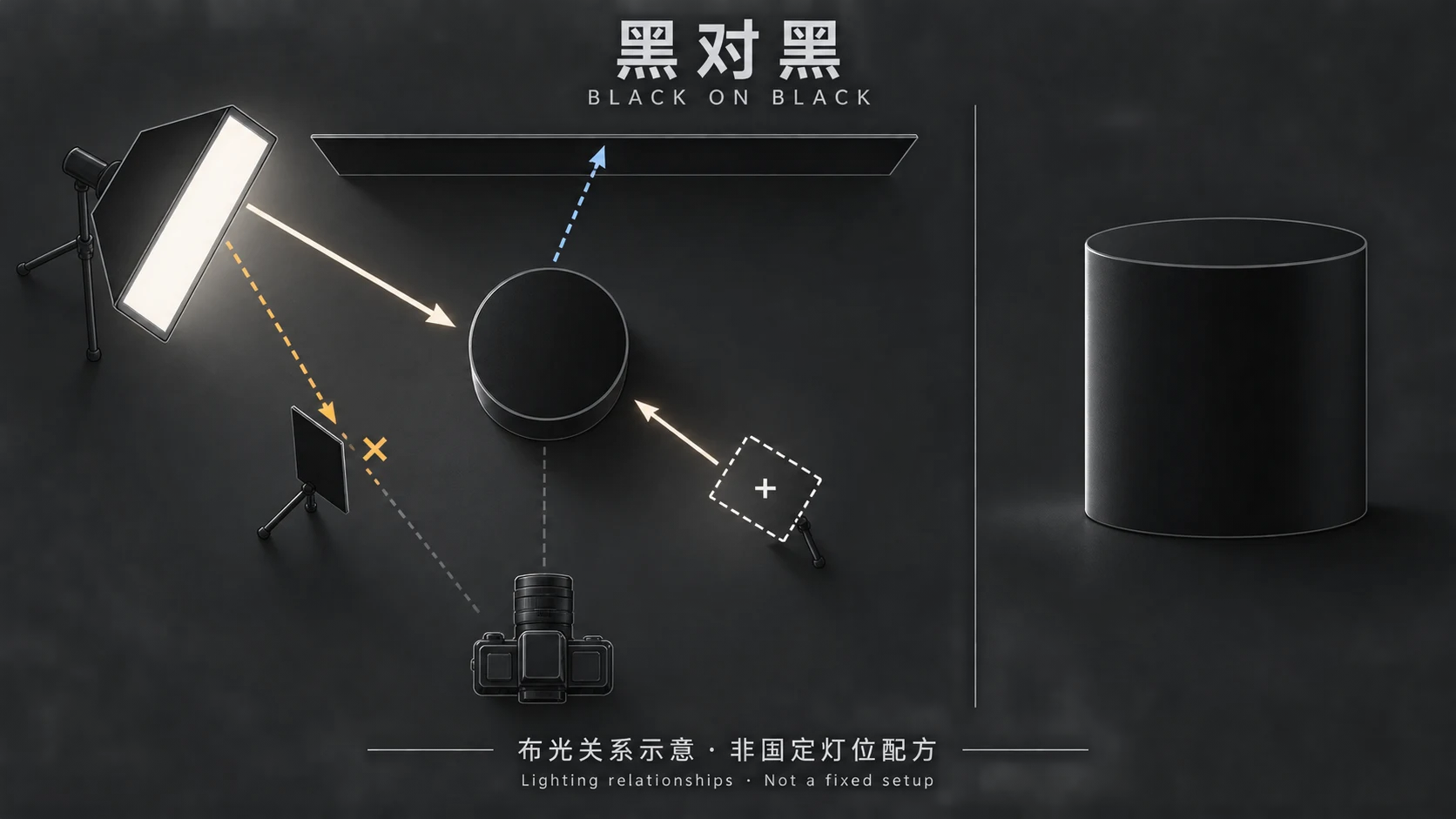
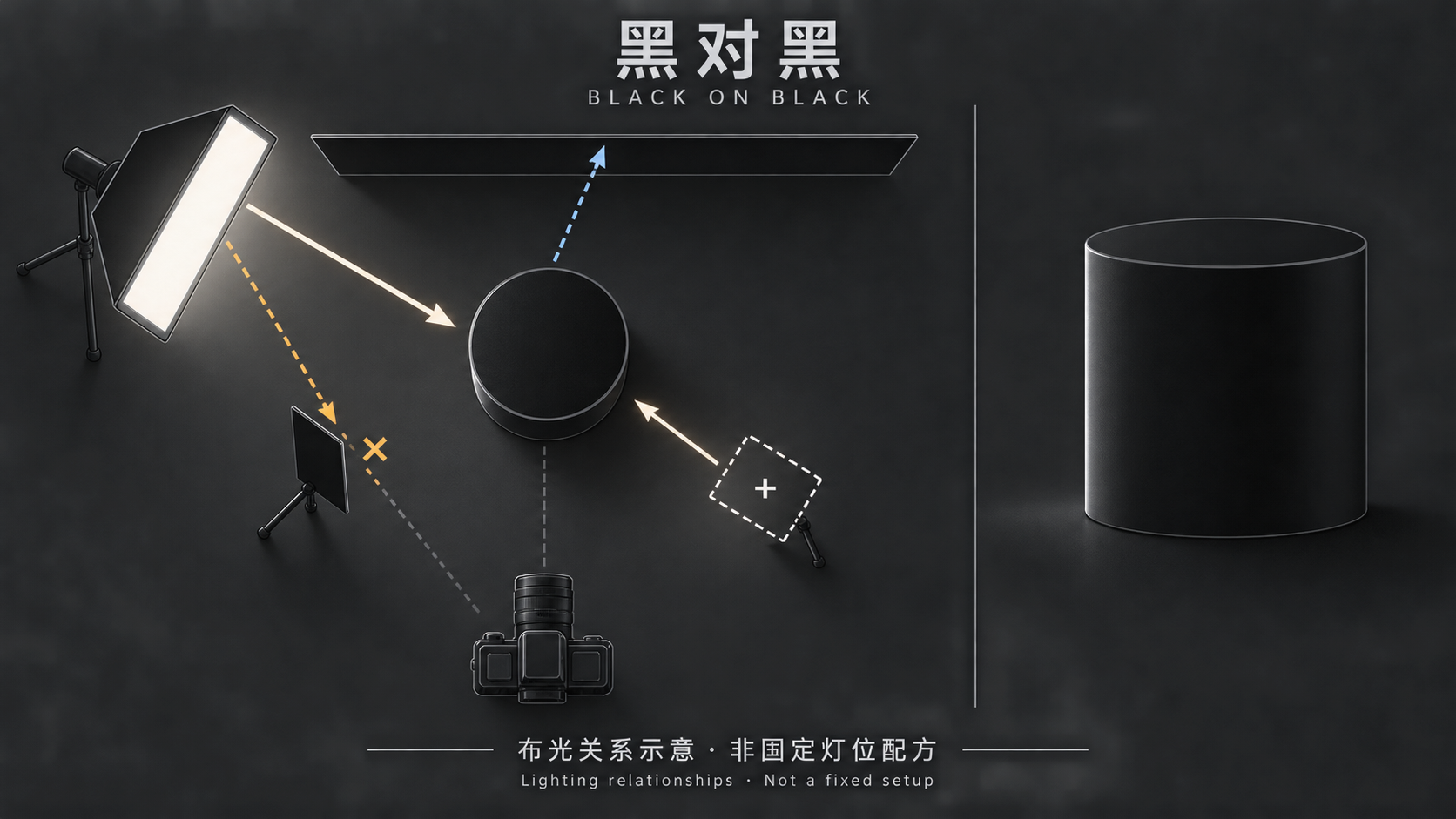
A black product does not need to become bright to stand out against black. It needs enough local contrast to reveal its outline, enough shadow detail to describe its surface, and highlights that make sense for the material.
Visual Education’s public class description describes backlighting a black product to create rim lighting and lists gradient lighting and flare reduction among its topics. The approach below is an independent set of shooting recommendations, not a reconstruction of the paid lesson. We have not watched that video or tested a prescribed setup.
Separate the outline without lifting every shadow
Decide what the photograph must communicate: silhouette, surface texture, or a reflection that explains a curve. Matte black may benefit from light skimming across surface relief. Glossy black often needs a carefully positioned reflection. Making both equally gray can erase the difference between them.
Two brightness relationships matter: product against background, and highlights against shadows within the product. The first separates the outline; the second describes volume. Raising frontal light may brighten the object while leaving a disappearing side edge unresolved.
There is no useful universal power ratio here. Distance, modifiers, angles, and surface reflectance all change the result. Aim instead for a readable outline at the intended display size, a convincing black surface, and highlights that retain important information.
Give the background and the light separate jobs
As a starting exercise, place the product in front of a black backdrop and use a soft source from a rear-side position. Look at the edge it creates before adding frontal fill. This isolates a variable; it is not a universal lighting recipe.
Leaving space between product and backdrop gives you room to flag light and limit background illumination. The distance depends on the room and beam spread. If the backdrop looks too bright, first check whether light is falling directly on it rather than reducing exposure across the entire photograph.
Move the rear-side source while watching where the bright edge appears and how wide it becomes. Also watch whether the source becomes visible to the lens. Light spilling onto the backdrop, a softbox reflected in the product, and stray light reaching the lens are different problems. One exposure adjustment will not necessarily solve all three.
If the outline works but front-facing texture disappears, try restrained frontal fill or a reflector. Keep camera settings fixed while examining each light separately, then together. If fill turns the whole surface gray, reduce its contribution or change its direction before adding more light.
Shape reflections, and distinguish them from flare
A softbox reflected in a glossy product is not automatically a flaw. A continuous gradient can explain curvature. It becomes a problem when it hides important detail, breaks awkwardly across the surface, or makes a matte finish look glossy.
Keep the camera and product fixed while changing one aspect of the source at a time: position, orientation, or apparent size. Compare the reflection’s width and transition, not just overall brightness. Check the photograph against the actual object for gloss, roughness, and small surface features.
If the whole image becomes washed out after introducing a backlight, inspect whether direct or stray light is reaching the lens. Try a lens hood or a black flag between source and lens without blocking the intended illumination or entering the frame. Contrast-reducing flare is different from a useful surface reflection.
| What you see | Check first | First adjustment to try |
|---|---|---|
| One edge disappears | Whether light reaches that edge from a useful direction | Move the rear-side source slightly |
| Backdrop looks too bright | Direct light on the backdrop | Redirect or flag the source; reconsider spacing |
| Image looks veiled | Backlight reaching the lens | Shield the lens or change the source angle |
| Black looks like gray plastic | Excessive frontal fill | Reduce fill while preserving relevant texture |
| A highlight hides texture or lettering | Reflection angle and highlight intensity | Move the reflection, then reassess exposure |
Judge the finished image at two scales
At the intended display size, check whether the product’s shape is readable. Then inspect shadow texture, highlight transitions, and important lettering at higher magnification. Not every edge needs a bright line, and not every shadow needs to open up. The parts that explain the product should not disappear by accident.
Check whether important highlights still contain gradation. If they do not, adjust the capture rather than assuming editing can recover them. Lifting shadows can also reveal noise rather than useful texture. Keep the original and compare changes so that “brighter” does not quietly become your definition of “more accurate.”
Optional editing for an existing photograph
If the shoot is complete and the remaining task is a background or local adjustment, the InkRoom image editor accepts an existing image and an editing description. Describe the change and ask to retain the existing outline, shadow texture, and highlight shape. Those are editing instructions, not guaranteed outcomes.
Available models and parameters depend on the current interface. Subject fidelity, lettering accuracy, and unchanged structure are not guaranteed. Compare the output with the original; if essential texture or highlight detail was never captured, consider reshooting rather than treating editing as a substitute for lighting.
Related articles and cases
- Packaging Photography: Show the Structure, Printing, and Actual Contents
Choose useful views for cartons, pouches, and labels, handle foil and window reflections, and check finished images against the physical package and shipping contents.
- White on White Product Photography: Keep Edges and Texture Visible
A brighter background should not erase a white product. Use a subject-only reference frame and a separate background-light comparison to find spill, protect texture, and inspect the exported image.
- Metal Product Photography: Show Polish, Brushing, and Real Wear
Shape reflections with diffusion, white cards, and black cards, then check that lighting and editing have not hidden the product’s actual surface condition.
- Glass Product Photography: Clear Edges, Honest Transparency
Make clear cups and bowls readable with bright-field and dark-field lighting. Learn what to check in the rim, walls and reflections—and what not to invent during editing.