How to Choose a Product Photography Backdrop for a Small Space
Choose paper, fabric or boards by the area your camera actually sees—not just the size of the product. Compare maintenance and storage, plan a seamless sweep, and identify problems that need a lighting change or a reshoot.
·
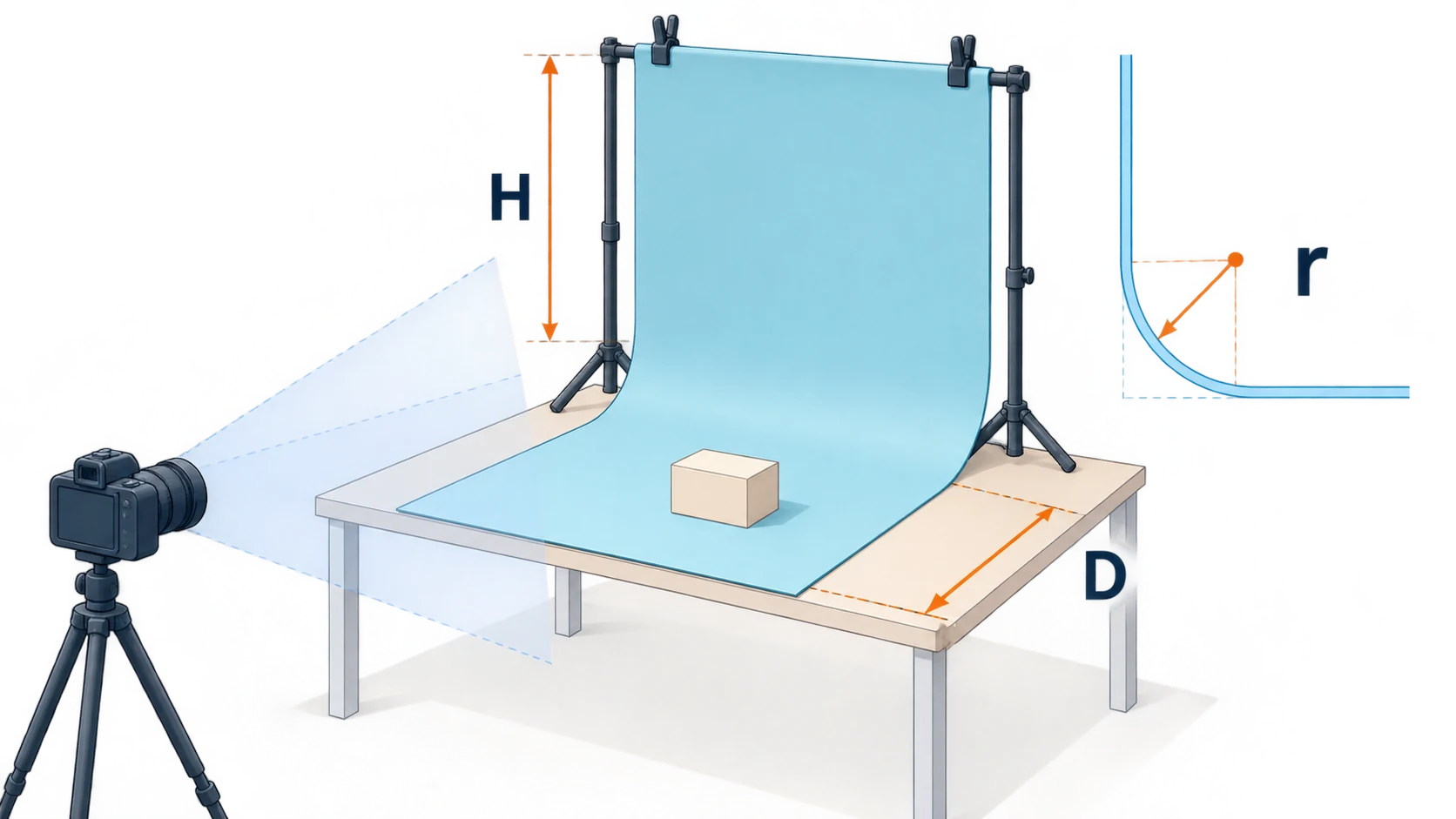
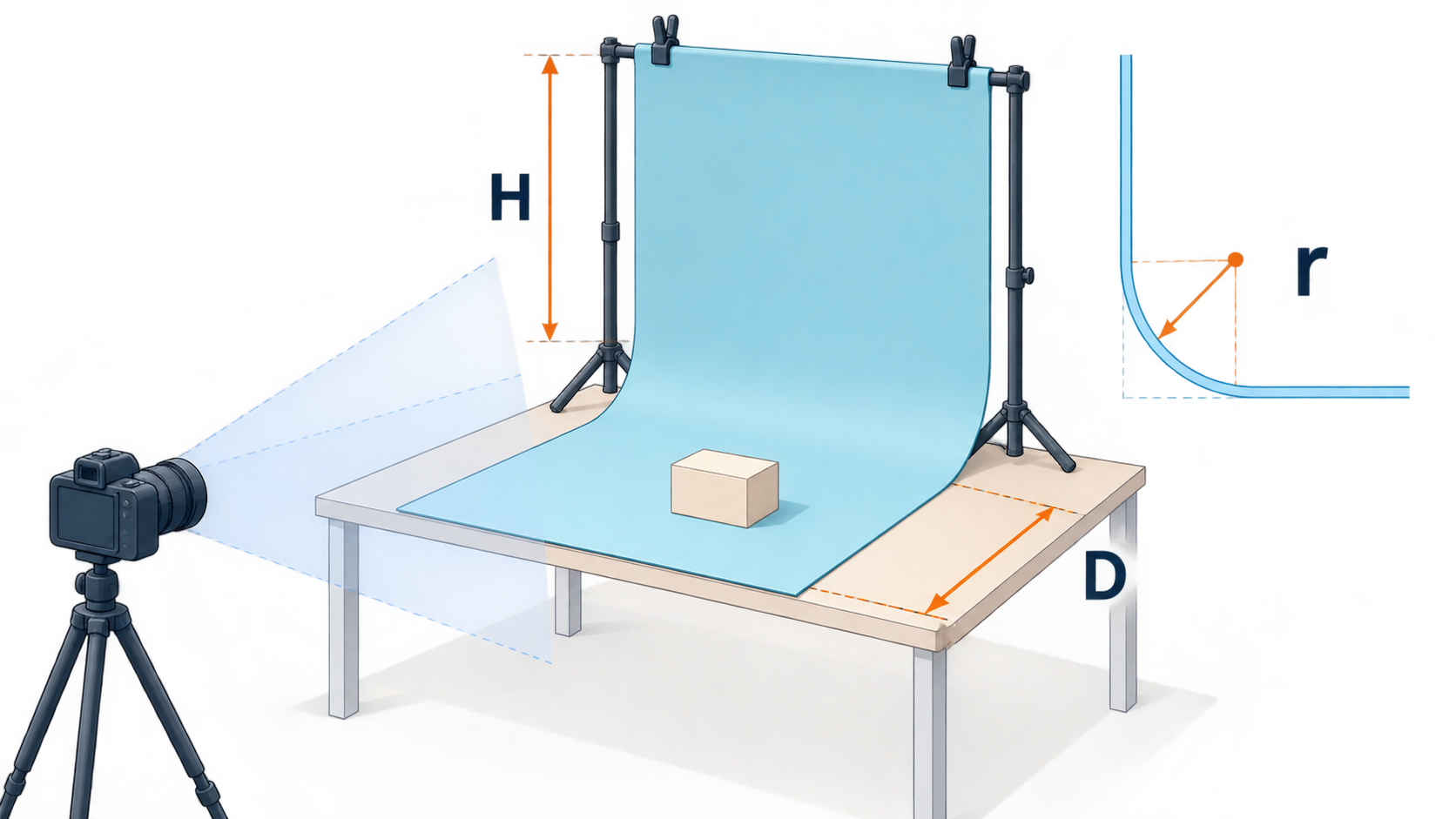
A backdrop can be wider than your product and still be too small for the photograph. An angled view may reveal a table edge, a clamp or the corner behind your setup. Before buying a product photography backdrop, put the camera where you expect to use it and check what needs covering.
For small products, matte paper is a useful starting point when you want a smooth sweep and expect a dry shoot. Fabric packs down more easily but needs wrinkle management. Rigid boards provide a flat surface for repeat setups, but they cannot curve into a sweep like paper. Each choice shifts work between setup, cleaning and storage.
Size the backdrop from the frame
Place your largest product on the table and choose your intended camera angle, composition and crop. Measure more than the product: include visible space on either side, behind it and across the foreground.
Use spare sheets to mark the coverage boundary while looking through the camera at your widest planned composition. Then allow additional material outside the frame for fastening. A backdrop's nominal width is not all usable picture area if clamps need to grip its edges.
The camera angle changes the requirement:
- Overhead: cover the tabletop area visible in the frame. An upright background may be unnecessary.
- Eye-level or low-angle: the rear background must extend above the product within the composition.
- Angled downward: allow for both tabletop depth and any rear background that remains visible. This is an easy combination to underestimate on a small desk.
For a multi-angle session, plan around the view most likely to expose an edge rather than repositioning the backdrop for every photograph.
Compare materials by the work they create
Squareshot's backdrop guide identifies durability, transport, reflectivity and creasing as selection factors. It also notes that some vinyl backdrops reflect light. Assess the actual finish, not just the material name.
| Material | Reflection and texture | Cleaning and joins | Small-space and budget trade-off |
|---|---|---|---|
| Matte paper | Useful for a low-texture background; check for bright patches under your lighting | Marks or creases may require a fresh section; a single curved sheet avoids a right-angle join | Allow for roll storage and replacement material, not just the initial purchase |
| Fabric | Weave may be visible; shiny fabric produces directional highlights | Washing depends on the fabric; inspect wrinkle shadows even after stretching | Packs down well, but arranging or ironing it adds preparation time |
| Matte rigid board | Provides a flat surface; coating and printed texture affect its appearance | Wipeability depends on the finish; two boards create a join | Convenient to reposition, but larger boards need flat storage; verify load support separately |
| Rollable vinyl | Do not assume it is reflection-free | Follow the maker's cleaning instructions; folds and curl can remain visible | Worth comparing for repeated cleanup, provided you have room to store it rolled |
With a limited budget, one surface that covers the frame is usually a more useful first purchase than several patterns that do not. For occasional dry-product work, consider paper. For frequent drips or marks, compare surfaces explicitly rated for wiping. If you cannot store a long roll, weigh fabric preparation time against board storage space. These are purchasing suggestions, not tested prices or lifespan claims.
A seamless sweep needs room for the curve
Paper folded sharply from wall to table creates a crease. A smooth transition replaces that corner with a curve. Keep the product on the supported, flat foreground—not on the unsupported bend. The backdrop is not a substitute for a load-bearing table.
For a planning estimate, model the side profile as a quarter-circle. Let H be the straight vertical section, r the bend radius, and D the straight horizontal section after the curve. The approximate unrolled length is:
L ≈ H + πr/2 + D
Add fastening and trimming allowances separately. This is a geometric approximation, not a standard backdrop specification: real material may not follow a circular curve, so verify it in the camera.
As a planning example only, H = 40 cm, r = 15 cm and D = 50 cm give an unrolled length of about 114 cm before allowances. The setup occupies roughly r + D = 65 cm of tabletop depth and H + r = 55 cm of height. Enough paper does not necessarily mean enough desk space.
If the setup does not fit, reconsider the framing, camera position or unnecessary foreground. Do not force the sheet into a permanent crease to save depth. If you use two boards instead, treat their join as a real feature to manage with framing and lighting—not something that will automatically disappear.
Read the problem before replacing the material
Take a diagnostic frame and inspect the product outline, label and background transition. Change one variable at a time so you can identify the cause.
A bright patch on the background: move the light or change its angle and see whether the patch moves. Consider another finish if you cannot light both product and background as needed. Reflective and transparent products can also show objects outside the frame; changing the backdrop alone may not solve that.
A heavy shadow behind the product: try increasing product-to-background distance or softening the light, then inspect the shadow's edge and position. If space prevents separation, decide whether the shadow works with the composition. Not every shadow is a defect.
Wrinkles or a visible join: changing light direction may make them less obvious without removing the physical unevenness. For a smooth catalog image, straighten the fabric, replace the damaged paper section or rebuild the setup first.
Background color spilling onto the product: a saturated surface can reflect colored light onto the subject. Try more separation or a neutral flag outside the frame to interrupt the reflection path, then compare the same area. Replacing the background later will not necessarily restore an already altered product color.
What to fix on set, and what to edit later
Reshoot when the label is out of focus, glare hides essential text, or the product edge disappears into the background. A background change cannot reliably recover information that was not captured clearly.
A visible join, isolated background marks or insufficient background coverage may be candidates for post-production while keeping the original file. Transparent edges, fine structures and contact shadows still need close inspection.
If you already have a photograph and want to work on its background, the InkRoom image editor accepts an existing image and an editing description. Specify the background change and identify details to inspect afterward, such as the label, outline and contact shadow. Available models and parameters depend on the current interface; subject fidelity, text accuracy and seamless transitions are not guaranteed.
The physical backdrop controls the surface and lighting conditions during capture. Editing addresses changes to an image you already have. Capture readable product detail and coherent lighting first, then decide whether background editing is useful.
Related articles and cases
- Product Photography Focus Stacking: When to Reshoot Instead of Using AI Sharpening
Capture overlapping focus coverage, align and blend real photographs, and use the source frames to decide whether a soft detail needs a mask adjustment or a reshoot.
- Product Image Alt Text: Examples for Main, Detail, and Lifestyle Photos
Write alt text around what each product image contributes. Compare original hypothetical examples for main photos, color variants, texture details, and lifestyle shots, then handle functional images, charts, and CMS entry correctly.
- How to Remove Glare from Glasses in Photos Without Changing the Eyes
Check whether the original eye detail is visible before choosing a reshoot, a local tonal adjustment, or careful retouching. Learn what to change on set and what to check before keeping an edit.
- Flat Lay Clothing Photography: Show Shape, Outfits, and Fabric Clearly
A practical guide for small apparel teams: plan product, outfit, and detail shots, then handle garment preparation, overhead alignment, lighting, crop space, and background edits without misrepresenting what is for sale.