Product Image Alt Text: Examples for Main, Detail, and Lifestyle Photos
Write alt text around what each product image contributes. Compare original hypothetical examples for main photos, color variants, texture details, and lifestyle shots, then handle functional images, charts, and CMS entry correctly.
·
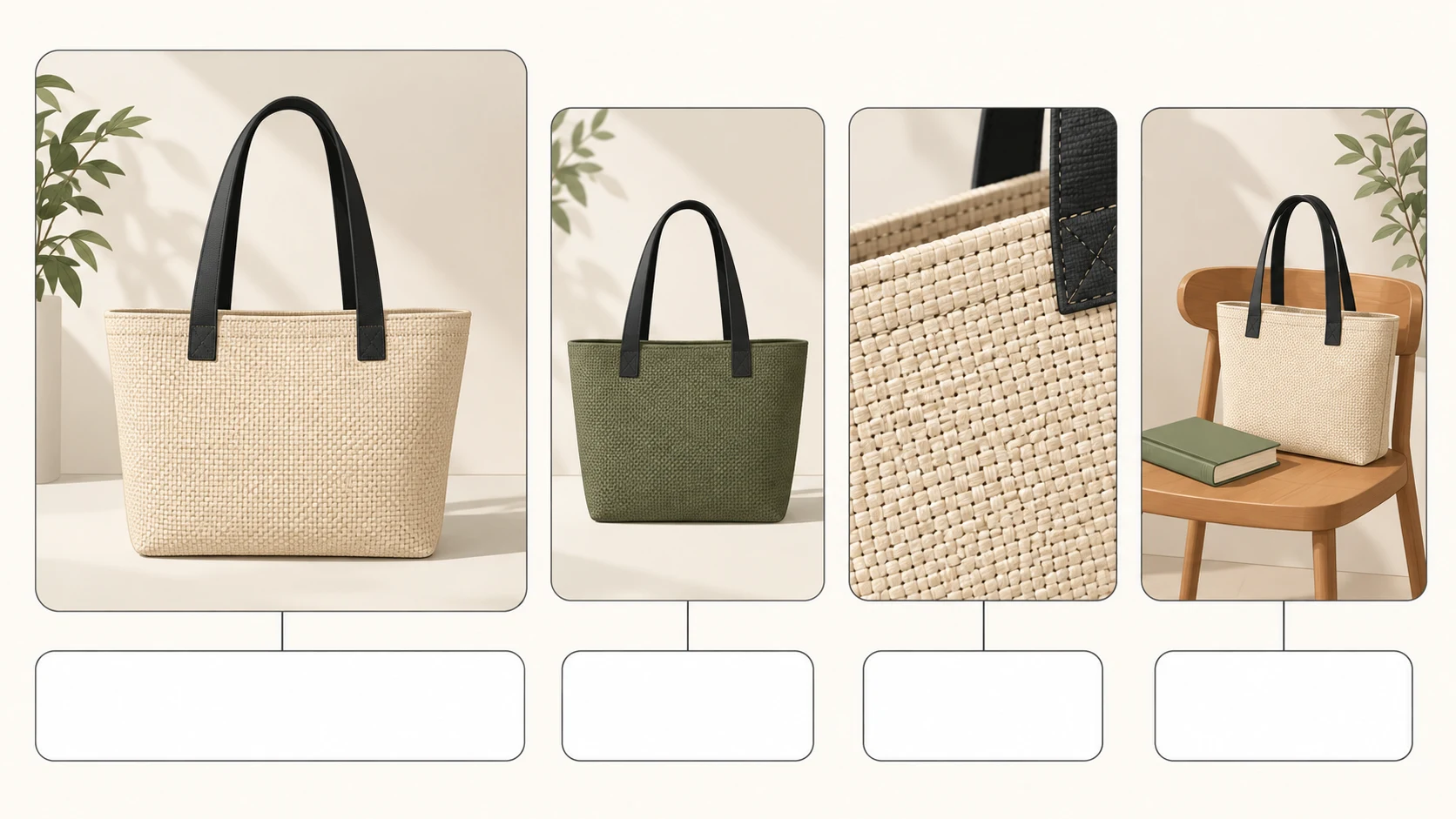
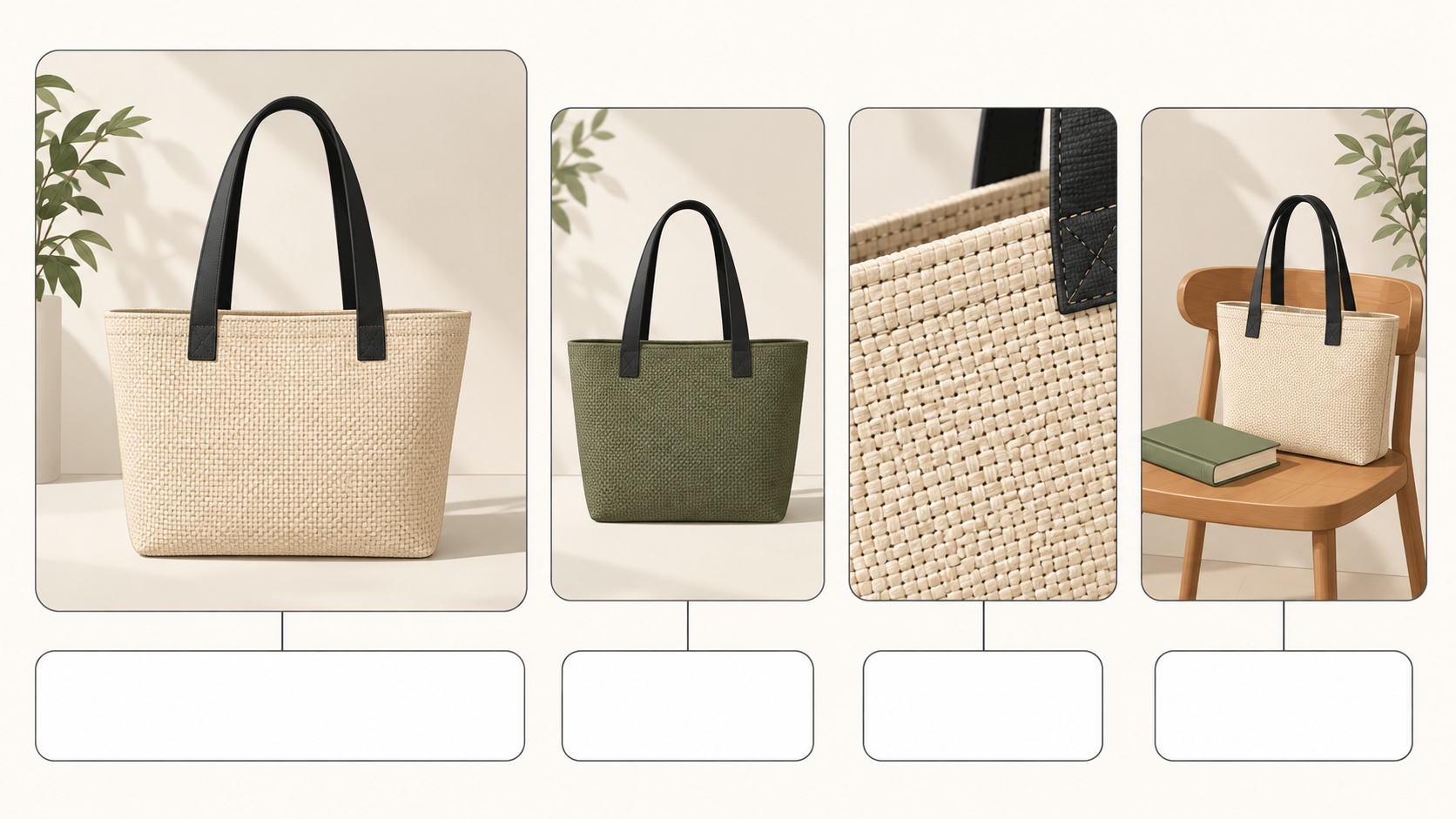
Four photos of one product do not need four copies of its product name. The main photo identifies the item. A color image distinguishes a variant. A close-up reveals construction. A lifestyle photo shows placement or use. Good product image alt text preserves those useful differences for someone who cannot see the images.
Alt text is a text alternative for an image on a webpage. Its job is to convey the image’s information or function in that location—not to hold the entire product description. Shopify’s guide to image alt text likewise emphasizes purpose and page context.
Give each gallery image a distinct job
Look at the gallery as a set. What would a shopper miss if this particular image were unavailable? That question helps you identify a useful difference instead of finding another adjective for the same product.
The following are original examples based on hypothetical image contents, not descriptions of supplied photos or a visual inspection. Use a suggested description only when your own image matches the stated conditions.
| Image and assumed visible content | Weak alt text | Better alt text | What changes |
|---|---|---|---|
| Main photo: front of a beige tote with two black handles | Best-selling premium everyday bag | Beige tote bag, front view, with two black handles | Identifies the item and visible features without promotional claims |
| Color variant: the same design in olive green | Tote bag shopping bag handbag carry bag | Olive-green tote bag with two black handles | Distinguishes the variant without a list of search terms |
| Detail: close-up of the weave and stitched edge | Durable pure-cotton tote detail | Close-up of the tote’s woven texture and stitching along the edge | Describes visible construction without guessing fiber content or durability |
| Lifestyle: tote on a chair with a book beside it | Extra-large bag perfect for every commute | Beige tote bag on a chair with a book beside it | Gives the spatial relationship without treating a prop as proof of capacity |
A main photo rarely needs every detail of the studio. A lifestyle description does not need an inventory of the room: keep details that explain the product’s placement, presentation, or use. If another photo adds only a different angle, identify the actual new view—such as the side, back, or opening. Do not invent a difference just to make the text unique.
Separate visible evidence from product knowledge
A canvas-like texture does not establish that a bag is pure cotton. A glossy surface does not establish that it is leather. For detail images, start with observable features: weave, seams, openings, contours, or surface patterns.
A verified material name from product records can help identify the item accurately, provided it belongs to the current SKU and matters to this image. Do not add waterproofing, load capacity, comfort, or durability claims merely because they appear in marketing copy. A static product photo usually cannot demonstrate those properties.
Color needs the same care. If the catalog label says “sand” but the image shows the green variant, resolve the image-to-SKU mismatch rather than copying the label. For generated or edited images, describe the final published image, but remember that accurate alt text cannot fix a picture that misrepresents the actual product.
Use the length needed to communicate the relevant information. There is no character count every description must fill. A CMS field limit is a technical constraint, not a writing target. Include a product type, color, or model when it genuinely identifies the image; leave out unrelated keywords and claims such as “cheapest” or “best.” Accurate descriptions help communicate image meaning, but do not guarantee indexing or rankings.
When a product description is the wrong alternative
Charts and infographics need access to the complete information. For an image containing several rows of measurements, “size chart” alone is not enough, and squeezing every value into one long alt attribute is not a useful substitute for an accessible table. You could write “Tote bag measurement diagram; full dimensions in the table below,” then actually provide that table with all values, labels, and units. Include any notes or limitations that appear only in the image in the text version too.
Functional images need an action or destination. If an image is the only content of a link, identify its destination—for example, “View the olive-green tote bag.” An image control that advances the gallery needs a name such as “View next product image,” not just a description of an arrow. If an image and visible text are inside the same link or button, and the text already names the action, check the accessible name of the whole control to avoid repetition.
Decorative images should be deliberately skipped. An image that conveys no product information and performs no action can use an empty attribute: alt="". Empty is different from missing: a missing attribute does not explicitly tell assistive technology that the image can be skipped. A large gallery is not a reason to classify useful angles or close-ups as decoration.
These distinctions are also explained in Shopify’s discussion of descriptive, functional, and empty alt text. The appropriate alternative can change when the same image takes on a different role elsewhere.
Match the text to the right image in your CMS
After exporting and uploading the product images, open the relevant media details or alternative-text field in your own CMS. Labels vary by platform. Do not assume a filename, visible caption, and alt text are interchangeable fields.
For a gallery update, a small working record can help: media ID or filename, SKU, gallery position, and proposed description. This is an editorial aid, not an extra section for customers. It helps prevent the green variant’s description from being assigned to the beige image. After reordering a gallery, verify by media identity rather than position alone.
Save the changes and open the actual product page. Switch variants and move through the gallery to check that each description belongs to the image currently displayed. If needed, inspect the rendered alt attribute. Does a blank field produce an empty attribute, no attribute, or text automatically inserted by the theme? A correct entry in the admin does not prove every front-end placement uses it correctly.
Finally, read the nearby heading, link text, and image alternative together, and use a screen reader where available. The page should let a shopper identify the product, understand meaningful image differences, and predict what controls do—without repeatedly hearing the entire product title. The goal is a useful alternative in the published page, not simply a collection of completed fields.
Related articles and cases
- Product Photography Focus Stacking: When to Reshoot Instead of Using AI Sharpening
Capture overlapping focus coverage, align and blend real photographs, and use the source frames to decide whether a soft detail needs a mask adjustment or a reshoot.
- How to Choose a Product Photography Backdrop for a Small Space
Choose paper, fabric or boards by the area your camera actually sees—not just the size of the product. Compare maintenance and storage, plan a seamless sweep, and identify problems that need a lighting change or a reshoot.
- How to Remove Glare from Glasses in Photos Without Changing the Eyes
Check whether the original eye detail is visible before choosing a reshoot, a local tonal adjustment, or careful retouching. Learn what to change on set and what to check before keeping an edit.
- Flat Lay Clothing Photography: Show Shape, Outfits, and Fabric Clearly
A practical guide for small apparel teams: plan product, outfit, and detail shots, then handle garment preparation, overhead alignment, lighting, crop space, and background edits without misrepresenting what is for sale.