AI Tattoo Design Generator: Turn an Idea Into an Artist Brief
Use AI to make your tattoo idea easier to discuss, not to declare it ready to tattoo. A hypothetical brief shows how to describe placement, size, and line preferences, then review the concept with a professional tattoo artist.
·
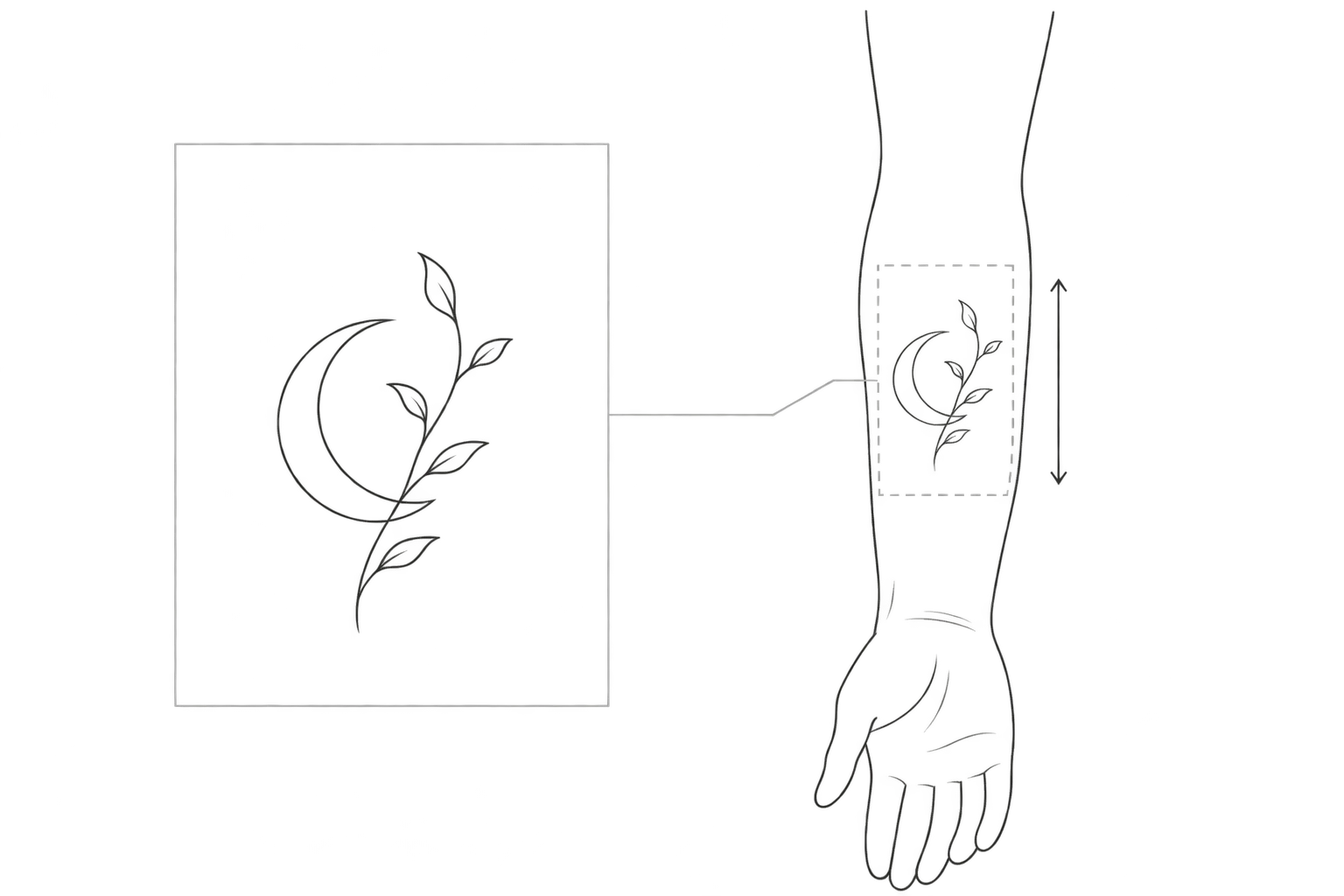
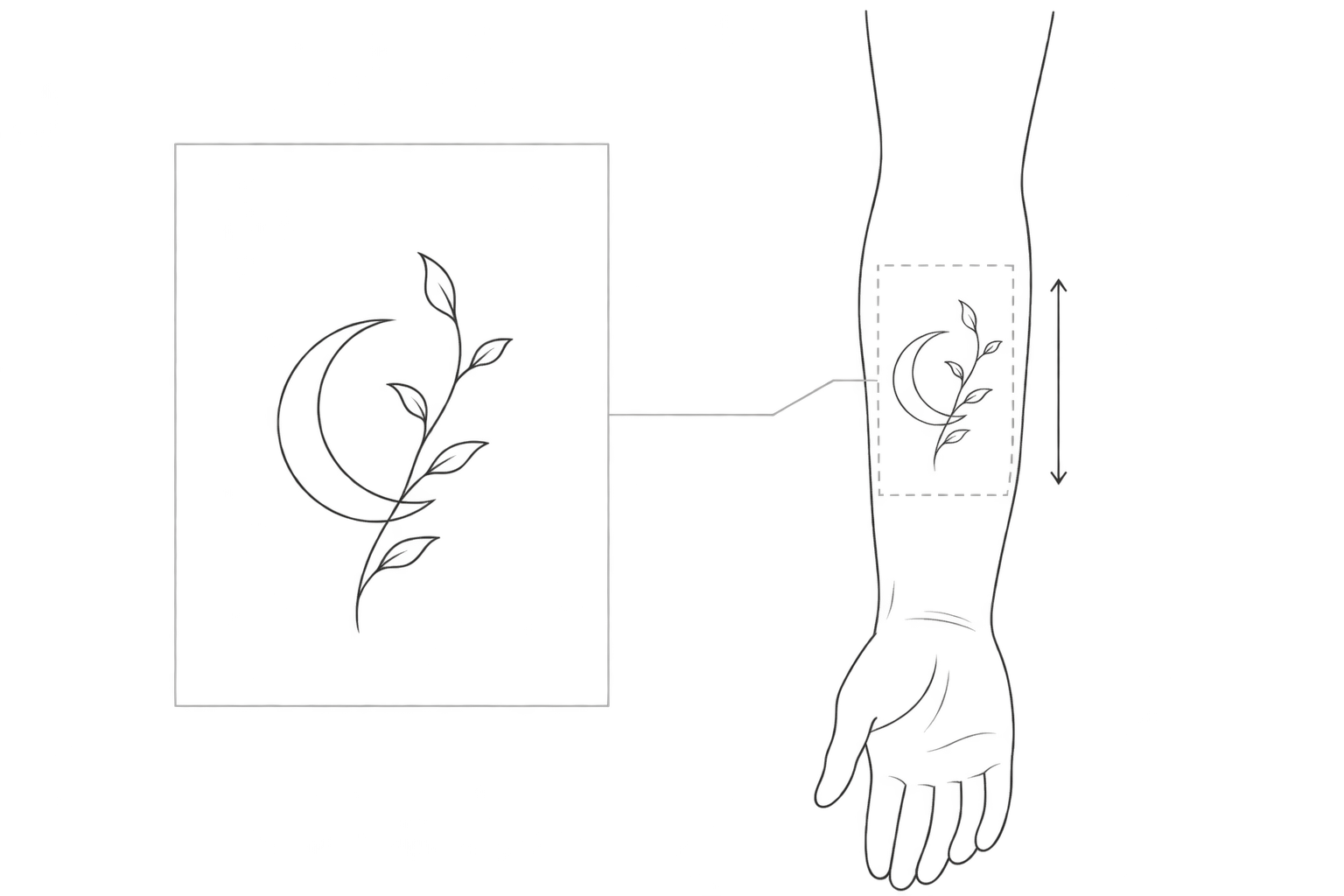
A tattoo image can feel right without being ready to tattoo. The most useful role for an AI tattoo design generator is to help you show an artist what matters, what can change, and what still needs their judgment.
The TattoosAI page supplied for this article asks users to describe their idea as part of the generation process. That is a starting point for exploration, not a substitute for a design consultation. The approach below is a suggested communication method, illustrated with a hypothetical brief—not a tool test or a completed client project.
What must survive the redesign?
“Moon, botanical, minimalist” names a subject and a style. It does not tell an artist which part carries the meaning. If the moon represents an important experience, it may be essential; the plant species might be negotiable. Making that distinction is more useful than adding more style adjectives.
Here is a hypothetical brief. The measurement demonstrates how to express a preference; it is not a recommended tattoo size.
| Brief item | Example preference | Question for the artist |
|---|---|---|
| Central idea | A crescent moon with one botanical sprig; keep the moon | How can the elements work together without obscuring each other? |
| Placement and orientation | Inner forearm, lengthwise; the moon visible when I raise my arm | Where should it sit, and which way should it face? |
| Intended size | About 8 cm tall; width undecided | What detail should be removed within that space? |
| Line and color preferences | Black lines; a clearer outer contour than leaf veins | Does that line hierarchy suit the placement and size? |
| Flexible and excluded elements | Leaf count can change; no lettering, shading, or background | Should the concept be simplified or redrawn? |
If size is undecided, say so. Do not let the detail in a generated image decide the final dimensions for you. You also do not need to prescribe needle groupings or technical line measurements: describe what you want people to notice first.
Make a concept that is easy to discuss
Start with an isolated design on a plain background rather than a photorealistic image of a finished tattoo. For the hypothetical brief above, a prompt could read:
> Tattoo concept sketch for discussion with a professional tattoo artist, not a tattoo-ready drawing. A crescent moon and one botanical sprig in a vertical composition, intended for the inner forearm, provisionally about 8 cm tall. Make the moon the focal point and the plant secondary. Black lines, clear main contour, fewer tiny leaf veins, open negative space. White background, isolated design, no skin, lettering, shading, or decorative frame. Placement and final dimensions require the artist’s review.
These are instructions to the generator, not a guarantee that it will follow the dimensions or exclusions. Any measurement printed in the output needs separate verification; it is not proof of scale.
To turn the brief into a new image, you can enter it in InkRoom’s image-generation interface and select a currently configured model. Availability, parameters, and fees depend on the current interface and account configuration. This is an entry point for a discussion draft, not a claim of tattoo-specific production tools or virtual body try-on.
Keep a concept that communicates the idea, then make the next request specific: “Keep the moon’s position, reduce the leaf count, and leave more space between the plant and the moon.” As a working method, focus each revision on one issue so that the trade-off stays visible.
Use a placement diagram to ask spatial questions
On a simple arm outline, mark the intended area, an orientation arrow, and the proposed dimensions. Put the concept beside it or make a clearly labeled illustrative overlay. Label it “placement illustration—not a real try-on.” This can be done manually; it should not be presented as a built-in generator feature.
First discuss where the focal point sits and which way it faces. Then view or print the draft at the intended physical size to discuss whether the silhouette is readable and the details feel crowded. Unless display or print scale has been calibrated, treat that view as approximate rather than a precise size check.
An outline cannot reproduce skin curvature, movement, or a healed result. A pleasing arrangement on a diagram does not establish suitability for tattooing. The artist needs to assess the layout and detail on the actual placement.
Give the artist intent, not an instruction to copy
Bring the selected concept, the original brief, and a placement illustration noting what must stay and what may change. Comments attached to specific areas are more useful than “make it more premium.”
Ask the artist to review composition, readability at the intended size, detail density, line hierarchy, and technical suitability—and leave room for a redraw. If the idea involves existing artwork, characters, lettering, or cultural symbols, disclose the references and intended meaning so that substitutions or further checks can be discussed. AI generation does not establish originality or resolve rights questions.
Uncertainty belongs in the consultation materials, not hidden behind a polished rendering. For a permanent tattoo, a draft that makes your priorities clear is more useful than an image that merely looks finished.
Related articles and cases
- AI Pixel Art Generator: From Style References to a Consistent Grid
A retro-looking image is not automatically a usable sprite. Define the intended use, logical grid, and limited palette, then explore silhouettes and check scaling, transparency, and frame consistency before delivery.
- AI Logo Generator: From Brand Brief to a Usable Mark
Turn a brand brief into comparable logo concepts, then review actual-size legibility, monochrome use, backgrounds, spelling, rights, and delivery files before adopting a design.
- AI Wedding Invitation Generator: Layout, Names, Dates, and Print Delivery
Turn a wedding brief into an invitation visual without treating the generated image as a finished invitation. Plan text hierarchy, verify event details, and prepare digital and print versions separately.
- How to Choose an AI Image Editing API: Inputs, Masks, Async Results and Cost
Evaluate an image editing API against delivery requirements, not just sample images. A developer-focused method for checking input contracts, recovering uncertain requests, testing preservation and reconciling actual costs.