AI Product Image Editor: Change the Scene, Not the SKU
Define what may change in an existing product photo, write a bounded editing prompt, and verify the result against SKU records and physical references. Judge efficiency by approved images and review time—not generation volume.
·
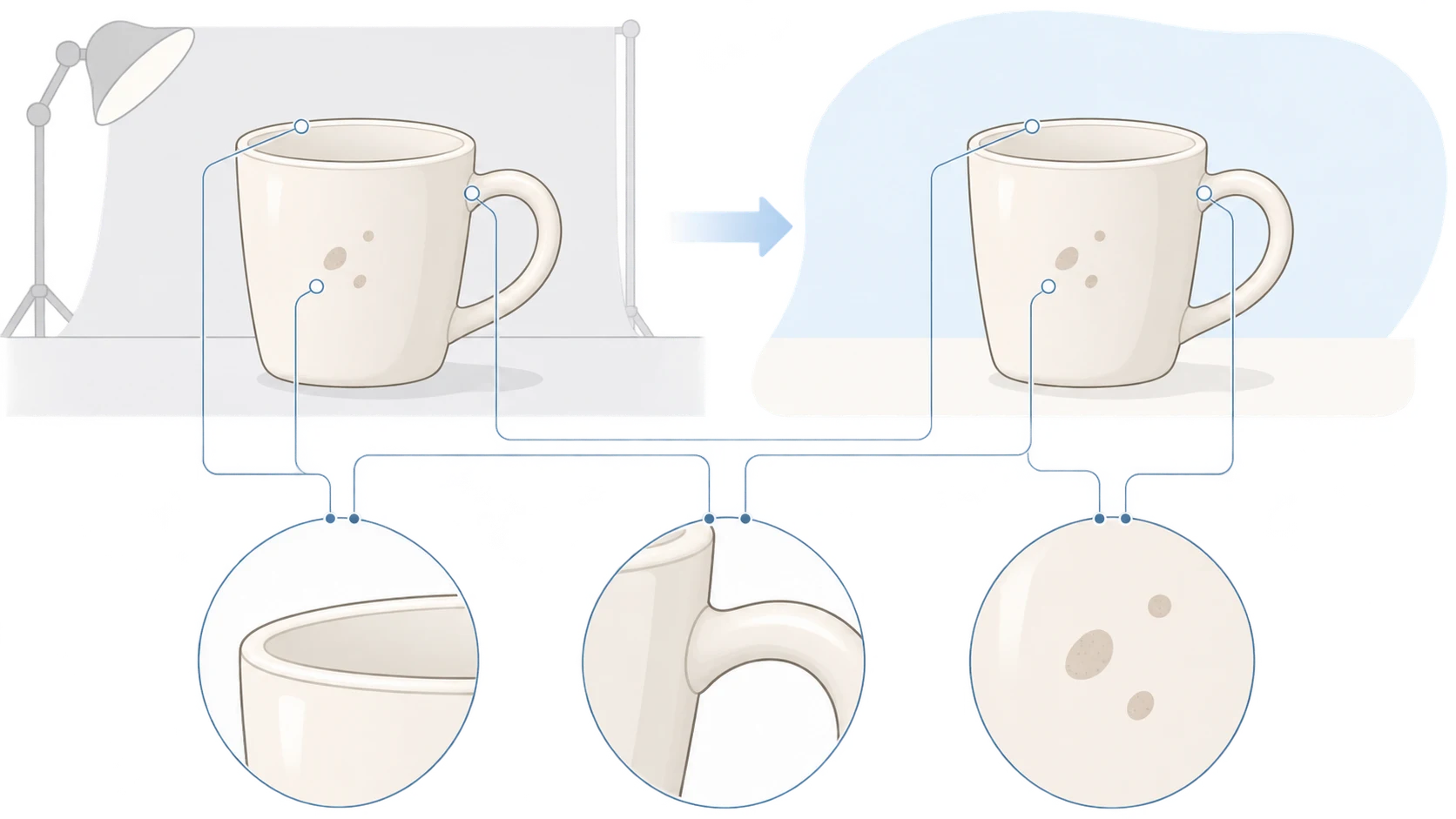
A cleaner background can make a product photo look ready for a listing. A changed cap, invented capacity label, or smoothed-away fabric weave can make it show something other than the product being sold. When choosing an AI product image editor, the useful question is not just how many scenes it can create. It is which changes you can verify without losing the identity of the SKU.
This guide concerns editing an existing photograph, not designing a product from scratch. Treat each output intended for sales use as a draft requiring review. If it only communicates a visual direction, label it as a concept rather than presenting it as a photograph or a verified product representation.
Different edits need different boundaries
WizCommerce’s product photography roundup includes fine detail and catalog consistency among its selection criteria. Those are relevant concerns, but a tool comparison cannot establish the accuracy of your particular SKU. The boundaries below are editorial recommendations, not tested performance claims.
| Edit | Reasonable scope to request | Boundary to verify |
|---|---|---|
| Background and composition | Replace the setting, adjust negative space or placement | Keep necessary product information visible; inspect outlines, contact shadows, and transparent areas |
| Product color | Make a review draft supported by records for the target SKU | A recolored image is not proof of a real color variant; compare it with the item or a reliable color reference |
| Props | Add or remove scenery that is not part of the product | Do not imply that excluded accessories come with the purchase or hide important construction |
| Packaging text and logos | Preserve legible originals; use approved assets for controlled corrections where needed | Do not ask the model to invent capacity, model numbers, ingredients, or marks |
“Background only” is a request, not an assurance that the product will remain unchanged. Reflective edges and transparent containers deserve particular attention because their appearance includes the surrounding scene. Likewise, newly crisp lettering is not evidence that previously unreadable text has been recovered correctly.
Write an editing brief, not just a visual mood
“Premium product photography” says little about what must stay accurate. List protected product features before describing the desired change. Adapt this template to the actual image; it states your intention, not a guarantee of compliance.
> Input: This existing photo shows SKU [identifier] and is intended for [product listing / contextual scene / concept proposal].
> Preserve: Product outline, proportions, part count, [verified color], logo, packaging text, patterns, and surface texture.
> Change only: [background / negative space / specified prop], aiming for [specific setting and composition].
> Do not add: Accessories not included with the purchase, extra marks, unverified text, or new product structures.
> This pass: Make [one defined change]. Leave everything else as in the source. Do not invent unreadable packaging text.
For a ceramic mug, that might mean requesting a pale background while preserving the rim ellipse, handle attachment points, glaze speckles, and existing mark. Changing the setting, glaze color, lid, and logo in the same pass makes it harder to identify the source of a mismatch.
With an existing image, you can submit the photo and a specific editing description through the InkRoom image editor. Check the current interface for available models and parameters. The entry accepts an existing image and editing instructions; it does not guarantee subject fidelity, accurate text, or seamless expansion. Review one sample before commissioning further images. A successful submission is not an accuracy check.
Compare the sample with evidence, not memory
Keep the original, edited output, SKU records, and physical references together. The original reveals changes introduced during editing. Product records establish the model, specifications, and included items. The physical product and a color reference help assess color and surface appearance. These references serve different purposes; none completely substitutes for the others.
Start with identity: the intended color variant, proportions, number of components, logo, and model number. Then inspect packaging details such as capacity, units, and warning text at a useful magnification. Check whether texture has become a different-looking material. Finally, examine the whole composition for props that imply a bundle or obscure important features.
Color references also have limits. A biased source photo, different lighting, or a different display can affect the comparison. Placing a photo of a color card next to an output does not establish calibrated color accuracy. Where color is material to the sale, compare with the physical item under consistent, controlled viewing conditions. An unresolved result should not be used as evidence of an exact shade.
Handle failures according to what is wrong. An “AI-generated” label does not make an incorrect capacity claim acceptable: correct the information, use reliable source assets, or discard the image. For an unproduced color idea or proposed display scene, a label such as “AI concept illustration—not a product photograph; color and details subject to the physical product” can distinguish the proposal from verified sales assets. Keep those asset groups separate. Concept labeling does not replace checking the accuracy of sales content.
Measure usable output before scaling
One approved sample establishes only that this sample passed review. It does not establish that later outputs will be consistent. Start with a defined task—such as replacing backgrounds for one SKU—and record the input version, prompt, and actual model and parameters used. Review the next small group before expanding. Do not generalize a background-edit result to recoloring or packaging-text work.
Use consistent accounting:
- Approval rate: approved images divided by reviewed outputs. Generation charges from all attempts still belong in the cost total.
- Cost per usable image: actual tool charges plus human review and rework costs, divided by approved images.
- Human time per usable image: preparation, review, and rework time divided by approved images. Record generation waiting time separately if it affects delivery.
These are suggested measurement methods, not results from a test. With no approved images, cost per usable image is undefined; retain the incurred spending and time instead. Missing invoices or time records remain unknown, not zero. Compare with an existing editing process only when intended use, output specifications, and approval standards are equivalent.
The workflow worth expanding is not simply the one that produces the most files. It is the one that delivers accurate, usable product images with a review burden your team can sustain.
Related articles and cases
- AI Ad Creative Generator: Make Room for the Product and the Message
Plan an ad background around real copy, keep product and offer details accurate, and adapt the composition rather than simply resizing the finished image.
- AI Image Generator for Ecommerce: A Workflow for Product, Lifestyle, and Marketing Images
Decide what each image must prove before choosing generation or editing. Separate real product evidence from creative concepts, review every deliverable, and compare costs using usable images rather than generation counts.
- AI Product Background Generator: From Real Photos to Usable Scenes
A better background is only useful if the product still represents what you sell. Choose between white-background and lifestyle images, describe the edit, and compare product details before using the result.
- Hand Model Product Photography: Natural Grips, Credible Contact
Plan small-product shots around visible details, believable support and useful scale cues. Learn what to check in a real photograph or an AI composition sketch without treating either a hand or a generated image as measurement evidence.