AI Hairstyle Changer: Compare the Hair Without Changing the Person
Prepare a clear portrait, describe the cut precisely, and compare hairstyle candidates without overlooking changes to your face. Includes a proposed comparison table and checks for hairlines, ears, edges, and lighting—not a tool test or a haircut guarantee.
·
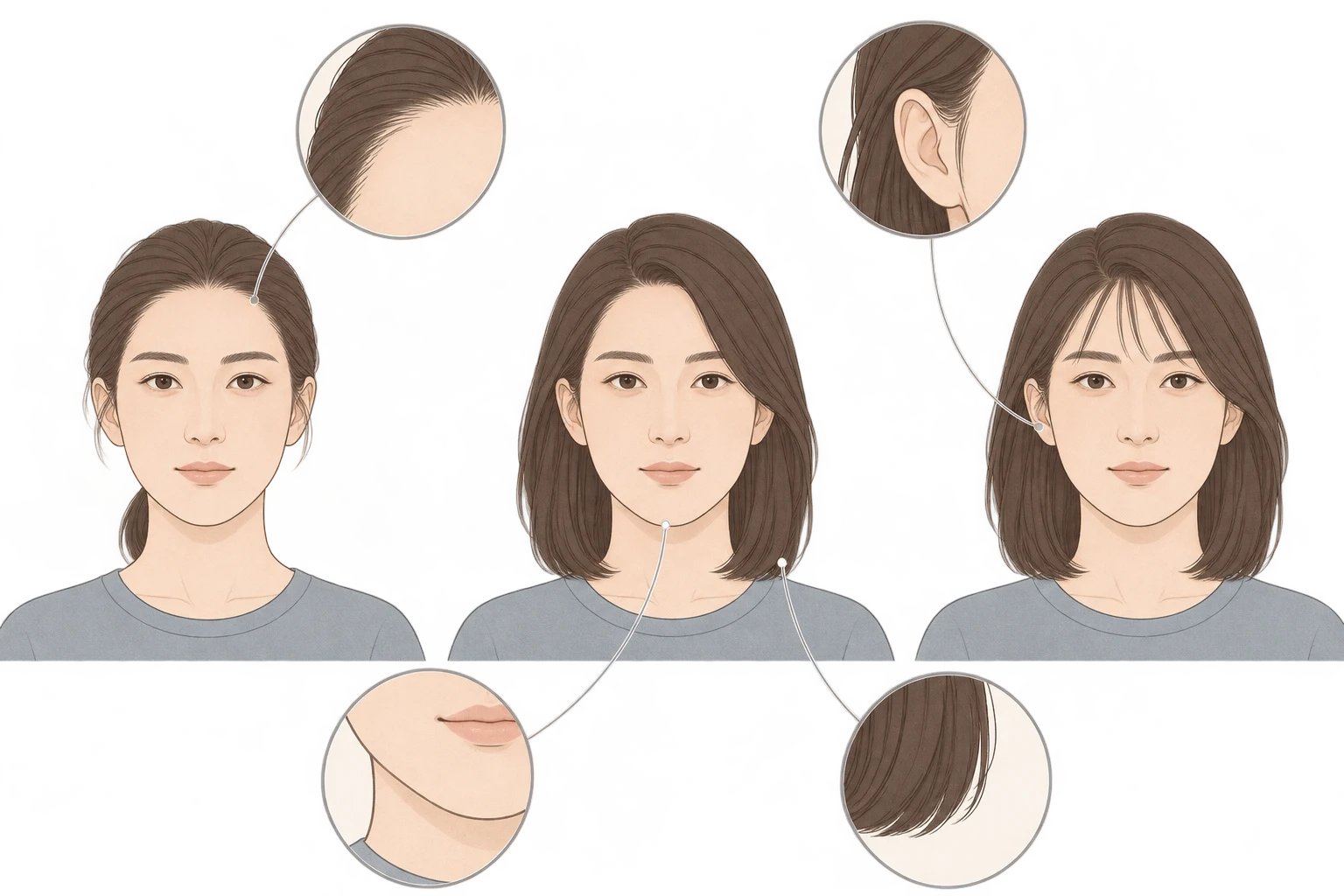
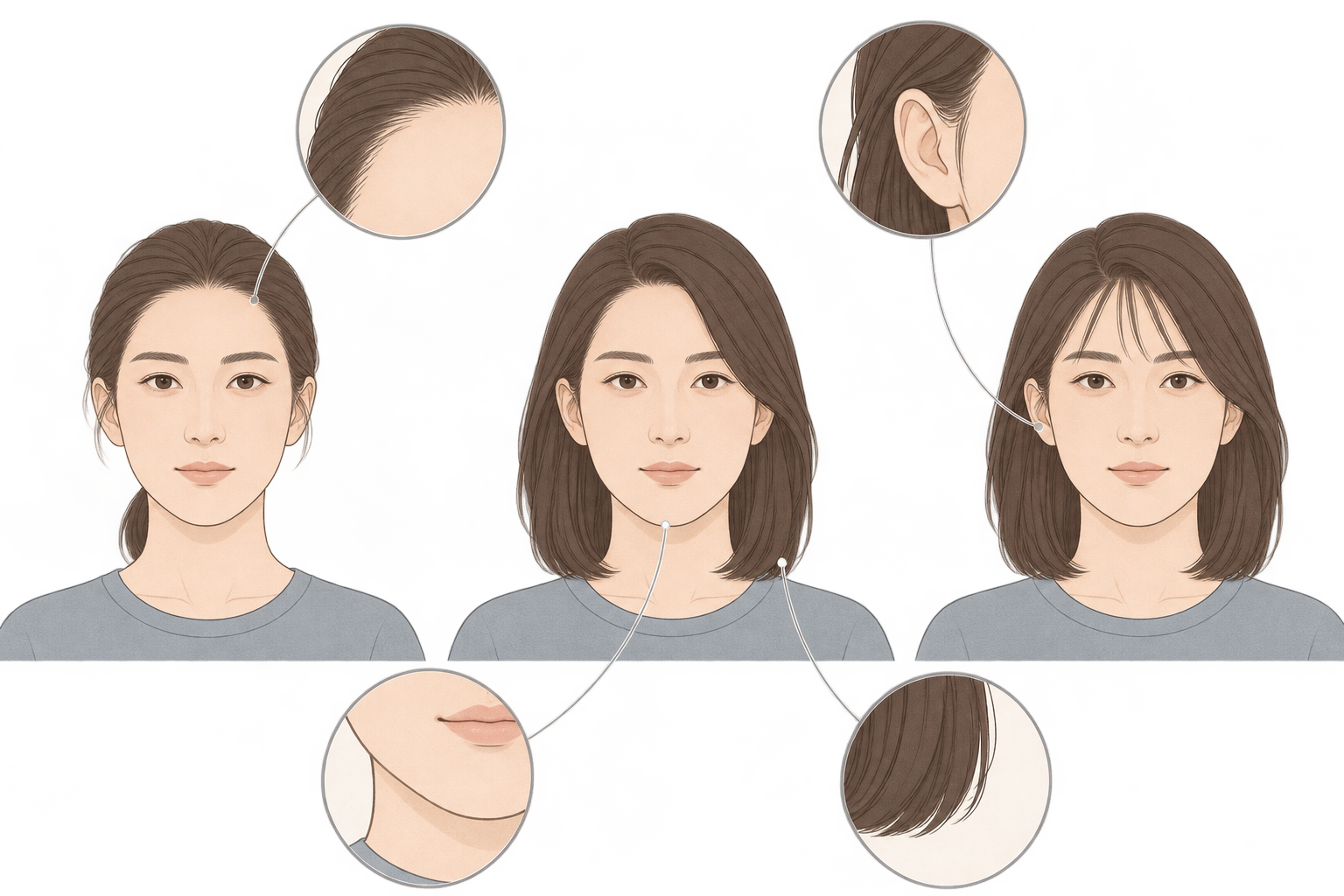
A new hairstyle preview can look flattering because the fringe works—or because the image has narrowed your jaw and smoothed your skin. Before choosing your favorite result from an ai hairstyle changer, check that you are comparing hair on the same person.
A virtual preview can turn “something shorter” into a discussion about length, outline, and bangs. It cannot guarantee what a real haircut will look like. The approach below is a suggested comparison method, not a report of tested tool performance.
Describe the hair you want, not the entire reference portrait
Your original photo and a hairstyle reference have different jobs. The original anchors your visible features. The reference explains the hair shape; its subject's face, makeup, and studio lighting are not necessarily part of your goal.
HeadshotMaster's hairstyle changer page starts with a clear selfie and discusses using another photo as a hairstyle reference. That helps establish the reader's task. It does not establish that another editor accepts reference images or that its previews are accurate.
Choose an evenly lit photo without an obvious beauty filter, with your face and the top of your head in frame. Keep the hairline and areas around the ears visible where possible. If bangs already cover your forehead, a newly exposed boundary in a generated image is not evidence of your actual hairline. A front-facing photo helps compare the outline, but it cannot establish the shape at the back or the layering in profile.
Extract the details you actually want from a reference:
- Length: where the ends should sit—near the chin, shoulders, or collarbone.
- Bangs and parting: brows visible or covered, center or side part, longer pieces at the sides.
- Curl and volume: inward-turning ends, loose waves, or more height at the crown.
- Features to preserve: facial proportions, feature positions, expression, skin tone, and camera angle are not editing targets.
Preservation instructions express your intent. They are not a guarantee that an editor will follow them.
For example, adapt this brief to your own goal:
> Edit only the hair in this original photo. Aim for collarbone-length hair, retain the side part, and add a slight inward bend at the ends. Do not intentionally change facial features, face shape, expression, skin tone, clothing, or background. Keep the original lighting as closely as possible. If the forehead is covered, do not treat a newly generated boundary as my real hairline.
If you plan to use InkRoom, open the image editing entry and check whether the current interface supports your photo and requested edit. This is not a promise of a dedicated hairstyle library, reference-image upload, prefilled settings, or facial fidelity. If the required operation is unavailable, do not treat a general entry as a dedicated hairstyle tool.
Keep the comparison about one decision
To compare bangs, try to keep length, color, and camera angle fixed. If a candidate also adds blonde hair, heavier makeup, and a narrower chin, you cannot tell which change made it more appealing.
This is a proposed candidate plan, not generated results or a scorecard. Use the same original photo throughout. If a supposedly fixed feature changes, record that rather than assuming the instruction worked.
| Candidate | Planned change | Keep as consistent as possible | Question it helps answer |
|---|---|---|---|
| A: length | Move the ends to around the collarbone | Original part, color, and curl | Do I like the outline at this length? |
| B: bangs | Add light bangs at A's target length | Length, color, and side volume | Do I prefer an open or partly covered forehead? |
| C: wave | Add loose waves at A's target length | Length, part, and color | Do I want more bend, or more overall volume? |
You do not need all three. If length is your only question, compare the original with A before adding unrelated changes.
Check the places where hair meets the person
Place the original and candidate side by side with the face displayed at a similar size. First compare the eyes, nose, mouth, jaw, and expression. If the face has changed substantially, set that candidate aside before judging whether the cut suits you.
Then inspect the boundaries:
- Hairline and temples: has the visible boundary moved forward or backward? Covered areas remain unknown, not newly verified anatomy.
- Around the ears: look for duplicated or erased ears and earrings, or hair fused into them. Intentionally covering an ear is different from contradicting its visible structure.
- Hair edges: check for halos, jagged outlines, repeated texture, or implausible breaks against the background.
- Face outline: hair can hide part of a cheek and change its apparent shape. If the visible jaw or cheekbone itself changes, the difference is not just the hairstyle.
- Lighting: do highlights in the hair agree with the light on the face? Does the shadow under the bangs make sense for the new shape?
A small view helps you judge the overall silhouette; a larger view helps you inspect boundaries. Do not expect one display size to answer both questions.
Take a preference to the salon, not a promise
Show your stylist the original alongside the closest candidate. Identify what you like: the collarbone length, the amount of forehead showing, or the narrower outline at the sides. Ask what is feasible given your actual density, texture, natural curl, growth direction, and styling routine.
Apparent volume in a photo is not a measurement of hair density. A front view also leaves the sides and back unresolved. Point out any generated defects rather than asking the stylist to reproduce them. Before uploading, review the service's handling and deletion information for portrait photos, and do not upload someone else's image without permission.
Related articles and cases
- AI anime art generator: brief a character and scene you can actually review
Build a single-image anime brief around stable character traits, a readable action, and a specific scene. Then review clothing, hands, props, and storytelling without mistaking a concept image for a reusable character asset.
- AI Food Image Generator: Keep Menu Images True to the Dish
Build a generation brief from the food you actually serve, separate plating concepts from fixed dish facts, and review ingredients, portions and presentation before a menu image goes live.
- AI Pose Changer: Check Identity and Clothing After a Pose Edit
A convincing new pose is only part of the job. Describe the movement precisely, distinguish clothing details from changing folds, and compare hands, joints, and newly exposed areas with the original.
- AI Professional Headshot Generator: Keep the Portrait Recognizably You
Learn how to prepare selfie references, describe a professional setting, and compare generated headshots without overlooking identity changes. Includes guidance on glasses, skin texture, cropping, and identity-document restrictions.