AI Diagram Generator: From Source Notes to Verifiable Structure
Turn source material into nodes, relationships, and traceable references before generating a diagram. A clearly fictional example shows how to preserve unknowns, review branches, and choose an editable handoff or an API workflow.
·
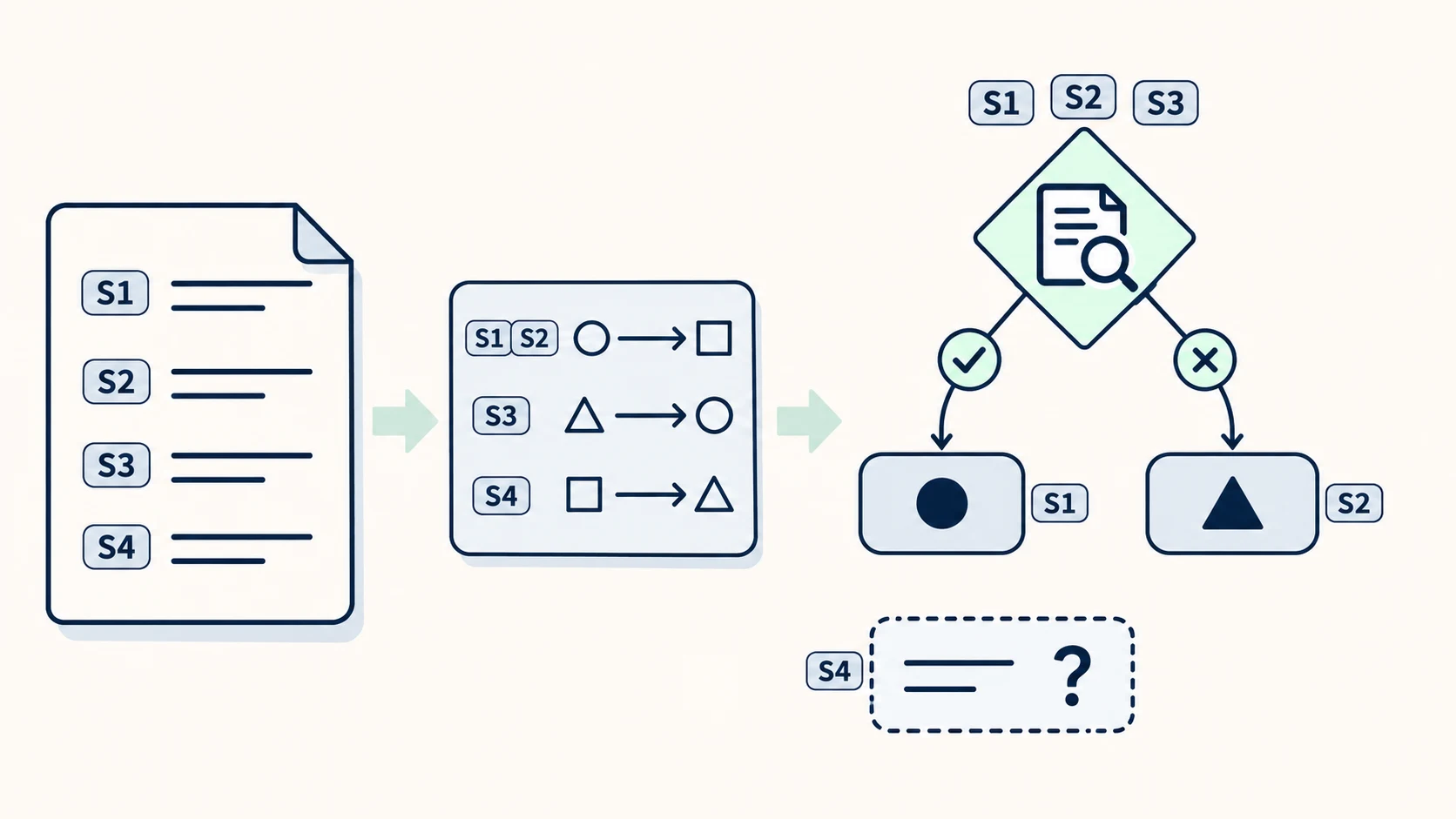
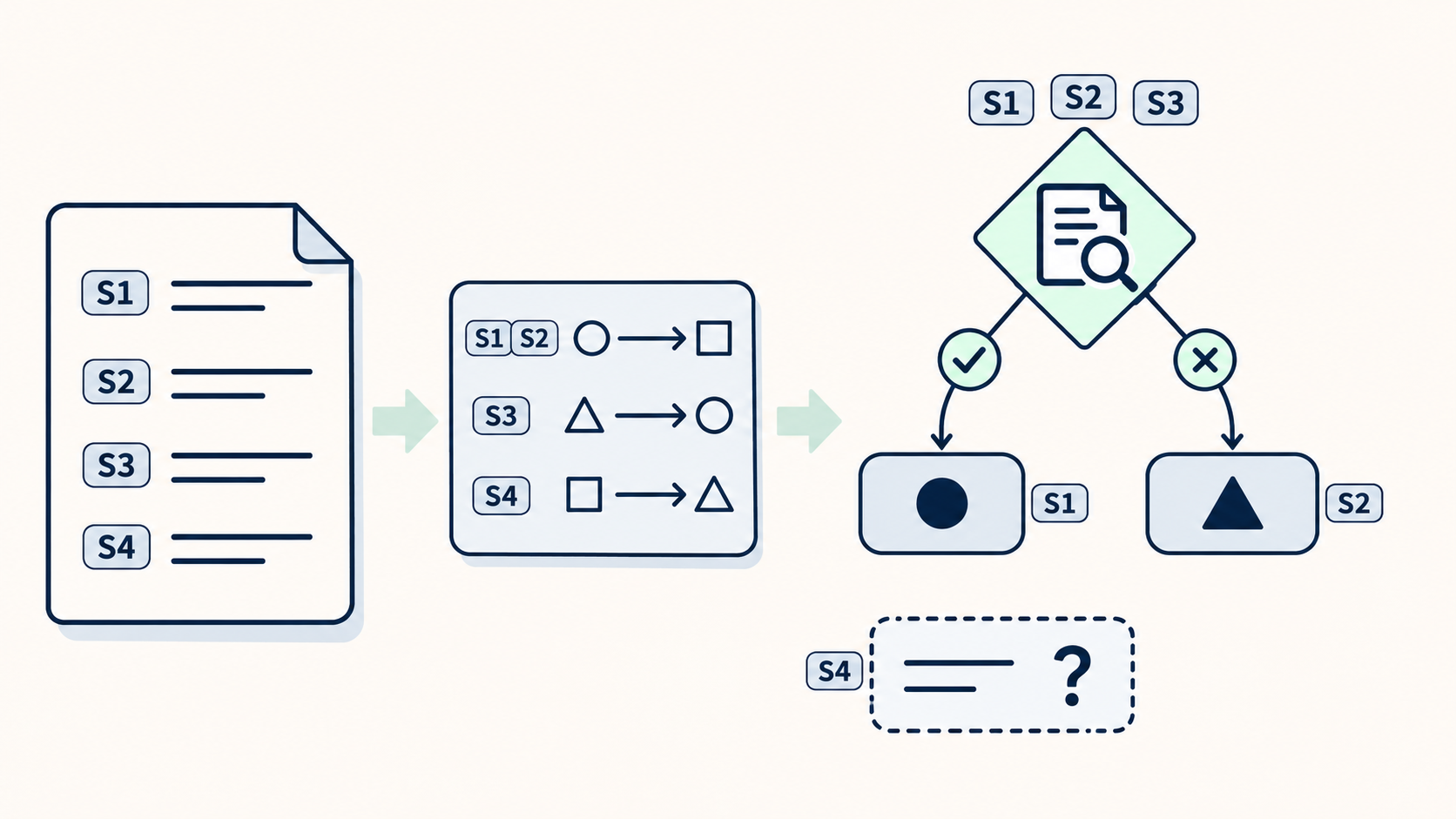
Give an ai diagram generator a set of meeting notes, and you may get a complete-looking flowchart. The harder question is whether every arrow can be traced back to something those notes actually say.
A useful starting point is to separate established facts from unresolved questions. AI can help arrange a diagram; it should not silently supply missing business rules.
Keep what the source leaves unresolved
Consider this fictional note, created to explain the method—not a real business process or a tested input:
> S1: A reviewer checks the request. S2: Approved requests go to the fulfillment team. S3: Rejected requests return to the applicant. S4: Incomplete requests are marked as awaiting information; the note does not say where they go after that information arrives.
There is no answer here to “What happens after the missing information arrives?” An automatic arrow from “Awaiting information” back to “Review” would introduce a rule, even if it sounds sensible.
Before asking for a complete diagram, prepare a relationship draft:
| Source location | Supported relationship | Boundary to preserve |
|---|---|---|
| S1–S2 | Review → fulfillment team, if approved | Do not invent fulfillment steps |
| S1, S3 | Review → applicant, if rejected | Do not infer what happens after return |
| S4 | Incomplete information → awaiting information | The next step is unspecified |
S1–S4 are simply sentence locators for this example. In real work, use a document link with a section, paragraph, or another reliable locator. Stable node IDs also help preserve the mapping when labels change.
The reference article recommends listing steps, actors, or components before generation and checking for invented connections. The relationship draft above is this article’s proposed way to put that advice into practice: record not only what exists, but why a connection is justified.
Ask for a draft that can leave gaps
With the relationships prepared, a prompt can specify constraints rather than merely a visual style:
> Create a flowchart draft using only the material below. List the nodes and supported relationships before drawing. Retain source locators for relationships. Label conditional branches. Put unspecified next steps in an “Unresolved” note instead of filling them in. Keep node names consistent, and do not merge branches with different conditions. Source material: …
This is a suggested prompt, not a guarantee that a particular tool can follow it. If the tool cannot retain source references, keep them in a separate relationship table. If it only produces images, do not assume it also provides queryable diagram data.
Choose the diagram’s meaning before its appearance. A flowchart represents steps and conditional paths; a structure diagram represents composition or membership; a sequence diagram emphasizes ordered interactions between participants. Changing diagram types can change what an arrow means. In particular, “A was mentioned before B” does not establish “A causes B.”
Review connections before layout
In this example, the critical issue is not alignment. It is whether the draft adds a return arrow from “Awaiting information” to “Review.” That extra arrow may make the drawing look finished while changing the source’s meaning.
Compare the draft with the source item by item: missing or duplicate nodes, consistent labels, arrow direction, and branch conditions. Every added connection needs support. If none exists, remove it or explicitly mark it as unresolved rather than mixing it into the confirmed process.
When numbers appear, check values, units, time periods, and measurement definitions. “Average processing time” must not become a maximum deadline, and hours must not become working days. Percentages on separate branches should only be interpreted together when their populations and relationship are clear.
Successful rendering establishes that the tool accepts the syntax or drawing—not that the business logic is correct. Colors, spacing, and icons can wait until after this review.
Choose a handoff based on what someone must edit
If a colleague needs to rename nodes, move connectors, or change branches, a PNG alone will usually be insufficient. Keep the native file or a text-based diagram source that has actually been checked for reopening and the required edits. Keep the source-material links with it.
Text-based diagrams are worth considering when a team wants to track structural changes alongside documentation. The reference article describes Mermaid as one such approach. However, syntax support in the target editor and the granularity of editing after import need checking in the actual tool and version; a file extension cannot establish either.
For a report, export a presentation copy as well. SVG does not automatically mean that nodes and connectors remain editable, and PDF does not automatically preserve the original diagram structure. Before choosing a tool, try a small round trip: generate a simple diagram, export and reopen it, then change one node and one connector. Confirm that the labels and relationships survive. This is a proposed verification method, not a test already performed.
Consider an API when the work must repeat
A one-off set of meeting notes may not justify an integration. An API workflow becomes more relevant when similar documents arrive repeatedly, results must enter an internal documentation system, or diagrams need regeneration after source changes.
One possible design is to extract nodes and relationships with stable IDs before passing them to a diagramming or rendering stage. Relationship records could include source and target IDs, conditions, source locators, and a confirmed/unresolved status. This is a suggested data design, not a claim about any product’s API schema.
Before implementation, consult the selected service’s official documentation for input and output types, authentication, data-handling constraints, error handling, and actual limits. A working web interface does not establish API availability. A general image-generation API is not a substitute for a structured-diagram API.
If the final output is only an image, retain the node IDs and relationship draft separately. The handoff should let someone distinguish what the source establishes from what still needs an answer.
Related articles and cases
- AI Map Generator: From Worldbuilding Notes to a Usable Fantasy Map Draft
A fantasy map needs more than convincing mountains and rivers. Use a fictional river-crossing scenario to turn worldbuilding notes into visual constraints, then check names, routes, distances, and what players should see.
- AI Tattoo Design Generator: Turn an Idea Into an Artist Brief
Use AI to make your tattoo idea easier to discuss, not to declare it ready to tattoo. A hypothetical brief shows how to describe placement, size, and line preferences, then review the concept with a professional tattoo artist.
- AI Pixel Art Generator: From Style References to a Consistent Grid
A retro-looking image is not automatically a usable sprite. Define the intended use, logical grid, and limited palette, then explore silhouettes and check scaling, transparency, and frame consistency before delivery.
- AI Logo Generator: From Brand Brief to a Usable Mark
Turn a brand brief into comparable logo concepts, then review actual-size legibility, monochrome use, backgrounds, spelling, rights, and delivery files before adopting a design.