AI Concept Art Generator: From Exploration to a Clear Visual Direction
Turn a visual brief into comparable concept drafts, choose a direction for specific reasons, and document revisions. A fictional coastal signal station shows how to explore designs without mistaking concept images for production-ready game assets.
·
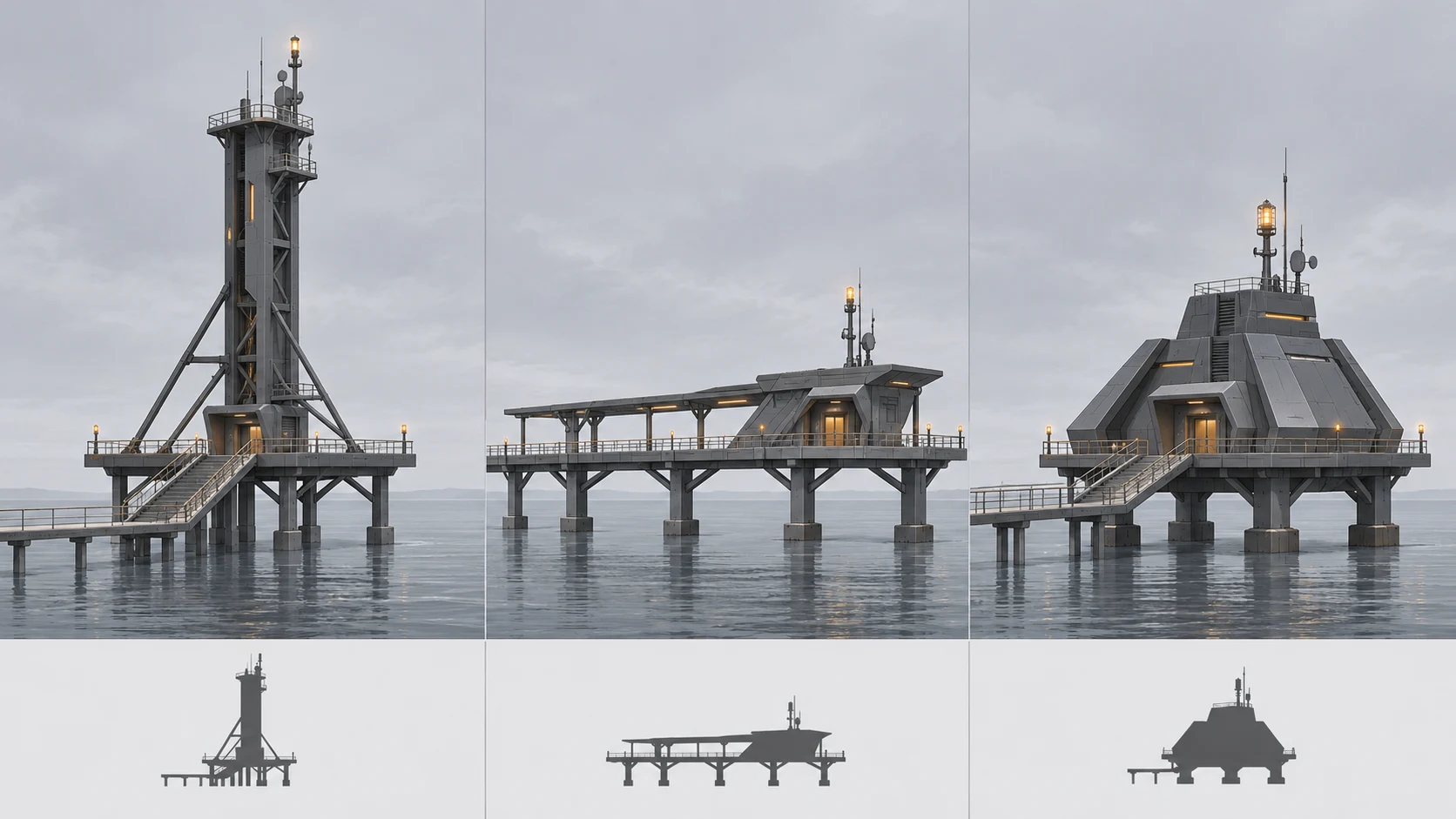
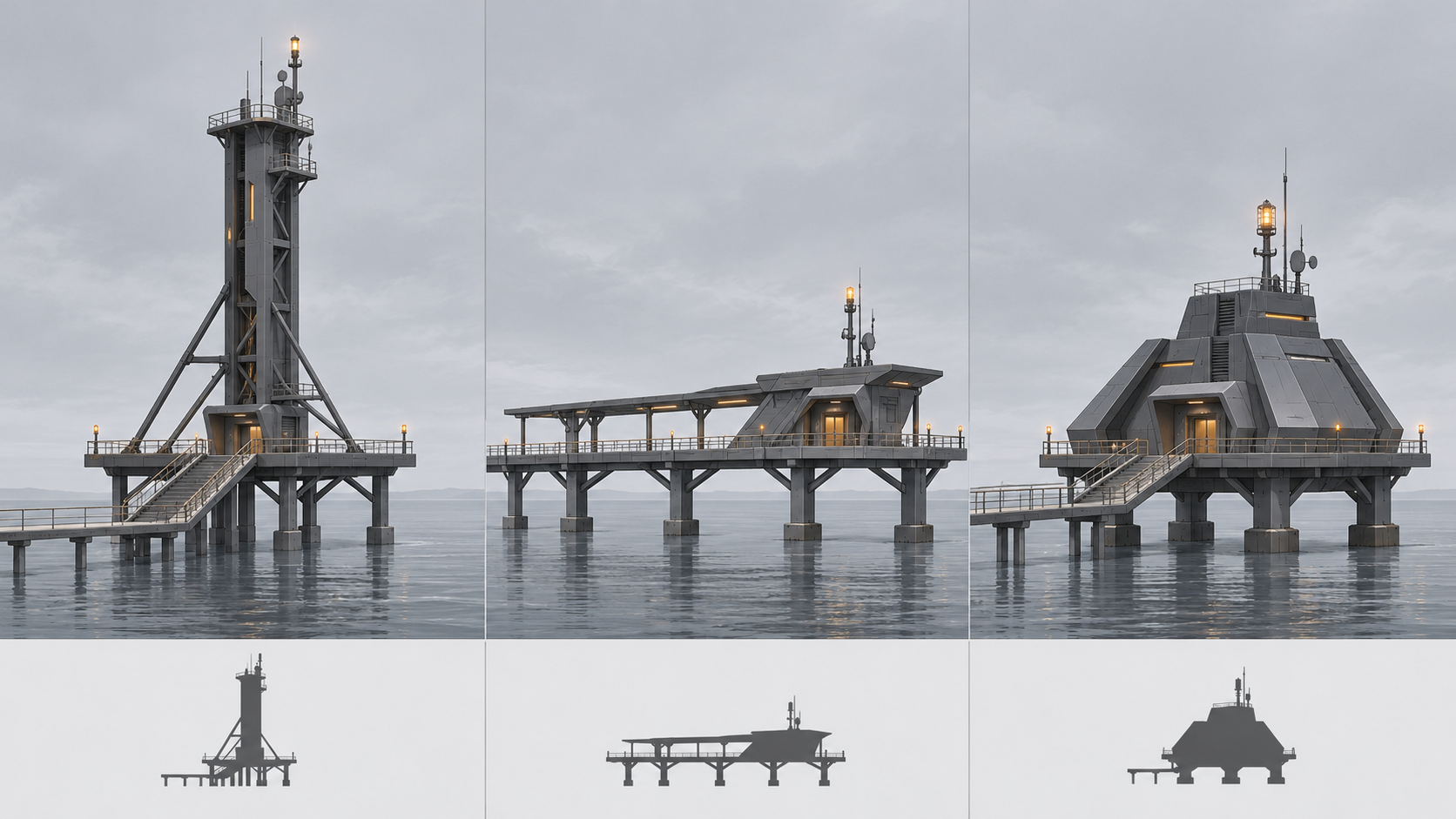
An impressive image is not necessarily a useful design answer. When using an AI concept art generator, aim for drafts that help you decide how a world works, what viewers should notice first, and which design deserves further development.
Postcrest’s concept art page illustrates scene-based prompting, but it is not a reproducible study of an iteration workflow. The tidal-coast signal station below is a fictional teaching example. Its prompts and comparison criteria are proposed methods, not tested results.
Give the brief something visible to resolve
“Lonely, cinematic science fiction” describes a mood without establishing a design problem. Add a question: How is this station recognizable through fog, and how does it remain usable at high tide?
That question produces a more concrete visual brief:
- World: low ground floods periodically; people still maintain the station. It is not a ruin.
- Mood: isolated, but occupied.
- Silhouette: an elevated signal element and a working platform above the tide line.
- Palette: cool gray surroundings, dark structure, limited warm signal light.
- Exclusions: neon cityscapes, decorative weapons, and extensively glowing exterior walls.
Then state what the image must do: “Support a discussion of the building’s form; show its full silhouette and the route to the working platform.” This keeps atmospheric fog, close-ups, and elaborate backgrounds from replacing the actual design task.
If you use reference material, note its specific purpose—platform construction or wet surfaces, for example—rather than asking for its entire “look.” Use material you have permission to use. Do not turn signatures or third-party branding in a reference into design elements.
Explore alternatives you can actually compare
For the first round, vary the main design idea while holding the setting, viewpoint, and image purpose approximately constant. A distant landscape, an interior, and a detail shot will not give you a fair basis for choosing a building direction.
| Direction | Deliberate change | Keep consistent this round | Design question |
|---|---|---|---|
| Vertical tower | Concentrate the main mass upward | Coast, overall view, cool gray palette | Is the silhouette recognizable at a distance? |
| Horizontal platform | Spread platforms and supports laterally | Coast, overall view, cool gray palette | Are circulation and working areas clear? |
| Compact core | Gather functions into one main volume | Coast, overall view, cool gray palette | Can a small structure still communicate its purpose? |
These are hypotheses to explore, not a ranking of proven options. Start with an original prompt such as this, then replace the main massing description:
> An occupied signal station on a tidal coast, a vertical tower and a working platform above the tide line, entire building in view, visible entrance and circulation route, cool gray sky and dark structure, limited warm signal light, isolated but still in use, architectural concept exploration; avoid neon cityscapes, weapons, and extensively glowing exterior walls.
To start a new image in InkRoom, enter the brief at the image generation entry and select a model configured in the current interface. Availability, parameters, and fees depend on the interface and your account configuration. This comparison method does not require batch generation, nor does it guarantee that a model will preserve the viewpoint or follow every condition. Mark outputs that depart from the brief as not directly comparable rather than treating every deviation as a design advantage.
Choose a direction without inheriting every detail
Display drafts at the same size. Look at the whole image before zooming in. Viewing a smaller image helps you inspect silhouette, value grouping, and hierarchy; it does not simulate final in-game presentation.
For this brief, first ask whether the signal element reads separately from the building. Next inspect the platform and access route. Surface detail comes later. A building hidden by beautiful fog has not answered this round’s question. If one draft wins mainly through dramatic lighting, a temporary grayscale view can help separate value structure from color preference. That is a human comparison aid, not an objective scoring system.
Record a decision such as: “Develop the horizontal platform because the route is easier to explain; reject its crowded supports.” “B looks best” gives the next person much less to work with. Revise one issue at a time—for example, reduce support density while asking to retain platform height, overall proportions, and viewpoint. Other features may still change. Check them rather than assuming that “keep unchanged” has locked the design.
If you already have a selected image to revise, you can check the existing-image editing entry. Confirm the specific operation in the current interface; this article does not establish that localized editing, structural locking, or automatic style consistency is available. If the required isolated change is not supported, use manual drawing or compositing and document what you changed.
Hand off design rules, not just a favorite image
A coherent direction is more than a shared filter. For this station, useful rules might be: working platforms stay above the tide line, the signal element occupies a high point in the silhouette, and warm light marks functional locations. Check those relationships when changing the camera or extending the setting, rather than checking color alone.
Save each retained version with the full prompt actually used, the model name and parameters visible in the interface, reference provenance, and manual edits. If a parameter was not shown, mark it as unrecorded; do not invent a seed. Add the reason for the choice, rejected details, and unresolved questions, such as access to the rear maintenance entrance.
This record supports further design work. It does not certify a production-ready game asset. If the project requires multiple views, dimensions, topology, UVs, textures, rigging, or engine validation, those remain separate production and verification tasks. A concept image does not prove they are complete. Before moving into production, also check tool terms, reference permissions, and the project’s AI-disclosure requirements. The concept-stage outcome is a reasoned visual decision that another creator can develop.
Related articles and cases
- AI Image Licensing for Ecommerce: Permissions and Product Accuracy
Separate output terms, third-party asset licenses, input permissions, and product accuracy. Use an image-level record tied to the SKU without treating tool access as permission to publish.
- AI Architectural Rendering Generator: Sketch Inputs and Render Review
Use a hypothetical building sketch to separate design constraints from visual choices, then review viewpoint, materials, proportions, structural relationships, and multiple views against the original design files.
- AI Character Turnaround Generator: Align and Review Front, Side, and Back Views
Turn one character reference into a reviewable set of views by separating confirmed design from invented details, checking proportions and anatomical sides, and documenting what the back view cannot establish.
- AI Product Catalog Generator: Consistent Images, SKU-by-SKU Review
Keep product facts, visual rules, and catalog placement separate. This workflow explains how to test difficult images, map API outputs to SKUs, and document exceptions without treating successful generation as approval.