AI Children’s Book Illustration Generator: From Storyboard to Consistent Pages
Plan interior illustrations around story changes, not isolated images. A fictional example shows how to track characters and props, reserve room for text, and distinguish illustration drafts from a finished book.
·
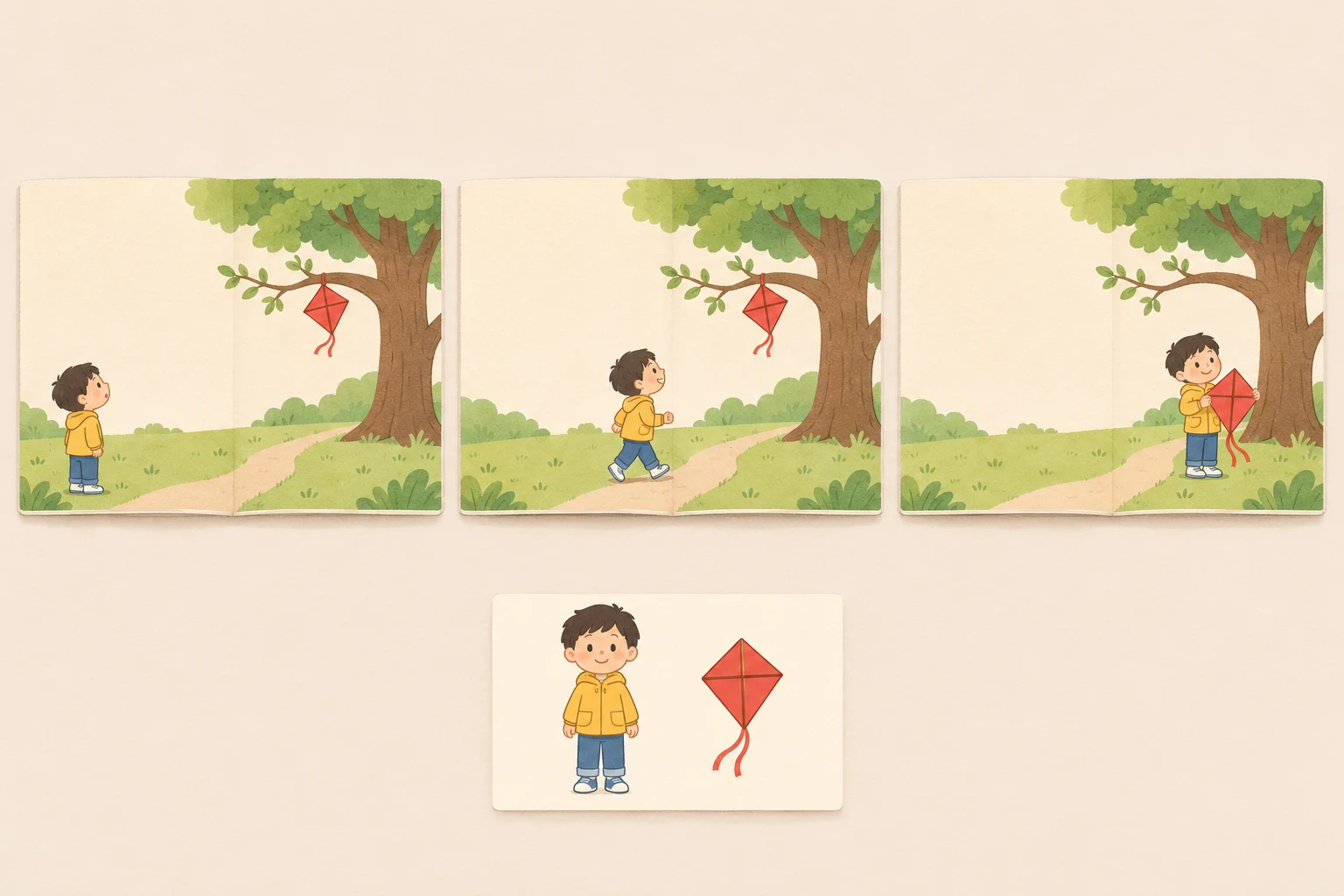
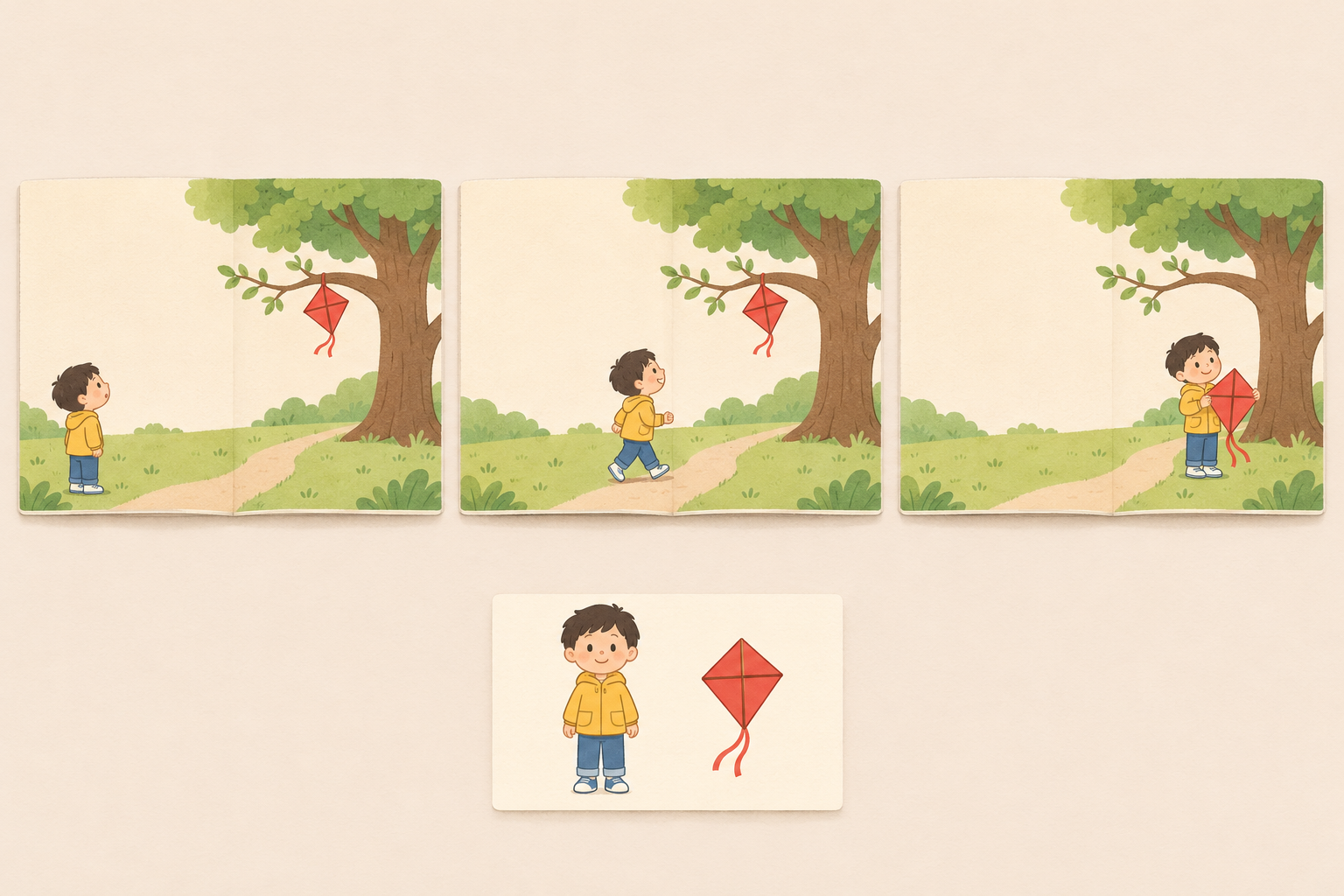
An illustration in a children’s book has to do more than show what happens on one page. It has to carry something forward. A kite a child has just retrieved should not reappear in the tree on the next spread. A character can become happier without inexplicably changing age, clothes, or hairstyle.
When using an AI children’s book illustration generator, the useful question is not simply how to make each image attractive. It is whether the images can tell one coherent story. The approach below is a suggested working method for individual authors and small teams, not a tested project or a demonstration of finished-book results.
Childbook’s article on AI book creation describes custom illustrations that complement a narrative. It is a product overview, however, not evidence that cross-page consistency has been verified. Its descriptions of licensing and layout should not be treated as claims about InkRoom or any other service.
Storyboard the changes, not just the locations
Consider a fictional story: a child named Lin spots a red kite caught in a tree, follows a path toward it, and eventually retrieves it. Rather than generating an image for every sentence, ask what each page turn reveals: a discovery, an action, or a change in feeling.
The following table illustrates the method; it is not a prescribed page count. A spread is a pair of facing pages. The final divisions depend on the story and layout.
| Spread | Character and action | Setting and emotion | State that must carry forward | Intended text space |
|---|---|---|---|---|
| Discovery | Lin looks up at the red kite | Beside the tree; worried and curious | Kite is on a branch, not in Lin’s hands | Low-detail background on the left |
| Approach | Lin follows the path toward the tree | Same location; focused | Kite remains on the branch; Lin’s position changes | Keep text away from the movement and gaze |
| Retrieval | Lin holds the red kite | Beside the tree; relieved | Kite has left the branch; any damage must match the story | Keep the face and kite unobstructed |
This plan makes a missing cause visible. If the story never explains how Lin reaches the kite, the illustration should not quietly invent climbing, a ladder, or another consequential action. Resolve that gap in the story or storyboard first. For young readers, also consider whether the image presents a dangerous action as something to copy.
Separate character identity from scene changes
It helps to divide the image brief into reusable information and page-specific information. The reusable part can describe apparent age, hairstyle, clothing shapes and colors, body proportions, and visual treatment. The changing part covers action, expression, position, lighting, and the state of props.
Giving Lin short black hair, a yellow jacket, and blue trousers does not mean using the same pose throughout the book. Identity should remain recognizable while the performance changes. Track the kite separately: its shape, color, tail, and location all matter to the story.
The discovery spread makes a useful first draft. An illustrative brief might read:
> Concept illustration for a children’s book interior. Lin, a child with short black hair, a yellow jacket, and blue trousers, stands beneath a tree looking up at a red diamond-shaped kite caught on a branch. Lin looks worried and curious. Make the line of sight between child and kite clear. Leave a low-detail area on the left for text to be typeset later. Do not generate lettering. Use a soft, flat-color treatment.
This is a suggested brief, not a tested prompt recipe. To try a new image, bring the character description and scene brief to InkRoom’s image generation page, enter a prompt, and choose an available configured model. Availability, settings, and fees depend on the current interface and account configuration. The entry point is not a guarantee of consistent characters across pages.
For later images, compare candidates beside the first illustration and the character notes. Ask more than whether the child looks familiar: is the kite still in the right place? Has the jacket changed color without explanation? Does the background path contradict the direction of travel? A change supported by the story is different from an unexplained continuity error.
Test text space in the actual layout
An apparently empty area is not necessarily usable text space. Bright sky may be crossed by branches. A quiet corner may sit too close to the trim or gutter. Place the expected text into a layout draft before deciding that an illustration is ready, rather than looking for room after every image is finished.
Check whether the text separates clearly from its background, whether a figure breaks up the reading area, and whether important content falls into the gutter between pages. Keep the book’s words as editable typesetting rather than relying on lettering generated inside the illustration. Test each language separately: the same reserved area may not fit the actual paragraphs in every translation.
If an existing image needs revision, you can consult InkRoom’s image editor entry and first check whether the current interface supports the operation you need. The existence of an entry does not establish lossless character edits, automatic text-space creation, or print adaptation. Review neighboring pages and the typeset text again after any change.
Interior artwork is not a complete book delivery
A cover concept can focus on one character or a mood. Interior art has to support sequential reading. An appealing cover does not establish that the rest of the book is coherent.
Use the specifications of the chosen printer or publisher for trim size, bleed, safe areas, file format, and color requirements. A supposedly universal picture-book size is not a substitute, and pixel dimensions alone do not prove print readiness. Review the content for the intended age group too, including emotional intensity, dangerous behavior, and details that could be misunderstood.
Keep a separate permissions record covering the service and applicable terms, model or asset licenses, and the basis for using uploaded photographs, character references, and fonts. A commercial-license statement in an article about another product does not replace the terms of the service you actually use. If real children’s photographs are involved, confirm applicable guardian-consent and privacy requirements. Pause publication while material rights remain unclear.
Keep the story, scene plan, character notes, image candidates, and layout draft together. That makes it easier to identify whether a problem comes from a narrative gap, an unexplained visual change, or the text layout—and to revise that specific problem instead of simply generating another image.
Related articles and cases
- AI Fashion Design Generator: From Silhouette Concepts to Sample Review
Turn audience, silhouette, fabric appearance, function, and cost constraints into fashion concepts—then separate visual decisions from the pattern, material, sizing, and sample checks needed for production.
- AI Generated Images Copyright: US and UK Checks and Creator Records
Separate permission to use an image, copyright protection and third-party rights, then document asset licences, tool terms and human edits. The current US and UK rules still require verification against the specified official texts; this draft is not ready for publication.
- AI Map Generator: From Worldbuilding Notes to a Usable Fantasy Map Draft
A fantasy map needs more than convincing mountains and rivers. Use a fictional river-crossing scenario to turn worldbuilding notes into visual constraints, then check names, routes, distances, and what players should see.
- AI Diagram Generator: From Source Notes to Verifiable Structure
Turn source material into nodes, relationships, and traceable references before generating a diagram. A clearly fictional example shows how to preserve unknowns, review branches, and choose an editable handoff or an API workflow.