AI Image Quality Assessment: Combining Automated Screening with Human Approval
Separate file validation, no-reference IQA, and business approval. Use automatic checks to catch clear failures and prioritize review, then verify text, product details, brand compliance, and factual claims against approved material.
·
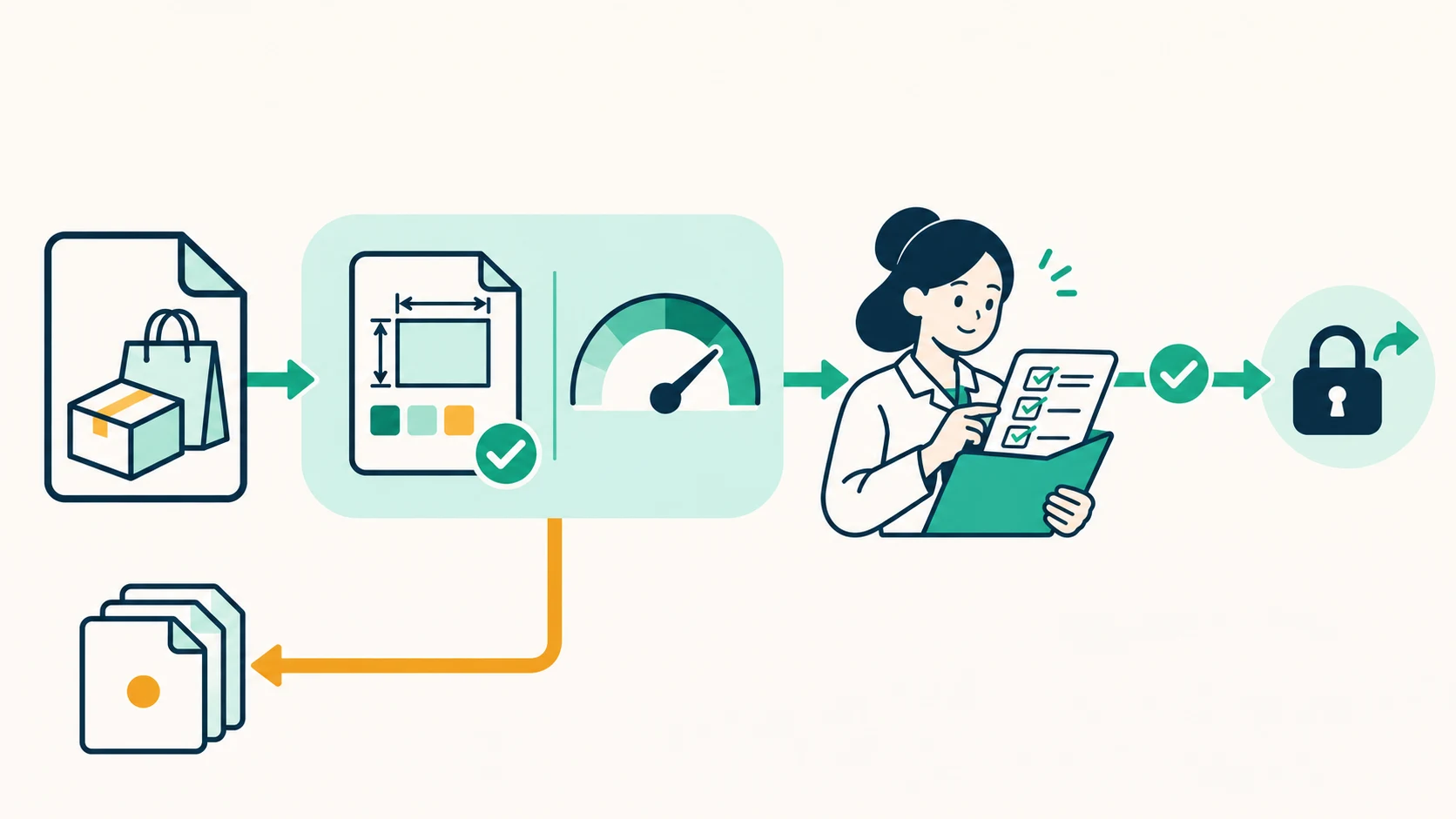

A generated image can be sharp and still show the wrong quantity on a package. It can meet every file specification and still misrepresent the product. For ai image quality assessment, the useful question is not which score captures everything. It is which decisions can be automated, which signals need calibration, and which judgments require business context.
For teams connecting generation to business systems, technical acceptance and permission to publish should be separate states. Automated screening can catch clear failures and prioritize review; human approval determines whether an image is suitable for its intended use. The workflow below is a design recommendation, not a report of measured results.
A sharpness score cannot verify packaging copy
No-reference IQA does not require a clean comparison image. 57Blocks’ introduction to image quality assessment explains that input condition and discusses BRISQUE, DIQA, NIMA, and OpenCV-based approaches. These approaches can provide signals related to perceptual quality, distortion, or aesthetics. Those signals do not establish product accuracy, brand compliance, or factual authenticity.
Incorrect lettering can have crisp edges and strong contrast. An image-quality signal alone cannot establish whether it matches approved copy. Conversely, a deliberately blurred background should not automatically disqualify a composition because of a low whole-image sharpness measure.
The reference also notes that model outputs do not definitively identify the type of distortion in a low-quality image. Do not turn a single score into a confident diagnosis such as “compression damage,” much less “incorrect text.” Its performance figures also lack the common evaluation conditions needed for a defensible model ranking, so they are not used here.
Separate deterministic rules from calibrated signals
Start with the requirements of the destination where the image will appear. File format and dimensions can support direct rules. Compression damage and sharpness generally need content-specific calibration. The routing below is a proposed system design, not a claim about an existing product.
| Check | Automatic evidence | Suggested routing and limitation |
|---|---|---|
| Readability and format | Successful decoding; actual format allowed by the destination | Return clear failures; do not rely only on the filename extension |
| Dimensions and aspect ratio | Pixel dimensions and ratio against placement requirements | Return specification failures; passing does not establish that the subject is correctly framed |
| Compression damage | A dedicated detection signal, or changes relative to the original output after compression | Calibrate on task-relevant samples; file size alone is not evidence of damage |
| Sharpness and no-reference IQA | Quality signals computed with fixed preprocessing | Set screening thresholds after calibration; route borderline or unusual cases to review rather than applying one threshold to all content |
The reference discusses the Laplacian as a way to examine edge information and flags issues involving white noise. Edge response is therefore not a substitute for business suitability. Include intentional blur, fine textures, text-heavy images, and noisy images when testing rules, rather than validating only on a tidy collection of product shots.
Give reviewers the evidence behind the task
A thumbnail and a total score are not enough. Reviewers should also receive the intended placement, approved copy, confirmed product information, and brand requirements.
Text accuracy requires comparison with approved wording, especially quantities, units, specifications, and package names. OCR can help locate possible differences, but its output also needs verification against the image.
Product details require checking structure, accessory counts, and label placement against confirmed information. Plausible is not the same as accurate. Mark unverifiable details as unresolved.
Brand consistency requires checking logos, colors, and layout against approved standards. An attractive image does not excuse an altered logo or an incorrect brand element.
Truthful representation depends on the use case. Does the image imply an unsupported size, function, or outcome? Looking at a generated image cannot by itself establish a real-world event or condition; claims needing proof still require supporting evidence.
In a hypothetical packaging example, an image with a high quality score but an incorrect quantity should be returned for correction. The score does not offset the content error. This is a policy example, not a test we performed.
Keep generation, inspection, and publication authority separate
Use a shared job identifier to connect generated files, inspection records, and approval decisions, while preserving the original output. Record the prompt, generation model, and available model version. Also record the detector version, preprocessing, threshold configuration, and human rejection reasons. If a provider does not expose a model version, record it as unknown rather than substituting the request date.
Possible states include pending checks, technically accepted, awaiting human approval, and approved for use, with separate return and resubmission paths. A failed or timed-out check should remain unresolved rather than defaulting to a pass. Edited or regenerated files should receive their own versions and be checked again. Publication should depend on approval of that specific file version, not simply on an IQA score.
If you specifically need programmatic access to the generation stage, consult the InkRoom image API introduction and access page for current integration information. This is an entry point for programmatic access and system integration, not a claim that InkRoom supplies IQA scoring, threshold enforcement, or human-review records. Inspection and approval components must be arranged separately. Learning about IQA alone does not require an API integration.
Tune screening around approval errors, not the highest score
Without task-specific samples and human labels, a universal threshold would be unjustified. A practical starting point is to collect examples by intended use and image type, label them usable or unusable with reasons, and examine which usable images the rules reject and which unusable images they let through.
Keep threshold-tuning samples separate from those used to check the resulting policy. Recheck the policy when the generator, detector, or output-processing chain changes. Compare alternatives using the same inputs, preprocessing, and approval criteria—not scores gathered from unrelated sources.
Automation is useful when it removes obvious problems early and leaves reviewers time for content and context. A score can help route an image; it should not silently become permission to publish.
Related articles and cases
- AI Photo Colorization: Separate Supported Colors from Model Guesses
A convincing colorized photo is not proof of its original colors. Preserve the scan, document color clues, and review visual quality separately from historical evidence.
- AI Embroidery Design Generator: From Concept Art to a Digitizing Brief
Create embroidery concept art around the finished size, fabric and essential identifying details. Review lines, lettering, colors and rights before professional digitizing and a test sew-out.
- AI Textile Pattern Generator: From Repeat Design to Print Sampling
Turn a textile-pattern concept into a reviewable repeat: define physical scale, spot seam and rhythm problems, calculate image resolution, and identify what still needs a fabric sample.
- AI Website Hero Image Generator: From Brand Brief to Responsive Crops
Turn a brand brief into a useful hero image, then check what survives on desktop and mobile. Includes a prompt example, a reproducible crop calculation, and practical checks for readability, loading, and truthful product representation.