AI Image Generator for Educational Materials: From Learning Goals to Diagram Review
Use a worked design example about equivalent fractions to turn a learning goal into visual requirements, then review proportions, labels and alternative text before classroom use.
·


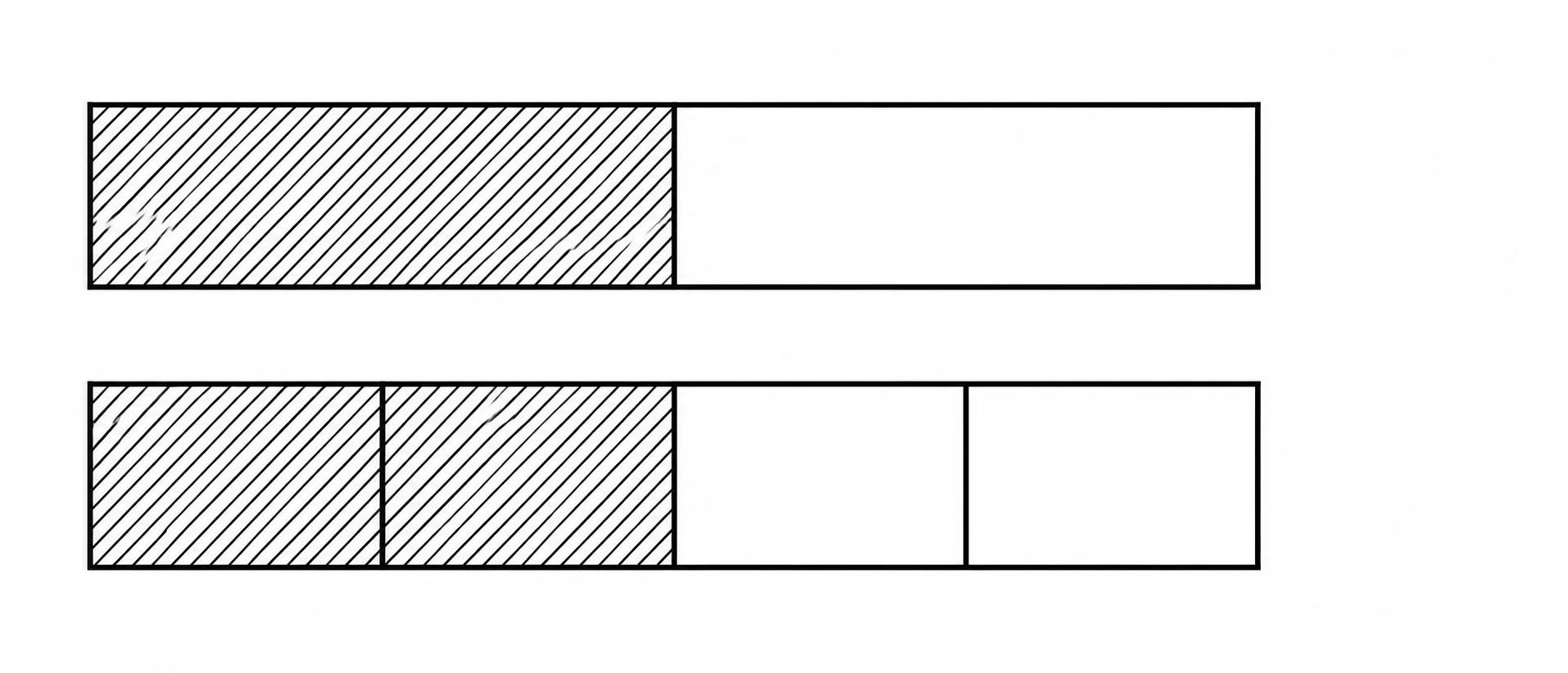
A fraction diagram can look polished and still teach the wrong idea. If its supposedly equal parts have different sizes, attractive styling will not fix the concept.
When choosing an AI image generator for educational materials, start with the relationship students need to understand—not the illustration style. The fraction example below is a proposed teaching design, not a completed generation test or evidence of improved learning.
Define what students should explain
“Make a fun fractions poster” specifies a subject, but not a learning goal. A more useful goal is: students should use two equal-sized wholes to explain why 1/2 and 2/4 represent the same amount.
That goal establishes the essential visual conditions. The wholes must be the same size, the parts within each whole must be equal, and the shaded proportions must match. Decorative characters and realistic lighting do not help establish that relationship.
Write those conditions before choosing how to make the image. For exact partitioning and length comparisons, rectangles, lines and fills in a slide editor may give a teacher more direct control. AI can help explore presentation ideas without being responsible for drawing the final mathematical geometry.
Set the non-negotiable requirements
The following table is a design specification for this example, not a universal rubric for every subject.
| Element | Requirement for this example | Why it matters |
|---|---|---|
| Wholes | Two rectangular bars with equal width and height | Different-sized wholes prevent a simple shaded-area comparison |
| Divisions | Two equal parts above; four equal parts below | Unequal pieces cannot represent these fractions simply by counting them |
| Shading | One upper part and two adjacent lower parts, starting at the same end | The shaded areas must match to illustrate the intended equivalence |
| Labels | 1/2 and 2/4 beside the corresponding bars | A misplaced label changes the meaning |
The mathematical basis does not come from the generator: dividing both the numerator and denominator of 2/4 by 2 gives 1/2. The image illustrates that relationship; a plausible-looking image is not its proof.
A candidate-image request could read:
> Create a flat educational illustration of equivalent fractions. Place two rectangular bars of equal width and height one above the other, aligned at the left edge. Divide the upper bar into two equal parts and fill only the left part. Divide the lower bar into four equal parts and fill only the two adjacent parts on the left. Use the same fill pattern in both bars. No perspective, shadows, decorative characters or embedded text. Leave room for labels to be added separately.
This is a suggested creative brief, not a guarantee that a model will obey counting, partitioning or alignment instructions. A correct prompt does not establish that its output is correct.
Once the relationships and constraints are clear, you can enter the prompt and select a configured model in InkRoom’s image generation interface. Availability, parameters and fees depend on the current interface and account configuration. The result remains a candidate for review; this entry point is not a promise of mathematical verification or editable labels.
Make labels and alternative text carry the same idea
Add labels separately as text in a slide or document editor when practical. This makes correction and translation easier. StoryTool’s article on educational diagrams likewise recommends manually adding labels as separate text layers. That specific recommendation does not establish the article’s tool rankings or performance claims.
In this example, checking spelling is not enough. Confirm that each fraction sits beside the correct bar, any leader line points to the intended object, and the text remains readable at its actual presentation size. Use a shared fill pattern or clear boundaries rather than color alone to identify the shaded portions.
Alternative text should convey the relationship, not merely say “a fractions picture.” For an explanatory lesson, a possible description is:
> Two equal-sized rectangular bars. The upper bar has two equal parts with the left part shaded. The lower bar has four equal parts with the left two shaded. The shaded areas are equal, illustrating that one-half equals two-fourths.
If the image is an assessment asking students to decide whether the amounts are equal, including the conclusion in alternative text would give different hints to different readers. Design an equivalent accessible question for that assessment rather than copying the explanatory description unchanged.
Review meaning, not just appearance
Before use, a teacher should compare the candidate with the lesson’s underlying material. Here, check the bar dimensions and division positions. If exact partitioning cannot be confirmed, rebuild the diagram in a controllable drawing tool instead of accepting “close enough.” Review the final layout again after adding labels or cropping: those edits can change which explanation belongs to which shape.
Other subjects need different checks. Science diagrams require checking structures and arrow meanings against the teaching source. Historical illustrations must not be presented as event photographs or primary sources. When a lesson needs photographic evidence, use authentic material with a verifiable source rather than a generated substitute.
Caption this example as an instructional diagram of equivalent fractions. If generated imagery is used, disclose that status as required by the school or course. Retain the teaching reference, final prompt, manual edits and review record for later revision—but do not mistake those records for proof of correctness. Classroom suitability still depends on the teacher’s review of the final image.
Related articles and cases
- Using an AI Image Generator for Blog Posts: Briefs, Crops, and Credits
Turn a blog argument into an image brief, then handle aspect ratios, attribution, rights, and alt text. A hypothetical cable-management example shows where an illustration helps—and where real evidence is needed.
- AI Image Generation Seed: Reproduction, Variations, and Fair Comparisons
A seed controls starting noise, not image quality or guaranteed reproduction across services. Separate reruns from variation searches and parameter comparisons, then record enough context to interpret the results.
- AI Image Negative Prompts: When to Use Them and How to Test
Start with a specific unwanted feature, not a universal negative-prompt list. Check model support, compare controlled conditions, and look for lost details as well as improvements.
- AI Fashion Lookbook Generator: From Product Photos to Collection Visuals
A practical approach for fashion brands and small content teams: organize garment references, collection direction, casting and layouts, then review every page without confusing concept imagery with product evidence.