AI Image Creative Brief: One Campaign, Different Channel Requirements
An AI image creative brief is more than a longer prompt. Use a clearly fictional campaign to separate product facts, flexible compositions, and delivery specifications before generating images for different channels.
·
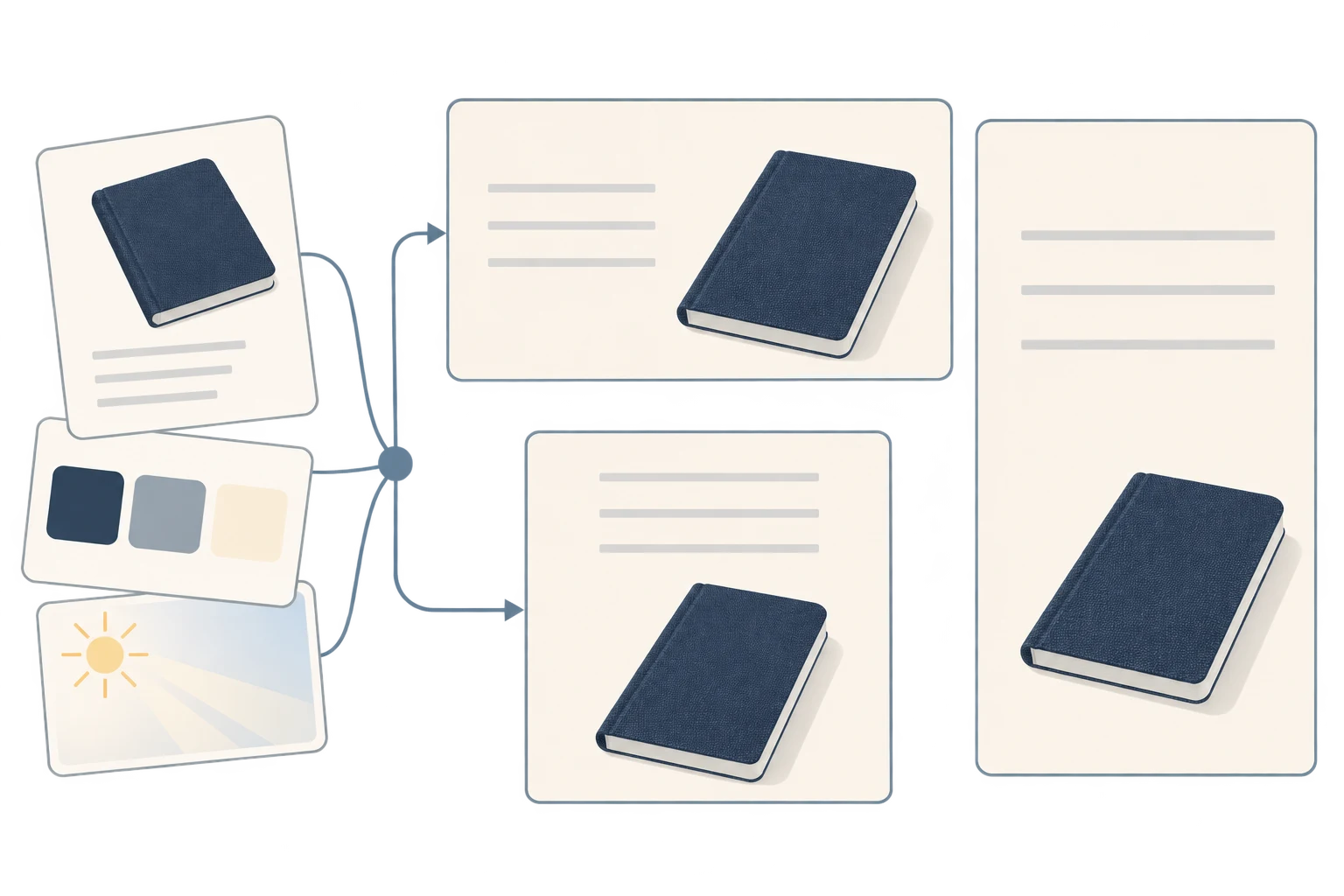
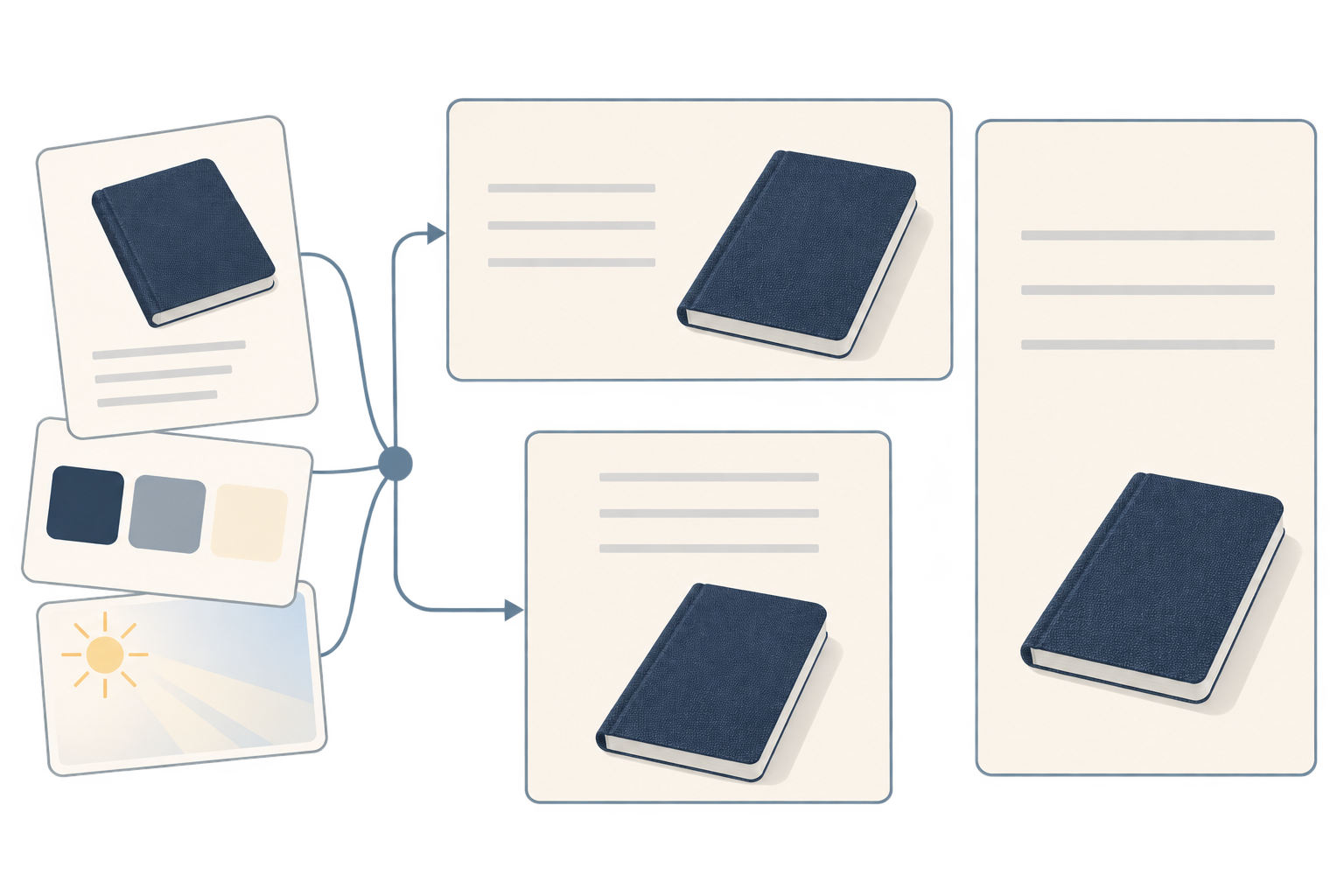
Your campaign needs a website banner, a square card, and a vertical poster. You ask for images that feel “consistent, clean, and premium.” The results show slightly different products—or leave nowhere to put the headline after cropping.
The missing ingredient is not another style adjective. It is an AI image creative brief that explains what must stay fixed and what may change. The brief records creative decisions and their supporting material; a prompt expresses the part relevant to a particular image.
This guide is for individual creators and small content teams preparing new campaign images. It treats moodboards as reference inputs, not as the deliverable, and does not assume that working across channels requires an API.
Share campaign constraints, not necessarily one master image
A useful approach is to separate campaign-level requirements from channel-level requirements. The campaign layer holds the audience, product facts, and brand boundaries. The channel layer specifies framing, subject placement, copy space, and delivery requirements.
The Acluebox creative brief guide recommends stating aspect ratios and technical output requirements upfront. For image work, add another question: can these layouts genuinely share one composition? A matching ratio does not guarantee a matching layout, and a different ratio should not automatically mean “just crop it.”
Consider a fictional campaign, not a client project or a test. An imaginary stationery brand is promoting a notebook to adults who record ideas during their commute. The creative objective is to communicate everyday note-taking. Click-through rate could be observed after publication; it is not an outcome that image generation has already achieved.
Assume the project owner has approved product photographs, dimensions, and a brand color file. The campaign-level brief could read:
> Feature a dark-blue notebook with a fabric-textured cover. Use the approved product photographs as the appearance reference. Convey quiet, practical everyday note-taking. Do not add an elastic strap, pen loop, or unconfirmed accessory. Do not imply unsupported benefits such as waterproofing. Product identity and brand colors stay fixed; props and placement may vary.
Those product details belong only to this fictional example. In a real project, missing colors, dimensions, or construction details remain unconfirmed. They are not gaps for a generator to fill.
Use the delivery table to expose composition conflicts
These are invented project specifications, not current platform requirements. Confirm the actual publishing placement and design container before setting yours.
| Placement | Example dimensions | Product and copy arrangement | Composition issue to resolve |
|---|---|---|---|
| Website banner | 1600 × 900 px, 16:9 | Product on the right; headline on the left | Keep high-contrast props out of the headline area |
| Square campaign card | 1080 × 1080 px, 1:1 | Product below center; short headline above | Product must remain recognizable at thumbnail size |
| Vertical poster | 1080 × 1920 px, 9:16 | Product in the lower half; copy above | Do not stretch the product to fill the vertical layout |
This is more useful than “adapt for all channels” because it exposes incompatible demands. A product placed against the right edge of a banner may be cut off in a square crop. A decorative background may leave no usable space for copy.
Resolve that conflict before generating: preserve product accuracy and approved brand requirements, then adjust the composition for each placement. If cropping would damage product visibility, plan a separate composition rather than treating one master image as mandatory. If a delivery size exceeds the selected tool's current support, agree on a separate production method instead of promising a finished export in one generation.
Add the file format, color-profile requirements, naming convention, version, and approver that the project actually needs. These are delivery requirements, not claims about model capabilities.
Assign each reference a job before writing the prompt
Product photographs establish appearance. Brand guidelines constrain colors and marks. A moodboard can communicate lighting, material atmosphere, or composition preferences. “Follow the reference” does not distinguish these responsibilities.
Write what to adopt and what to exclude beside each reference: use the moodboard's soft side lighting, for example, but not its product, lettering, or logo. When its product color differs from the approved photographs, follow the product material. When two approved sources contradict each other, ask the owner to resolve the conflict rather than guessing.
For localized assets, record the copy language and text area too. Headlines and disclaimers can be delivered as separate layout elements rather than generated inside the image. If text is generated, it still needs character-by-character review.
The fictional banner requirement could become this image description:
> Website banner composition, 16:9. Place a dark-blue, fabric-covered notebook on the right, following the approved product appearance reference. Soft natural side lighting, simple background. Keep the left side low-detail and low-contrast for a headline. No added accessories, extra brand marks, or promotional text.
This is an illustrative description, not a guarantee. Tools differ in the reference inputs and parameters they accept; one prompt is not a portable production specification.
If you need help finding language for framing or style, browse InkRoom's prompt examples. Use them as expression references, not as product verification or an automatically verified brief-conversion assistant.
Review the first images against the brief
Once the campaign requirements and channel table are approved, prepare the relevant image description and open InkRoom's image generation page. You can enter a prompt and select a configured model. Availability, parameters, and fees depend on the current interface and account configuration; a specification in your table does not establish model support.
Separate factual errors from layout issues and aesthetic preferences. An invented accessory or unsupported benefit is a factual problem. Accurate product appearance with an occupied headline area is a channel-layout problem. A usable image with less-preferred lighting is an aesthetic adjustment.
Tie feedback to the requirement: “Keep the product shape, remove the props on the left, and restore the banner's headline area” is actionable in a way that “make it more premium” is not.
Store approved images with their brief version, product references, prompts, and human-made layout files. When packaging or campaign copy changes, those links help the team identify what needs approval again instead of treating an old generated image as a new source of truth.
An executable brief does not describe every possibility. It lets different channel compositions share the right facts without forcing them to share the same frame.
Related articles and cases
- AI Image Compositing: Put Real Products in AI Scenes Without Losing Accuracy
Build the scene around the product photograph, not the other way around. Define editable areas and protected details, then examine perspective, lighting, color temperature, contact shadows, occlusion, and edges without assuming pixel-perfect preservation.
- AI image batch editing: product-image workflows and API integration
Build a traceable workflow for editing existing product images: distinguish batch adjustments from generative edits and queues, map inputs to outputs, track uncertain charges, and review every product.
- AI Image Generative Fill: Selections, Prompts, and Product-Image Checks
Plan local edits to an existing product image, distinguish removal from replacement and canvas extension, and compare results without losing track of the original. These are editing recommendations, not a tool test.
- AI Image Generator for Email Marketing: From Brief to Review
Plan visuals for welcome emails, promotions, and product updates without inventing product details. Build a focused brief, then check the image inside the email—not just as a standalone file.