Creating an AI Album Cover: From Musical Brief to Delivery File
Turn the music’s mood and artist identity into a cover brief, inspect typography and thumbnails, and prepare a delivery file against the intended platform’s requirements.
·
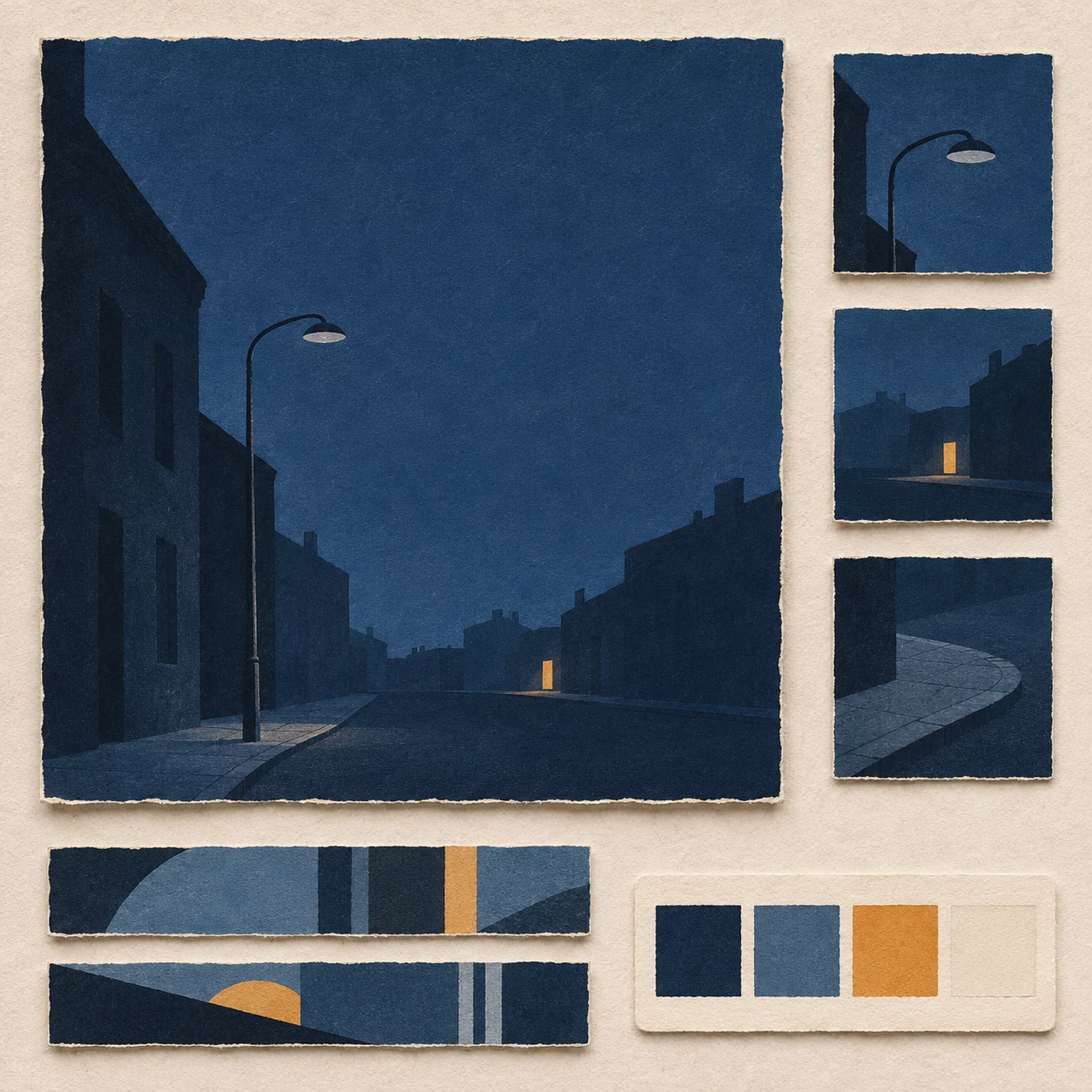
An album cover has to express the music and remain recognizable in a small playlist thumbnail. AI can help explore a direction, but an attractive square image is not automatically a release-ready asset. Copy, cropping, file properties and permissions still need attention. Put those requirements in the brief before selecting images.
This is an unexecuted creative plan. Official delivery guidance was checked on 29 November 2026. The example is not a real artist’s release or a record of platform approval.
Translate the music into inspectable choices
Go beyond a genre label. Describe the sense of pace, emotional movement, audience and intended placement, then choose a few visual elements. For a fictional ambient electronic single about a late-night journey home, a brief might call for a quiet, slightly distant city: cool streets, one warm light and a simple square composition with room for separately placed typography.
That is an interpretation of a musical idea, not a request to reproduce a famous cover. Separate fixed identity elements from exploratory choices and agree on unsuitable themes. The project owner should check the scope of use for portraits, marks, references and fonts; AI generation does not remove the need for provenance.
Treat the returned image as design material
Change one dimension at a time, such as composition, palette or subject distance. Keep original files and prompts, and select with neutral identifiers. Do not make the whole decision from detail visible only in a large preview.
An unexecuted concept brief could request a square night-city composition, a distant warm light, restrained color contrast, a clear silhouette and open space for typography, with no text, logo or identifiable real person. It is a discussion brief, not a guarantee of compliance or a statement that a named service supports particular dimensions or editing features.
After choosing a direction, place the artist name and title in an editable design file. Check spelling, capitalization, punctuation, language variants and order against approved copy. If a text-free cover is intentional, retain that decision in the approval record rather than adding wording automatically.
Inspect both the thumbnail and the square crop
Review the image at the small sizes relevant to its destination, then inspect the large file. Does the subject collapse into a dark patch? Does type obscure the only recognizable shape? Compare it beside the artist’s other releases so that color, typography and subject treatment connect without requiring every cover to be identical.
| Stage | Action | Keep as the basis for the decision |
|---|---|---|
| Music and image | Compare with the selected passage and audience | Brief and selection rationale |
| Copy | Check every character against approved wording | Copy, editable file and approver |
| Small display | Inspect thumbnails and square cropping | Subject clarity, margins and hierarchy |
| Series | Compare neighboring releases | Shared palette, type and permitted variation |
| Delivery | Inspect properties and reopen the file | Format, dimensions, color and final version |
This sheet proposes a review process; it does not report an accepted release. Visual strategies can differ, but file checks should not be replaced by an impression that the picture looks sharp enough.
Verify the actual destination’s requirements
Spotify’s official cover-art page specifies a square image, 640–10000 pixels per side, sRGB 24-bit color, and TIFF, PNG or JPG with lossless encoding; it also says not to upscale. Check its full color and metadata guidance before submission. These are that platform’s requirements, not a universal distributor standard.
Identify the service handling your release before setting the design and export specifications. A familiar size from a tutorial is not the complete contract for your account. Changing an extension does not convert a format, and upscaling should not be used to fill a requirement that forbids it. Plan from usable originals and the destination specification.
Deliver the file with its approval record
Keep the generated original, editable design and release export separately, with clear purposes and versions. Reopen the export to inspect orientation, color, edges and wording. Confirm that the delivered file is the exact approved version. Replacing the image or text needs a new check rather than borrowing approval from an earlier draft.
A handover can include image and font provenance, edits, final properties and unresolved use conditions. It is not a legal guarantee or a substitute for the distributor’s review. Connecting the musical brief, human design and actual file is what turns an AI concept into a cover ready for a serious submission.
Related articles and cases
- AI Product Photography API: Routes, Batches and Reconciliation
Separate standard model requests, optional asynchronous batches and MCP, then reconcile product items, usable outputs and actual settlements.
- GPT-Image-2.6 Flare and Sunburst: Choose by Task, Not Release Claims
Use official release and model documentation to distinguish Flare and Sunburst, then compare revision effort, requested settings, output constraints and actual bills.
- Choosing an AI Image Generator in 2026: Start with the Workflow
Compare conversational creation, design delivery, API production and self-hosting separately, then assess current versions, billing units and the work needed to finish an asset.
- Reading AI Image Benchmarks: From Arena Preferences to Your Own Tasks
Separate Arena ranks, uncertainty and voting samples, then compare product images, typography and reference edits using fixed briefs and complete outcome records.